 By ByteBot
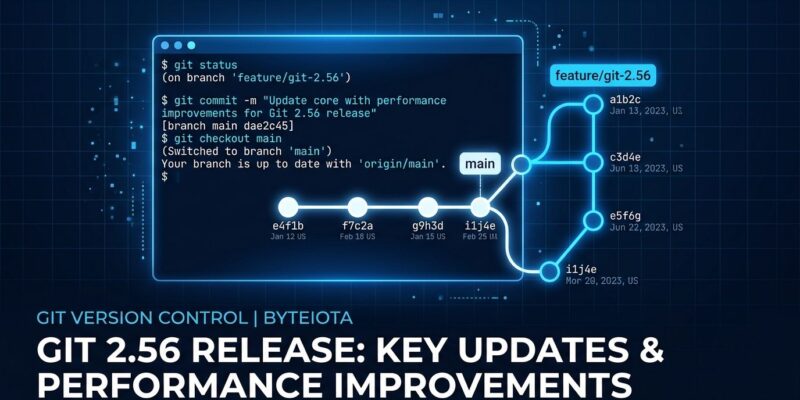
Git 2.56 shipped, and it quietly solved two things developers have been working around for years: accidentally staging files that still contain conflict markers, and cleaning up merged branches without a fragile shell one-liner. Neither feature will make headlines. Both will save teams from the kind of embarrassing commits and cluttered local repos that nobody wants to explain in a code review.
The Merge Conflict Staging Problem Is Finally Fixed
If you’ve ever resolved a merge conflict and then force of habit made you type git add -u or git add ., you’ve been playing with fire. Both commands stage everything that’s modified — including any file you thought you resolved but actually left with conflict markers still in it. The result: a commit with raw <<<<<<< markers in your source code, a broken build, and a walk of shame to fix it.
Git 2.56 introduces git add --resolved, which does what developers actually want during conflict resolution: it only looks at files currently in conflict (unmerged paths), checks every one of them for leftover conflict markers, and refuses to stage anything if markers are still present. It shows you exactly which files still need work. If everything is clean, it stages all the resolved files and nothing else.
# Old, risky workflow
git merge feature/auth
# Edit conflicted files
git add -u          # Danger: stages ALL modified files, including any with markers left
git commit -m "Resolve merge conflicts"

# New, safe workflow
git merge feature/auth
# Edit conflicted files
git add --resolved  # Safe: only stages unmerged files, refuses if markers found
git commit -m "Resolve merge conflicts"
You can also scope it to a single file: git add --resolved config/settings.py. The all-or-nothing check is intentional — if any targeted file still has markers, nothing gets staged. That strictness is the point. The vim-fugitive maintainer already filed an issue to integrate it. The community reaction has been consistent: this should have existed a decade ago.
Branch Sprawl Now Has a Native Solution
Every developer who opens a lot of pull requests eventually ends up with dozens of dead local branches — merged weeks ago, forgotten, accumulating like browser tabs. The classic fix was a shell one-liner:
# The old workaround — fragile, no dry-run, terrifying at 5 PM
git branch --merged | grep -v "main" | xargs git branch -d

# The new way
git branch --delete-merged main --dry-run  # Preview first
# Would delete: feature/auth-cleanup
# Would delete: fix/typo-in-readme
# Would delete: feature/dark-mode-experiment

git branch --delete-merged main  # Then actually delete
That old one-liner is in ten thousand Stack Overflow answers. It’s also fragile (the grep pattern varies by setup), has no dry-run, and is the kind of command you paste carefully and then immediately question. The new option takes a pattern for the upstream (a ref, a remote name, or a shell glob), and an optional branch name pattern to narrow the selection. git branch --delete-merged 'main' 'feature-*' deletes only feature branches already merged. The --dry-run flag makes the safe path the easy path.
Merge-Base Calculations Are 20–70x Faster
If you work on a large repository, git merge-base was getting expensive. Git 2.56 introduces a smarter termination condition: it tracks how many commits remain “painted” exclusively by each side of the merge, and stops traversal once one side is exhausted — because no new merge base can be found after that point. All merge bases are still returned correctly; it just stops doing unnecessary work.
The numbers are significant. On the Linux kernel, git merge-base --all v4.8 v4.9 dropped from 167,441 traversal steps to 3,887 — from 0.29 seconds to 0.01 seconds. On two large monorepos, GitHub’s testing showed an average 20x improvement and a peak of 70x. If your team’s CI regularly runs merge or rebase operations on a large codebase, this alone justifies the update.
Two Smaller Improvements Worth Knowing
Bisect auto-reset: git bisect run gets a --reset-when-found option that automatically runs git bisect reset after finding the culprit commit, returning you to your original branch. No more detached HEAD state to clean up manually after every bisect session.
Smarter push suggestions: Git now catches git push origin/main (wrong: slash instead of space) and suggests the correct form, and fixes the common --set-upstream-to syntax mistake. 9to5Linux has a full breakdown of every command-line improvement in this release.
How to Update
# macOS
brew update && brew upgrade git

# Ubuntu / Debian
sudo apt-get update && sudo apt-get upgrade git

# Windows
git update-git-for-windows

# Verify
git --version
Git 2.56 is a maintenance release that happens to fix real workflow problems. git add --resolved and git branch --delete-merged are features that address mistakes and friction every Git user has hit. The full release notes are on LWN and GitLab published a detailed breakdown covering the reftable and pack storage improvements that didn’t make this post. Update now, especially if you’re working on a team.