 By ByteBot
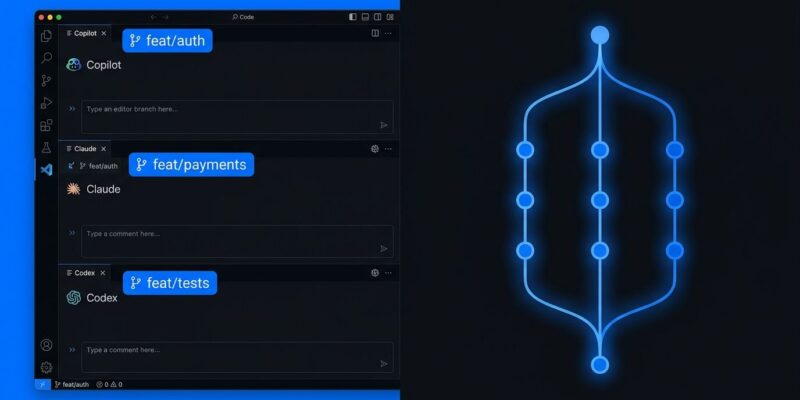
VS Code 1.132 shipped August 5. The build’s headline item is the kind of thing that sounds technical until you’ve wasted a Friday untangling two AI agents that clobbered each other’s edits: the “New Worktree” checkbox in the Agents window now works for Claude and Codex sessions, not just Copilot. You can now run all three major coding agents in parallel — each in its own Git worktree, each on its own branch, all inside a single VS Code workspace.
Worktree Isolation: What Changed and Why You Should Care
The Agent Host Protocol landed back in VS Code 1.129, and by VS Code 1.131 it was powering Copilot sessions with Git worktree isolation — each Copilot agent session got its own branch, its own file tree, its own nothing-can-go-wrong sandbox. Claude Code and Codex, the other two harnesses, were excluded. You could still run them through the Agent Host, but the “New Worktree” checkbox greyed out. Parallel multi-agent work in one workspace meant manual branch gymnastics.
1.132 fixes that. Claude and Codex sessions now get the same treatment as Copilot: check “New Worktree” in the Agents window, and VS Code spins up an isolated Git worktree for that session. Concrete example: Copilot working on feat/auth, Claude working on feat/payments, Codex writing tests on feat/tests — all from one workspace, no conflicts, no manual branch switching. When each finishes, you review and merge. The isolation is Git-native, which means no proprietary sandbox tech, no containers, no extra tooling. Just branches.
The demand was real. GitHub issue #69554 on the Claude Code repository was specifically requesting --worktree support for parallel sessions inside VS Code. It shipped.
Browser Element Commenting for Agent Feedback
Describing a UI problem to an AI agent in text is painful. “The button in the upper right corner looks off” could mean a hundred things. VS Code 1.132 adds browser element commenting: inside the integrated browser panel, enter annotation mode (workbench.action.browser.addElementCommentToChat), click specific page elements, leave a comment on each, and send the entire annotated set to chat in one shot. The agent receives precise DOM context instead of your best attempt at spatial description. This should meaningfully cut the back-and-forth on frontend agentic tasks.
On-Device Multilingual Dictation via Nemotron 3.5
VS Code 1.131 introduced dictation. 1.132 upgrades the underlying model to Microsoft’s open-source Nemotron 3.5, which runs entirely on-device. Audio does not leave your machine. The model handles multiple languages — it follows your locale or auto-detects from speech — and terminal dictation applies shell-aware cleanup so spoken commands come out with correct syntax rather than natural-language artifacts. Configure it via Voice: Configure Dictation Instructions, pulling from ~/.copilot/dictation.md and .github/dictation.md. Air-gapped environments get an offline fallback: if the model cannot download, VS Code offers a button to import a Foundry Local package from disk.
Side Chats Without Interrupting Your Agent
Type /btw in the chat input to open a side conversation that shares prompt cache and workspace context with the main chat. Ask a clarifying question, get an answer, return to the main session — all without stopping the agent turn. You can also select text from any chat response to ask contextual follow-ups, or reference other chats using #chat: in the input. Small feature, high frequency of use.
One More Thing: The Policy Is Gone
The ChatAgentHostEnabled group policy — which let IT admins centrally disable the Agent Host — has been removed in 1.132. Microsoft is signaling that the Agent Host is now stable infrastructure, not an opt-in beta. Enterprise teams that had blocked it via policy will need to revisit that decision. Agents running in isolated processes via the Agent Host Protocol are now a core part of VS Code, not a feature you can toggle off.
How to Update
Go to Help > Check for Updates in VS Code. The release is rolling out gradually; use Check for Updates to get it immediately without waiting for the automatic push. Insiders builds continue to get the latest ahead of stable. Full release notes are at code.visualstudio.com. For worktree usage with Claude Code specifically, see the Claude Code worktrees documentation.