 By
By MCP servers are multiplying fast, and most of them are one misconfigured endpoint away from disaster. A February 2026 report catalogued over 8,000 exposed MCP instances across IDEs, internal tools, and cloud services. The cause isn’t a protocol flaw — it’s that teams are hand-rolling auth, rate limiting, and auditing for each new agent tool, because they assume MCP requires new server infrastructure. Google’s answer: it doesn’t. Apigee, Google’s API management platform, now converts any existing REST API into a governed MCP tool automatically, with token-aware rate limiting included.
How Apigee Turns Your API into an MCP Tool
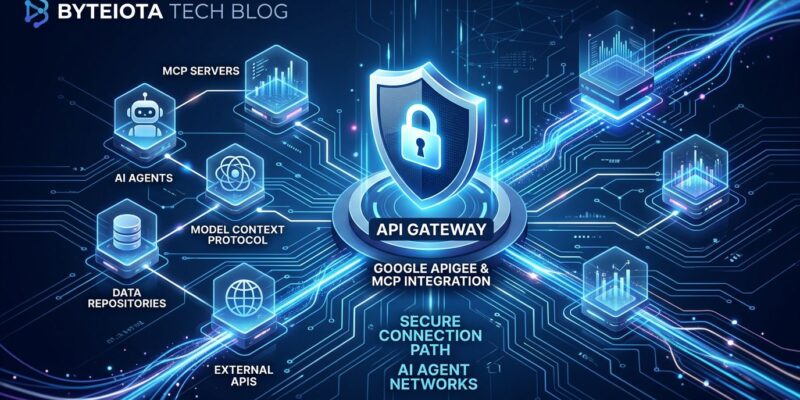
The mechanism is straightforward. If your API is catalogued in Apigee API hub — which it likely is if your organization uses Apigee — you select the operations you want to expose, click “Create MCP proxy,” and Apigee generates and deploys an MCP discovery proxy. No code changes. No new server. Apigee handles the REST-to-MCP transcoding at the gateway layer.
Every security policy already attached to that API carries over: OAuth, API keys, mutual TLS, IP allowlisting. The AI agent connecting to the MCP endpoint gets the same governance constraints your existing API consumers do, without any renegotiation. As Google’s own documentation puts it: “You don’t need to make changes to your existing APIs, write any code, or deploy and manage any local or remote MCP servers.”
This matters because the alternative — a raw MCP server — ships with none of that. You inherit the protocol but not the governance. That gap is exactly where the 8,000 exposed servers came from.
Token Policies: Rate Limiting for the Agentic Era
Standard request-based rate limiting doesn’t translate well to LLM workloads. A single agent invocation can carry a 50,000-token prompt or a three-token one. Throttling by requests treats both identically. Apigee’s new LLM-specific policies fix this.
PromptTokenLimit works like SpikeArrest, but for tokens rather than requests. It inspects incoming prompt size and blocks calls that exceed a configured token rate per time window, returning HTTP 429. This is your defense against token stuffing — where someone crafts an enormous prompt to maximize LLM compute at your expense.
LLMTokenQuota operates on a longer horizon: hourly, daily, or monthly token budgets per API product. If you’re billing clients based on token usage or enforcing different access tiers, this is the policy that enforces those boundaries. Once a client exhausts their quota, subsequent calls are rejected until the window resets. The official token policies tutorial covers both configurations with working examples.
| Policy | Throttles | Window | Primary Use Case |
|---|---|---|---|
| SpikeArrest | Requests | Per second/minute | General API abuse prevention |
| PromptTokenLimit | Prompt tokens | Per minute | Token stuffing, cost spikes |
| LLMTokenQuota | Total tokens consumed | Hour/day/month | Client budgets, usage-based billing |
The distinction between PromptTokenLimit and LLMTokenQuota is easy to miss but operationally important. The first is a safety valve for traffic spikes; the second is a business control for sustained usage. You need both.
Google’s Own Services Show What This Looks Like
Google isn’t just shipping a feature — it’s eating its own cooking. BigQuery, Google Maps, Compute Engine, and Kubernetes Engine are all now available as fully managed Apigee MCP endpoints. Connect your AI agent to one endpoint URL, and it can query BigQuery schemas, run geospatial lookups, or provision GKE clusters — all through the same governed gateway stack that enterprise Apigee customers use for their own APIs.
Google Cloud Storage and AlloyDB are in preview, with more services coming. The trajectory is clear: every Google Cloud service will eventually be an MCP-accessible agent tool, and Apigee is the governance layer underneath all of it. This doubles as a reference architecture for your own services.
Setting It Up
If you already use Apigee, the path is short:
- Open Apigee API hub and confirm your API is registered (or import its OpenAPI spec).
- Select the specific operations you want AI agents to discover and use as tools.
- Click “Create MCP proxy.” Apigee deploys the discovery proxy and registers it with Agent Registry automatically.
From there, add PromptTokenLimit and LLMTokenQuota policies to the proxy — the same policy editor you already use for REST APIs. The agent-facing endpoint is live, governed, and observable through Apigee’s existing analytics. Google has a quickstart guide covering the full MCP proxy creation flow.
The MCP Governance Problem Is Now
MCP is on track to become the standard protocol for agent-to-tool communication — the REST of the agentic era. And just like REST APIs needed governance layers to go from “exposed endpoint” to “production service,” MCP servers need the same treatment. The difference is that the MCP governance problem is arriving faster, with more attack surface, and fewer teams prepared for it.
Tool poisoning — where attackers embed hidden instructions inside MCP tool metadata that agents read but users never see — is already documented in production. The first confirmed malicious MCP package shipped 15 clean versions to build trust before adding data exfiltration code. Request-based rate limiting wouldn’t have caught it. A proper governance layer with tool allowlisting and audit logging would have raised the flag.
Apigee’s MCP support is the most complete answer to this problem currently available. It’s not the only path, but it’s the one that requires the least new code and carries the most battle-tested infrastructure — which is exactly what you want when you’re putting AI agents in front of production APIs.