 By
By OpenAI is shutting down the Sora API in September 2026. If your product pipeline depends on AI-generated video, that is a real deadline — not a footnote. Google’s Gemini Omni, which started rolling out to developers this month, is the most compelling migration path available. But migration framing undersells it. Omni has a capability that Sora never offered, and it changes how AI video production actually works in practice.
What Gemini Omni Is (Without the Marketing Layer)
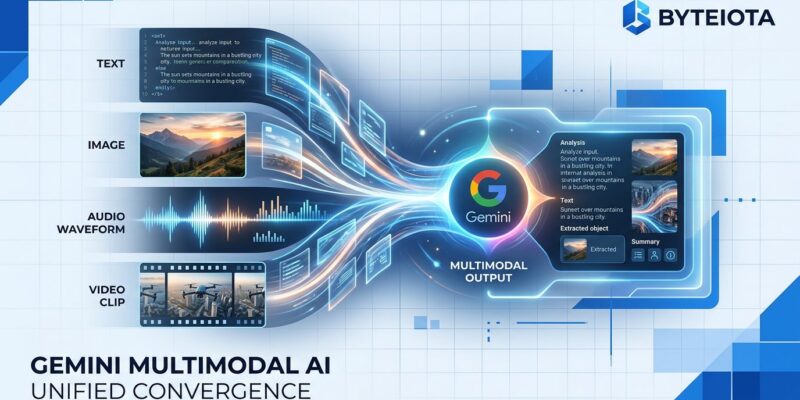
Google announced Gemini Omni at I/O 2026 in May and positioned it as an “any-to-any” multimodal model. The pitch is that it accepts text, images, audio, and existing video clips all in a single request. That is real and useful. But the headline feature buried in the announcement is multi-turn conversational editing — and that is what actually matters.
Here is what it means in practice: you generate a 10-second clip, then send a follow-up message asking the model to change the lighting or swap a background element. Only the affected frames re-render. The rest of the clip stays pixel-stable. No other major AI video model — not Veo 3, not Kling, not the Sora that is being deprecated — does this. Competitors require a full regeneration every time you change anything, which means every iteration costs the same as starting from scratch. Omni’s state-preserving edits break that cost structure entirely.
Getting Your API Key and Making Your First Call
Access is through Google AI Studio. Generate an API key there, install the google-genai Python package, and you are ready to make calls. Two model variants are available: gemini-omni-flash for fast 10-second clips, and gemini-omni-pro for longer, higher-fidelity output. Start with Flash during testing — it is faster and cheaper for iteration.
pip install -q -U google-genaiA minimal text-to-video call looks like this:
from google import genai

client = genai.Client()
response = client.models.generate_video(
    model="gemini-omni-flash",
    contents="A developer's desk at dawn. Keyboard, coffee mug, dual monitors glowing. 8 seconds, slow zoom in."
)
The response returns video data you can write to a file or stream. Google AI Studio has a test playground where you can verify your key and prompt before writing any code.
The Multimodal Input Pattern That Actually Gets Used
Text prompts alone underuse the model. The more powerful pattern combines a reference image (controls scene composition), an audio clip (controls mood and pacing), and a text instruction — all in one request. This is where Omni separates itself from tools that technically accept images but treat them as optional add-ons.
from pathlib import Path
from google import genai

client = genai.Client()

response = client.models.generate_video(
    model="gemini-omni-flash",
    contents=[
        {"inline_data": {"mime_type": "image/jpeg", "data": Path("product.jpg").read_bytes()}},
        {"inline_data": {"mime_type": "audio/mpeg", "data": Path("brand-audio.mp3").read_bytes()}},
        {"text": "Product reveal. 8 seconds. Camera circles the object. Match energy to the audio."},
    ],
)
For async workflows (long video, high volume), POST to /v1/videos/generations with a callback_url. The API returns a task_id immediately and posts the result when generation completes — more practical than polling in a tight loop.
Three Use Cases Worth Building Right Now
E-commerce product demos. Upload a product photo plus a brand audio clip and generate a reveal sequence with camera motion. Teams that previously spent days per video are reporting 15-minute workflow builds with Omni. The key is using the image as a compositional anchor so the model does not hallucinate the product’s appearance.
Social content at scale. Batch photo-to-video conversion for Instagram Reels or ad variations. The consistent physics and character coherence across multi-turn refinements means you can generate 20 variations of an ad creative, refine the best one conversationally, and export — without paying full regeneration cost on every tweak.
Educational and documentation animation. Static diagrams, architecture charts, and step-by-step processes benefit from motion that text and images cannot convey. Upload a diagram, describe the animation sequence, iterate on timing conversationally. Gemini’s real-world physics grounding keeps object behavior plausible without manual keyframing.
Pricing: Honest Assessment
Google has not published official per-second pricing for Omni yet, which is normal for a preview launch. Based on the structure of existing Gemini API pricing and estimates from the developer community, expect output to bill per second of generated video, with input tokens (including image frames and audio) following standard per-million-token rates. Rough estimates put the range at /bin/bash.10–/bin/bash.50 per second depending on model tier and resolution. Sora’s API was approximately /bin/bash.03 per second at comparable quality. Omni will likely land higher, but the reduced iteration cost from state-preserving edits offsets that in any workflow with multiple refinement rounds.
Batch API support with a 50% discount is likely to follow the standard Gemini pattern — worth watching when pricing goes official.
Who Should Start Testing Now
If you are running AI video workflows on Sora, you have until September to migrate. Start now. The SDK is the same google-genai package you may already be using, the prompt structure is familiar, and the early-access window means you can test at lower-than-GA demand levels.
If you are building a new video feature, Omni is the correct default choice in June 2026. Multi-turn editing alone makes it more production-practical than any competitor at launch. The “any-to-any” pitch is real, but treat it as a bonus on top of the conversational editing workflow, not the headline reason to adopt.
The Gemini API documentation and Google AI Studio are the right starting points. The model is rolling out broadly this month — get in early before quota queues fill up.