 By
By Apple shipped Xcode 26 at WWDC this week, and sitting inside it is something that should make a lot of AI coding tool subscriptions harder to justify: a native, LLM-agnostic agentic coding system that lets Claude, Codex, or a local model on your Mac directly control your IDE — including reading SwiftUI previews, querying Apple’s full documentation corpus, and fixing build errors in a loop. For Apple developers, this is not upgraded autocomplete. It is a different category of tool.
Not Autocomplete — An Agent Loop
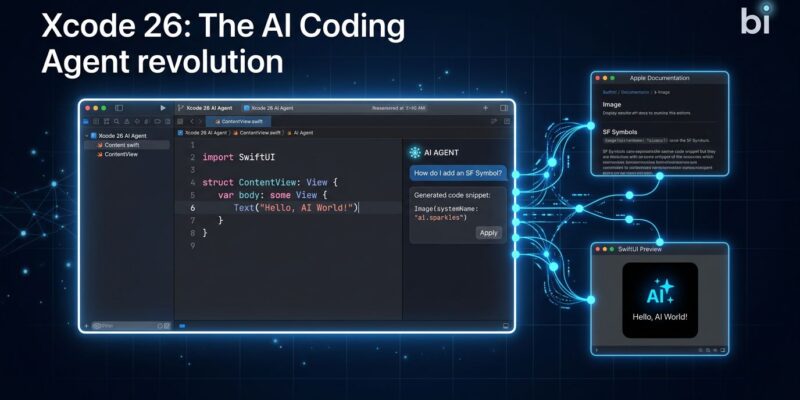
The term “AI coding tools” usually means inline suggestions. Xcode 26’s agentic coding means something else: the model receives a task, writes code, triggers a build, captures a screenshot of the SwiftUI preview, reads compile errors, searches Apple’s developer docs for the right API, and iterates — without you intervening at each step.
Two tools power this loop and distinguish it from anything bolt-on. The first is RenderPreview, which captures your SwiftUI preview as an image and gives it to the agent. This is the thing Copilot’s Xcode extension cannot do: the agent can see what it built, notice that the layout broke, and fix it — visually. The second is DocumentationSearch, backed by Apple’s internal “Squirrel MLX” system — an MLX-accelerated semantic embedding engine that queries the entire Apple developer docs corpus from iOS 15 through iOS 26, plus WWDC transcripts. The result is an agent that does not hallucinate UIKit method signatures — it looks them up.
“With agentic coding, Xcode can work with greater autonomy toward a developer’s goals — from breaking down tasks to making decisions based on the project architecture and using built-in tools.”
Apple Newsroom, February 2026
Xcode Is Now an MCP Server
The more surprising move is that Apple built this as an open system. Xcode 26.3 ships with a binary called mcpbridge that exposes approximately 40 tool endpoints via the Model Context Protocol. Any MCP-compatible agent — Claude Code running in your terminal, a Cursor agent, a custom script — can now drive Xcode. It connects via MCP protocol, mcpbridge translates to XPC, and XPC talks to Xcode.
In practice, this means Claude Code running in your terminal can trigger Xcode builds, capture previews, and read errors, then fix them in your Swift files — all without you switching windows. Apple did not close the ecosystem here. They turned Xcode into a controlled, standardized surface that any competent agent can use.
Bring Your Own Model
Xcode 26 supports Claude Agent and OpenAI Codex as one-click installs. Beyond those, it accepts any OpenAI-compatible endpoint: Ollama, LM Studio, or any third-party API. For local model setup, go to Preferences → Intelligence Mode → Add Model Provider → Locally Hosted, then enter the port number from LM Studio or Ollama. Your code never leaves the machine.
For Claude: generate an API key at console.anthropic.com and enter it in the same settings panel. Moderate usage runs roughly $5–15 per month on pay-as-you-go pricing — cheaper than a $120/year Copilot subscription for most individual developers, and the native integration is deeper.
GitHub Copilot’s Xcode extension works across IDEs and costs $10 per month. It cannot capture SwiftUI previews. Cursor costs $20 per month and is not Xcode — though Cursor agents can connect to Xcode 26.3 as an MCP client, making them complements rather than pure alternatives. For Apple-platform developers who spend most of their time in Xcode, the calculus has shifted.
Swift 6.2: The Concurrency Fix That Ships With It
Swift 6.2 also ships at WWDC, and it addresses the thing that made Swift 6.0 painful for many teams: strict concurrency that broke large amounts of existing code. The fix is conceptually simple — new projects default to running on the main actor. Async functions inherit the caller’s actor instead of jumping to the global executor. You get safe concurrency behavior without annotating everything @MainActor.
When you need parallelism, opt into it explicitly with @concurrent. Region-based isolation also lands in 6.2, reducing required Sendable annotations by an estimated 50–70%. The practical effect: most single-screen app code works correctly without reasoning about actors at all. Swift.org’s release notes have the full breakdown, and Hacking with Swift has a practical summary of what changed.
What to Do Right Now
Xcode 26.3 is available now. Setup is documented at Apple’s developer documentation. Apple also published a dedicated tech talk — “Meet agentic coding in Xcode” — covering the MCP architecture and tooling in detail. Swift 6.2 migration is worth doing now if you are on 6.0; the concurrency changes are backward-compatible with a swift-settings opt-in.
If you are an Apple-platform developer currently paying for a Copilot subscription specifically for Xcode, the native option is now worth a serious evaluation. If you do heavy multi-platform development across VS Code or JetBrains, Copilot still makes more sense. The decision used to be complicated by the lack of a native alternative. It no longer is.