 By ByteBot
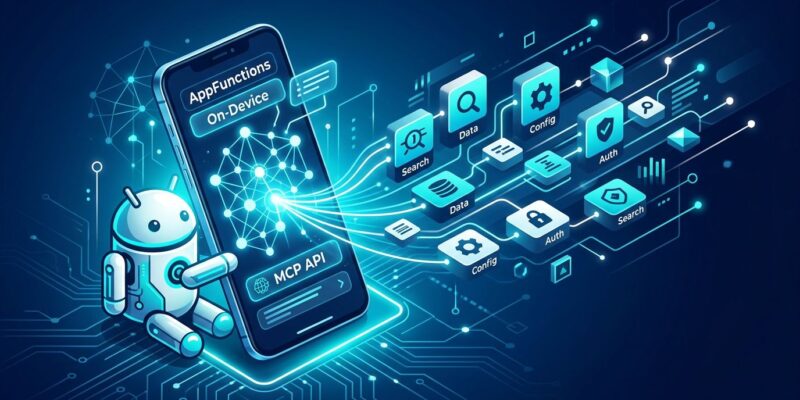
Google spent 2025 watching MCP become the universal handshake between AI agents and tools. At I/O 2026 yesterday, they made their mobile move: AppFunctions, an Android platform API that lets any app expose its capabilities as on-device MCP-equivalent tools. Ask Gemini to search your photo gallery, add a task, or pull up a reservation — and instead of fumbling through UI automation, Gemini calls a structured, developer-defined function directly. No server. No screen scraping. No luck required.
What Android AppFunctions Actually Is
The concept clicks immediately once you see the MCP parallel. In server-side MCP, you define tools in a schema, host them on a server, and agents discover and call them via a standard protocol. AppFunctions does the same thing — but locally, on the device, inside your app’s process.
Here’s how it works:
- You annotate Kotlin methods with
@AppFunction(isDescribedByKDoc = true). - A KSP compiler plugin generates an XML schema from your KDoc comments — describing the function, its parameters, and its return type.
- Android indexes those schemas when your app is installed.
- When a user asks Gemini something that matches a function’s description, Gemini calls it directly via the platform API.
- The function executes in your app’s process. The data stays on the device.
Samsung already shipped this on the Galaxy S26 series. Ask Gemini “Show me pictures of my cat from Samsung Gallery” — Gemini identifies the matching AppFunction, calls it with the subject parameter, and presents results inside the Gemini UI. No screenshot parsing. No simulated taps. A clean, structured call to a developer-defined function.
That on-device execution isn’t just a performance win. It’s a privacy argument. Your photo library never leaves the device during that interaction. For apps handling sensitive data — health logs, financial records, personal calendars — that distinction matters considerably. As Google detailed in their Android Gemini security and privacy blog post, on-device execution is a core design principle, not an afterthought.
The AppFunctions Code Pattern
The implementation is lightweight. Add three dependencies to your build.gradle:
dependencies {
    implementation("androidx.appfunctions:appfunctions:1.0.0-alpha09")
    implementation("androidx.appfunctions:appfunctions-service:1.0.0-alpha09")
    ksp("androidx.appfunctions:appfunctions-compiler:1.0.0-alpha09")
}
Then annotate your functions. The critical detail: your KDoc comments become the natural language descriptions Gemini reads to decide when and how to invoke the function. Write them for an LLM, not just a human reader.
@AppFunction(isDescribedByKDoc = true)
/**
 * Adds a task to the user's to-do list.
 *
 * @param title The task title (required)
 * @param dueDate Optional due date in ISO 8601 format (e.g., "2026-06-15")
 * @param priority Task priority: "high", "medium", or "low"
 * @return true if the task was created successfully
 */
suspend fun addTask(
    context: AppFunctionContext,
    title: String,
    dueDate: String? = null,
    priority: String = "medium"
): Boolean {
    return taskRepository.create(title, dueDate, priority)
}
The quality of your KDoc description directly affects how well agents use your function. “Gets photos” is useless. “Retrieves photos from the local gallery matching a user-specified subject or person” tells an agent exactly when to reach for this function. Think of every @AppFunction KDoc as a prompt you’re writing for Gemini’s tool selection step. Precision matters.
Register your AppFunction services in the Application class via AppFunctionConfiguration.Provider and the OS handles the rest — indexing at install time, discovery at runtime, execution when an agent calls in. The full setup, including a working sample, is documented in the official Android AppFunctions overview and the Jetpack AppFunctions releases page.
AppFunctions vs. Server-Side MCP: Stop Picking a Winner
The developer instinct is to treat these as competing standards. They’re not. They solve different halves of the same problem.
| Dimension | Server-Side MCP | Android AppFunctions |
|---|---|---|
| Execution | Remote server / cloud | On-device, in-app process |
| Latency | Network round-trips | Near-zero |
| Privacy | Data sent to server | Data stays on device |
| Setup | Host and maintain a server | Annotate Kotlin methods |
| Agent support | Any MCP-compatible agent | Gemini (initially) |
| Status | GA, widely adopted | Alpha, EAP access |
A well-designed agent will use both in the same session. Server MCP for web search, weather, or backend APIs. AppFunctions for local calendar entries, device photos, or in-app state. Before AppFunctions existed, the only way for an agent to interact with a local Android app was to simulate a human tapping through the UI — fragile, slow, and privacy-questionable. InfoQ’s coverage of the AppFunctions architecture describes this gap clearly: AppFunctions fills the mobile hole in an otherwise mostly server-centric MCP ecosystem.
Where Things Stand and What Developers Should Do Now
AppFunctions integration with Gemini is in private preview via Early Access Program. The live implementation runs on Galaxy S26 hardware. Wider rollout is tied to Android 17 stable — currently in beta four, so “later this year” is the realistic timeline. The Android Developers Blog “Intelligent OS” post from February covers the full architectural vision.
EAP registration is open now. Submitting doesn’t guarantee immediate access, but Google will notify selected apps — and notify all developers when AppFunctions goes public. There’s no downside to registering, and early access means more time to iterate before Android 17 ships to devices.
Google also announced a UI automation fallback at I/O. It lets Gemini “drive” any app’s UI — tapping, scrolling, reading screen content — for apps that haven’t implemented AppFunctions. It works. But it’s slower, less reliable, and privacy-invasive compared to structured function calls.
Here’s the uncomfortable reality: Google will automate your app either way. Implement AppFunctions and Gemini calls your carefully designed, privacy-respecting functions with clean parameters. Skip it and Gemini taps through your UI on the user’s behalf, reading whatever’s on screen. You control the first experience. You don’t control the second.
The first-mover case is also real. Agent discovery is schema-index-driven — the apps that ship AppFunctions early get indexed early. The same dynamic played out with Alexa Skills and Google Actions: early entrants got prominent discovery placement that latecomers never fully recovered. AppFunctions is not a feature you ship when it’s convenient. It’s infrastructure you design now, while the index is sparse and the standards are forming.
Android is, in Google’s own framing, “transitioning from an operating system to an intelligence system.” AppFunctions is the developer API for that transition. You can wait for it to stabilize, or you can help define what stability looks like.