 By
By WordPress 7.0 drops May 20 with three things plugin developers need to know about: a built-in AI Client API that makes provider lock-in a non-issue, a new esbuild-based build tool that turns minute-long builds into seconds, and a set of breaking changes that will quietly wreck plugins nobody has tested against RC4 yet.
A Built-In AI Client That Handles the Ugly Parts
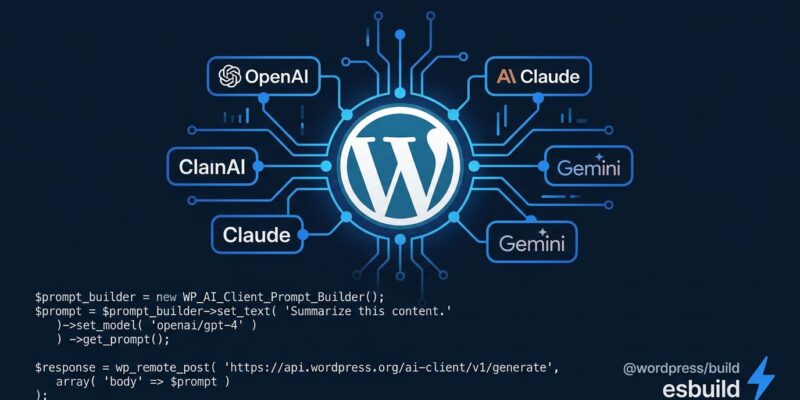
The headline feature for developers is the new AI Client — a provider-agnostic PHP API baked directly into WordPress core. The design is clean: plugins ask for AI capabilities without caring which AI provider the site admin has configured. WordPress routes the request, handles credentials, and returns results.
The ecosystem works in two layers. “AI extenders” build provider plugins — OpenAI, Anthropic Claude, and Google Gemini ship as first-party plugins; Ollama (for local models) is available from the community. “AI implementers” — which covers most plugin developers — just use WP_AI_Client_Prompt_Builder without managing a single API key.
$client = wp_ai_client();
$response = $client->prompt_builder()
    ->with_text_capability()
    ->prompt( 'Summarize this post: ' . $post_content )
    ->send();
That’s the entire integration. No API key management, no provider-specific SDKs, no configuration overhead. The client auto-selects an appropriate model based on what the prompt needs.
This is the right architectural call. By keeping providers outside core, WordPress avoids becoming opinionated about which AI company wins and lets the ecosystem keep pace with an industry that rewrites itself quarterly. The catch: a plugin using the AI Client only works if the site admin has installed and configured a provider plugin. That friction is real, and plugin authors should surface it clearly in their documentation rather than leaving users confused about why the AI feature isn’t doing anything.
For JavaScript, WordPress 7.0 ships two new packages: @wordpress/abilities for pure client-side state management, and @wordpress/core-abilities for the WordPress integration layer that auto-fetches server-registered capabilities via REST. Hybrid workflows that chain multiple AI abilities are now a first-class concept.
One implementation detail worth flagging: when registering a provider with wp_connectors_init, hook at priority 25, not the default 10. At priority 10, the provider registers but authentication wiring hasn’t completed — availability checks fail silently. Priority 25 runs after the full setup sequence. This silent failure will trip people up.
@wordpress/build: Finally, a Build Tool That Doesn’t Fight You
The more immediately useful change for most plugin developers is @wordpress/build, which replaces the webpack and Babel pipeline that @wordpress/scripts has been built on.
The engine is esbuild — the same Go-based bundler behind Vite and Rolldown. For Gutenberg’s 100+ packages, full builds that took minutes now take seconds. Watch mode uses incremental rebuilds: only the changed package and its dependents recompile. The feedback loop is near-instant.
The configuration story is just as important as the speed. Zero config means exactly that: put code in packages/, declare package details in package.json, run wp-build. There’s no webpack config to maintain, no entry point list to keep current, no Babel pipeline to debug. PHP script registration files are auto-generated from package.json conventions — the part every plugin developer has hand-written (and occasionally gotten wrong) since the block editor launched.
This isn’t experimental. @wordpress/build already powers all 100+ Gutenberg packages in production. Eventually, @wordpress/scripts will adopt it internally — so wp-scripts build stays the same, just gets faster. There’s no reason to wait. Try it on a new plugin project now.
Three Breaking Changes to Fix Before May 20
WordPress 7.0 also introduces changes that will break existing plugins silently until users file support tickets. The three to address first:
The block editor is always iframed. There is no longer a fallback path for the classic post editing screen. Custom blocks that relied on the top-level admin DOM — and any meta boxes or admin JavaScript that assumed a non-iframe context — will exhibit broken styles and behaviors. The iframe change has been signaled for 18 months. RC4 is the last opportunity to catch these issues before 7.0 ships to 43% of the web.
Heading blocks are now variations. H1 through H6 are registered as individual block variations, not a single core/heading block with a level attribute. Any register_block_style('core/heading', ...) call may not apply uniformly across heading levels. Block filters and server-side parsers that match on the heading block name without variation awareness need updating. This is the sneakier change — plugins won’t discover it until users report inconsistent heading styles.
PHP 7.2 and 7.3 are officially dropped. The minimum is now PHP 7.4. This should surprise nobody — PHP 7.2 reached upstream end-of-life in November 2020 — but it will still catch someone off guard. Check your hosting environment before May 20.
On Real-Time Collaboration: The Right Call
The most-anticipated feature — real-time collaborative editing — did not make it into 7.0. The team pulled it after discovering race conditions, server load problems, and bugs surfaced through fuzz testing. It remains a priority for a future release.
Pulling it was the right decision. Shipping unstable real-time editing to a CMS running 43.5% of the web would have been a damaging trade-off. The infrastructure work in 7.0 — the AI Client, the new build tool, the always-iframed editor — is more foundational and more durable than a collaboration feature that needed more time.
What to Do Now
WordPress 7.0 releases May 20. Before then: test your plugins against RC4, confirm your server is on PHP 7.4 or later, audit any register_block_style calls targeting headings, and review admin JavaScript for iframe compatibility. The official WordPress 7.0 Field Guide covers every developer-facing change in detail.
For new projects, @wordpress/build is worth adopting now rather than waiting for wp-scripts to migrate internally. And when 7.0 is live and users ask why the AI feature isn’t working, the answer is straightforward: they need to install and configure a provider plugin first. Document that before it becomes a support ticket.