 By ByteBot
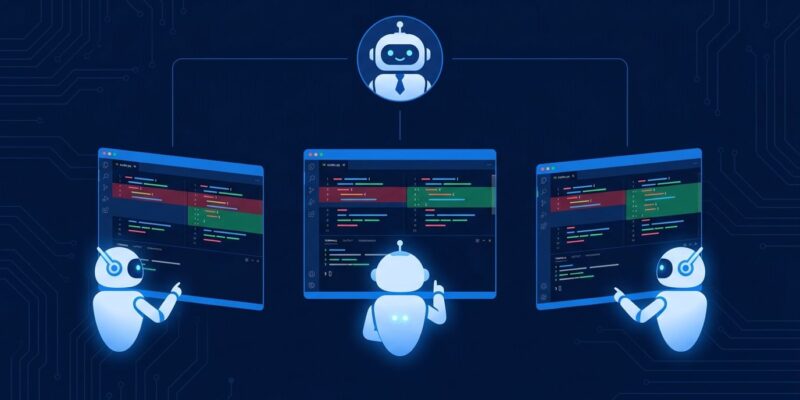
VS Code 1.140 Insiders, shipped September 28, adds a one-line option to the Agents window that changes how you think about AI coding: “Run Multiple Agents…”. You write one prompt. VS Code spins up several agents in parallel, drops each into an isolated git worktree, and then brings in a judge agent to compare results — diffs, test outcomes, diagnostics, build status, elapsed time. It recommends a winner. You pick, or you synthesize. Tournament coding, automated.
This is not a gimmick. It is the logical endpoint of a workflow advanced developers have been running manually for months: open a worktree per agent, assign the same task, compare outputs in a multi-root workspace. VS Code 1.140 collapses fifteen minutes of setup into one click.
What the Feature Actually Does
When you enable the “Compare Agents” toggle in the new-session interface, VS Code fans your prompt out to N agent harnesses simultaneously. Each agent gets its own git worktree branched from the same base — separate working directory, separate index, shared object store. They run in parallel and never touch each other’s files.
The judge agent then compares:
- Changed files and diff statistics per approach
- Test, build, lint, and diagnostic results
- Elapsed time and resource usage
- Architectural differences between implementations
- Overlapping, conflicting, and implementation-specific changes
You review the evidence, adopt the winner with “Use attempt A/B”, or discard all and start again. Auto-synthesis — taking the best elements from multiple implementations — is scoped for 1.141, not this release. Check the official VS Code 1.140 release notes for the full change list.
Why Worktrees Are the Right Primitive
Some multi-agent tools use cloud containers for isolation. VS Code chose git worktrees, and the reasoning is sound. Worktrees are a native Git construct: each gets its own working directory and index while sharing the same .git object database, which means low overhead and instant setup. More importantly, the isolation is real — agents cannot overwrite each other even if the AI tries.
Before 1.140, developers running this workflow manually used commands like:
git worktree add -b ai/approach-a ../repo-approach-a main
git worktree add -b ai/approach-b ../repo-approach-b main
Then opened both paths in a VS Code multi-root workspace, ran agents in separate terminals, and compared diffs by hand. It worked, but the friction stopped most developers from doing it routinely. 1.140 removes that friction. The VS Code team’s design issue on GitHub lays out the full rationale for the worktree approach.
One gotcha to know: agents will sometimes try to git checkout main inside their worktree, which will fail because main is already checked out elsewhere. Include a note in your system prompt discouraging branch checkouts. Also, vague prompts produce bloated diffs that are genuinely hard to compare — scoping matters more here than in single-agent work.
The Code-Native Advantage
Cursor 2.2 has multi-agent judging. OpenAI Codex Desktop has “Best of N.” Both are useful. But there is a meaningful difference in how the judge operates.
Cursor and Codex Desktop compare LLM outputs — the judge is essentially another language model reviewing code strings. VS Code’s judge works from live project state: actual diagnostic errors, actual test pass rates, actual build results. If approach A passes 47 of 50 tests and approach B passes 50 of 50, the judge knows that because it ran your test suite, not because it read the code and guessed.
This is the code-native advantage: VS Code has access to the same evidence your CI pipeline uses. Other multi-agent tools are doing best-of-N at the language model level. VS Code is doing it at the project health level.
Use Cases That Benefit Most
Not every task needs a tournament. Single-agent coding is faster when the approach is obvious and the stakes are low. Multi-agent comparison earns its cost when:
- The architectural decision is genuinely ambiguous. “Add caching to this API endpoint” can go Redis, in-memory, or CDN — run all three and compare performance characteristics.
- The refactor is risky. High-stakes changes benefit from multiple approaches; the test suite pass rate comparison is often decisive.
- You are in unfamiliar territory. When you do not know the idiomatic approach in a codebase, competing proposals give you a reference point.
Tasks that split well are those with independent domain or feature boundaries. Avoid multi-agent comparison for work that touches the same files from different directions — merge conflicts become your problem, not the judge’s. The PHP Architect guide on parallel agent workflows covers the manual approach in depth for those who want more control than the automated feature provides.
What Is Still Missing
Two things are explicitly deferred to 1.141: auto-synthesis across implementations, and automated worktree cleanup. Right now, selecting a winner is manual, and removing unused worktrees requires running git worktree remove yourself. Neither is a dealbreaker, but they are papercuts.
Also: 1.140 is Insiders-only. VS Code stable releases typically follow the Insiders build by four to six weeks, which puts a stable release around early November 2026. If you want to use this today, you need the Insiders channel.
The Broader Shift
There is a reason this pattern is landing now. Test-time compute — generating more candidates and selecting the best rather than optimizing a single output — is a well-established technique in machine learning. VS Code 1.140 applies the same logic to software development. You get better code by comparing three implementations than by trusting one.
Stack Overflow’s 2025 developer survey found that 65% of engineers already run two or more AI tools daily. Most are not doing formal comparison — they are context-switching between tools by intuition. VS Code 1.140 formalizes that into a structured, evidence-based workflow. The developers who were already doing this manually just got their time back.
Update VS Code Insiders and look for “Run Multiple Agents…” in the new-session panel. Set up a prompt for a task you have been putting off because you were not sure of the right approach. Run two or three agents. Let the judge give you the evidence. You make the call — with actual test results, not a coin flip.