 By ByteBot
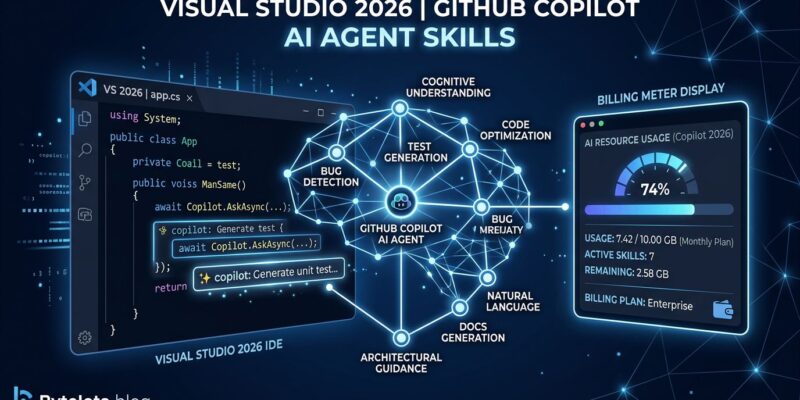
GitHub switched Copilot to usage-based billing on June 1. Since then, developers running agentic sessions have watched monthly bills jump from $39 to $800 with no warning and no in-IDE visibility into how fast the meter was spinning. Visual Studio 2026’s July update (version 18.7.4, released July 14) ships two things that actually address this: real-time billing alerts before you hit your credit ceiling, and built-in Agent Skills that put .NET and Azure expertise directly into the Copilot agent. Neither is turned on by default. Here is what changed, what to enable now, and what to leave alone for the moment.
Fix the Billing Alert First
Agentic sessions are expensive by design. Each step in an agent’s plan generates its own prompt-response cycle through a frontier model — so a single “refactor this module” request might spawn ten or twenty billed interactions. GitHub’s allotments are modest: Pro plans get 1,500 AI Credits per month ($15), Pro+ gets 7,000 ($70), Business 1,900 per user, Enterprise 3,900 per user. One credit equals one cent. Inline completions and Next Edit Suggestions are still flat-rate and do not consume credits — only chat, agent mode, cloud agent, and code review workflows are metered.
The July update adds a configurable quota alert. By default it fires at 75 percent of your monthly allotment — which means your first warning arrives when you have already spent three-quarters of your budget. Go to Tools → Options → GitHub → Copilot → Copilot Chat → Quota warning threshold and lower it to 50 percent. You will catch overages before they cascade. Open the Copilot Usage window (Copilot badge menu → Copilot Usage) to see your real-time consumption across sessions.
What Agent Skills Actually Are
Agent Skills are reusable instruction sets that teach Copilot agents how to handle specific tasks. Define a skill once and the agent loads it automatically whenever the context matches. They follow the open agentskills.io specification — the same format supported by over 30 platforms including Claude Code, Cursor, Gemini CLI, Roo Code, and VS Code itself. Skills you write for Visual Studio work in every other tool that reads the standard.
The auto-discovery paths are shared across the ecosystem. At the repository level, Visual Studio looks in .github/skills/, .claude/skills/, and .agents/skills/. Globally, it reads ~/.copilot/skills/ and ~/.claude/skills/. Each skill is a folder containing a SKILL.md file with YAML frontmatter (name and description are required) plus optional scripts, templates, and reference files. The Copilot Chat panel has a tools icon that opens a skills browser where you can view, edit, and create skills without leaving the IDE.
The Five Built-in Skills Worth Knowing
Microsoft shipped five built-in skills created by its .NET and Azure teams. All are disabled by default — Microsoft is tracking effectiveness through telemetry before enabling them automatically, an honest admission that agent token spend needs to earn its keep. Enable the ones relevant to your stack from the Built-in category in the tool picker.
dotnet-webapi generates ASP.NET Core HTTP endpoints with correct OpenAPI metadata and error handling. Prompt it with something like “Add an endpoint to handle moving entries from current to archived, include proper error handling” and it produces production-ready code rather than a skeleton you have to fix.
analyzing-dotnet-performance scans your codebase for roughly 50 performance anti-patterns spanning async misuse, memory allocation, LINQ overhead, regex compilation, serialization bottlenecks, and I/O patterns. Ask it for the top three changes in a module and it returns ranked, actionable findings rather than generic advice.
The Azure deployment chain — azure-prepare, azure-validate, and azure-deploy — runs as a three-step sequence: generates infrastructure-as-code, runs preflight validation, then deploys with error recovery. “Deploy my ASP.NET Core app to Azure Container Apps with managed identity” becomes a single-prompt operation.
azure-kusto converts plain English descriptions into KQL queries against Azure Data Explorer. Useful if your team uses ADX for logs but not everyone knows the query language. microsoft-foundry handles AI feature lifecycle — discovering models, deploying agents, running evaluations — all from within the IDE.
Community skills for other workflows are available at github.com/github/awesome-copilot. The official .NET and Azure skill repositories are at github.com/dotnet/skills and github.com/microsoft/azure-skills.
The New Copilot Agent (Preview)
The July update also introduces a new “Agent (Preview)” option in the Copilot Chat agent picker. It runs on the same GitHub Copilot SDK that powers the CLI and is described as getting more tasks right the first time with fewer clarification rounds and shorter responses. Access it by switching the agent picker in Copilot Chat — the standard agent is still available if you prefer it. Microsoft is collecting feedback before making it the default.
This matters beyond the immediate feature. Visual Studio is migrating its entire AI layer to the GitHub Copilot SDK, which means future capabilities land in sync with VS Code and the Copilot CLI rather than on a separate development track. The old agent is already on borrowed time.
Organization-Level Instructions
GitHub organization owners can now push custom Copilot instructions that apply automatically when any team member works on organization repositories. This is the right level to enforce coding standards, security policies, and deployment conventions rather than relying on individual developers to maintain matching custom instruction files. The instructions appear in Copilot’s reference list during interactions. Disable them per-machine at Tools → Options → GitHub → Copilot → Copilot Chat if needed.
What to Do Today
Three actions in order of urgency. First, lower the Copilot billing alert threshold from 75 percent to 50 percent — five seconds in settings, prevents a bad surprise at month-end. Second, open the skills panel and enable the built-in skills that match your stack: dotnet-webapi and analyzing-dotnet-performance if you are on .NET, the Azure deployment chain if you deploy to Container Apps. Third, switch to Agent (Preview) in Copilot Chat and run your next feature task through it to see whether the reduced back-and-forth translates to fewer token burns in your workflow.
The full release notes are at learn.microsoft.com. The Agent Skills developer guide is at devblogs.microsoft.com.