 By ByteBot
Computer use for AI agents has relied on a vision model and pixel coordinates. Take a screenshot, send it to the model, ask it to find the button, click at (x, y). It works — until the UI shifts, the window resizes, or the model hallucinates a button that isn’t there. Each screenshot also costs between 1,000 and 1,800 input tokens. Vercel Labs just shipped a different approach, and the architecture is worth understanding.
What agent-desktop Does
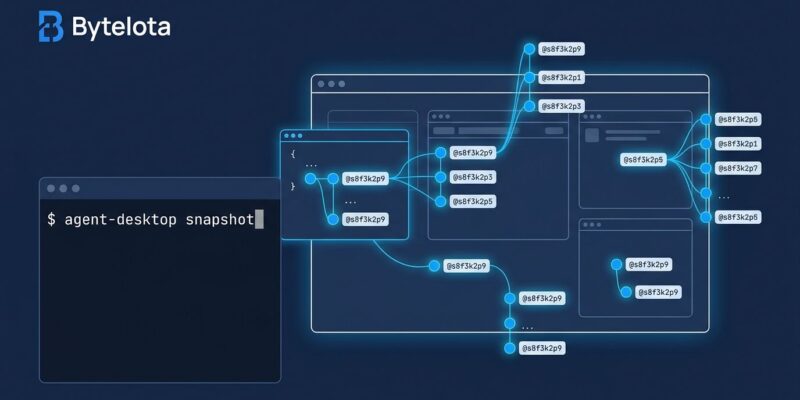
Released October 31 and updated to v1.1.0 on November 3, agent-desktop is a Rust CLI and C library that reads your OS’s native accessibility tree instead of taking screenshots. Every interactive element gets a stable JSON ref — something like @s8f3k2p9:e8. The agent acts on that ref, not on pixel coordinates. When the layout changes, the ref stays valid.
Chris Tate at Vercel described it as “agent-browser, for your whole computer” — a direct extension of Vercel’s existing agent-browser (token-efficient headless browser control) to the full desktop. Apache-2.0 licensed, open source, it picked up over 13,000 GitHub stars in its first few days.
Why This Architecture Matters
The token cost difference is not a minor optimization. Accessibility tree snapshots run about 273 tokens each. Screenshot-based computer use runs 1,000 to 1,800. On a workflow that checks app state 50 times, that’s the difference between roughly 14,000 tokens and 75,000 tokens. The economics change which agent workflows you can run at scale.
Beyond cost, there are two properties screenshots can’t match. First, stability: refs are tied to named elements, not pixel positions. A button that moves stays the same ref. Second, parallelism: multiple agents can work on the same application simultaneously, each with its own cursor. Screenshot-based tools generally don’t support this.
Getting Started
Installation is a single command:
npm install -g agent-desktopmacOS requires granting Accessibility permissions via agent-desktop permissions --guide. Windows needs nothing extra. Linux needs at-spi2-core installed in the user’s graphical session.
The core observe-act-verify loop:
agent-desktop status
agent-desktop snapshot <app-name>
# Agent reads JSON, decides action, acts on ref
# Snapshot again to verify state changed
To integrate with Claude Code, Codex, or any shell-capable agent:
npx skills add https://github.com/vercel-labs/agent-desktop --skill agent-desktopThis loads tool documentation directly into the agent’s context. agent-desktop skills get desktop gives a guide to all 56 operational commands.
Where It Works — and Where It Doesn’t
agent-desktop reads the accessibility tree that screen readers use. Apps that work well with screen readers — VSCode, Slack, modern browsers, most native macOS and Windows apps — work well here. Apps with custom-drawn UIs that ignore accessibility APIs don’t expose a usable tree.
macOS coverage is strong via the AX API. Windows UI Automation is solid, though some Windows developers report that Windows-MCP serves their workflows better. Linux is the weak link: AT-SPI coverage varies significantly by application, and the Hacker News thread flagged this clearly.
If you’re targeting well-built modern software, agent-desktop is the better architecture. If you’re targeting legacy apps with no accessibility support, screenshot-based computer use remains the fallback.
What Changed in v1.1.0
Three days after launch, Vercel shipped v1.1.0 with platform-specific fixes: Windows overlay crashes at exit, double coordinate scaling, and a black startup flash are resolved. macOS Dock, menu bar status items, and system panels are now reachable. Refs on Windows and Linux are stricter and more predictable.
The release pace signals active development. The rough edges in a 1.0 release are getting fixed quickly.
The Takeaway
Accessibility trees are the right data model for desktop computer use. They’re structured, stable, and cheap — exactly what an agent loop needs. The pixel-guessing approach made sense before native accessibility APIs were well-supported; that’s no longer the constraint. agent-desktop ships this architecture in a single npm install that works across macOS, Windows, and Linux, integrates with any shell-capable agent, and supports running multiple agents on the same app in parallel.
The limitation is real: not every app exposes a good accessibility tree. But for the apps that do, switching from screenshots to structured refs is not a marginal improvement. It’s a workflow redesign worth making.