 By ByteBot
Apple spent WWDC week handing out shiny new toys — Gemini-powered Siri, a rebuilt design language, foldable device APIs. Buried in the fine print was something less exciting but more urgent for iOS developers: SiriKit is deprecated. If your app uses SiriKit to integrate with Siri, it will be invisible to the new AI assistant starting this fall. Not broken. Not throwing runtime errors. Just absent. The rebuilt Siri routes exclusively through App Intents, and SiriKit might as well not exist to it.
Your App Compiles. It Just Does Not Exist to Siri.
This is the part worth repeating. Apps using INExtension and the old intent classes still compile under iOS 27. You will see deprecation warnings in Xcode. The app ships. It runs. But when a user asks Siri to trigger one of your features, nothing happens. The rebuilt Siri experience — now routing through a Gemini model for complex queries — does not know your app exists unless it exposes App Intents.
iOS 27 ships to the public this fall, likely September. That is a narrow window to avoid handing your Siri-integrated features to competitors who already migrated. Apple made the switch official at WWDC 2026 on June 8.
This Is Not a Rename
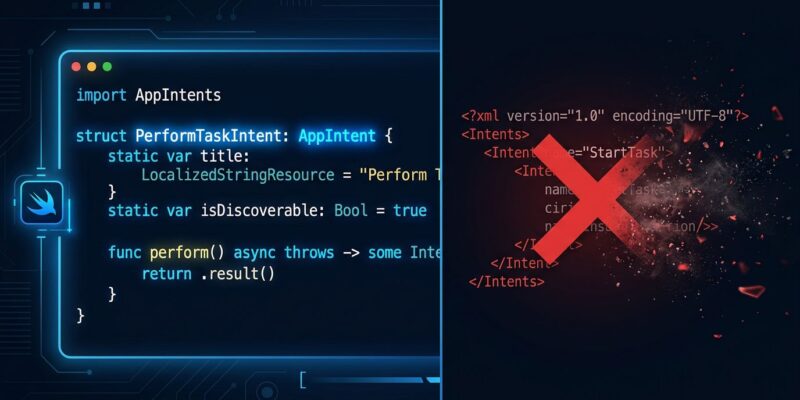
The name change from “SiriKit Intents” to “App Intents” undersells how different these frameworks are. SiriKit was built on XML intent definition files and a separate INExtension process. When Siri wanted to call your app, it spawned that extension process and communicated over an IPC layer you could not control. Siri’s role was pattern-matching — matching user speech to a hardcoded category, then handing off to your handler.
App Intents is the opposite. You define a struct conforming to the AppIntent protocol in Swift. The compiler reads your source at build time and generates compact metadata describing your app’s actions, parameters, and entity types. The new Siri — backed by Gemini for heavy lifting and Apple’s on-device models for speed — can reason declaratively over those intents. It understands what your app can do, not just which category it fits.
The practical result: SiriKit supported single-turn, category-matched commands. App Intents supports multi-turn conversations. “Log a workout” → “What activity?” → “How long?” That flow requires App Intents. SiriKit cannot participate. A single AppIntent declaration also plugs into more system surfaces than SiriKit ever did: Siri voice, the Shortcuts app, Spotlight search, Focus filters, widgets, Control Center, and the Action Button. You write the logic once.
The Migration Playbook
Apple’s developer documentation and WWDC 2026 sessions outline a four-step approach:
1. Audit Your SiriKit Usage
Open your project and search for INExtension, INIntent subclasses, and .intentdefinition files. List every voice feature built on SiriKit. Each one is now on a deprecation clock and invisible to the new Siri experience. The audit typically takes an afternoon.
2. Expose Core Actions as App Intents
Identify the three to five actions users most want to trigger by voice. Implement each as an AppIntent struct. Here is what a minimal intent looks like:
import AppIntents

struct LogWorkoutIntent: AppIntent {
    static var title: LocalizedStringResource = "Log Workout"

    @Parameter(title: "Activity")
    var activity: String

    func perform() async throws -> some IntentResult {
        WorkoutStore.shared.log(activity)
        return .result(dialog: "Logged \(activity).")
    }
}
That replaces what used to require an XML definition file, an INExtension subclass, a handler class, and an IPC communication layer. The migration is not trivial for complex intents — parameter handling and entity queries take real work — but the baseline is far simpler than SiriKit ever was. The official App Intents documentation covers entity queries and multi-turn support in detail.
3. Declare Privacy Routing for Regulated Data
This step is easy to overlook and important to get right. Apple introduced per-intent privacy manifest declarations at WWDC 2026, letting you specify on a per-intent basis whether a Siri interaction may route to the cloud or must remain on-device. If your app handles protected health information, legal documents, or financial data, audit your App Intents implementation against these declarations before iOS 27 ships. Apps that miss this step may inadvertently route regulated data through Gemini’s cloud infrastructure.
4. Test on iOS 27 Beta
The new CPU scheduler and rebuilt Siri search index can shift timing behavior from what you saw on iOS 26. Run your intents on a physical device with the iOS 27 beta installed and use Xcode 27’s improved Instruments profiles to catch anything unexpected before general availability.
The Timeline You Need to Know
SiriKit launched in iOS 10 in 2016. A decade of integration work across thousands of apps is now on a clock:
- Now (iOS 27 beta): SiriKit deprecated, compile-time warnings active, invisible to rebuilt Siri
- Fall 2026: iOS 27 public release — Siri AI reaches billions of devices, SiriKit apps absent
- ~2028 (iOS 29): SiriKit removed entirely
Apple is serious about this timeline. The UIWebView deprecation ran for four years before removal. SiriKit will follow the same pattern. The full-removal deadline is far enough away not to panic, but the visibility loss deadline is this fall — and that matters more.
Start the Migration Now
You do not need to migrate every SiriKit intent before September. But you need to migrate the ones your users actually use. The audit step takes an afternoon. Exposing your top three actions as App Intents is a sprint’s work for most teams. The new Siri is better at acting on well-written App Intents than the old Siri ever was at parsing SiriKit handlers — so there is genuine upside here, not just compliance work.
Apple’s SiriKit-to-App-Intents migration guide and the App Intents framework documentation are the right starting points. Block the sprint time before July and you will ship iOS 27 with Siri support intact, rather than explaining to users why the voice feature stopped working.