 By
By Apple deprecated SiriKit at WWDC26 on June 8. iOS 27 Beta 2 dropped June 22. And if your app hasn’t migrated to App Intents yet, the new Gemini-powered Siri won’t find it at all — not in a degraded state, not with reduced functionality. Completely invisible. The fall iPhone launch is roughly ninety days out. This is the migration you don’t want to discover in September.
What Deprecation Actually Means Here
SiriKit code still compiles under iOS 27. Xcode 27 emits deprecation warnings, but there are no build errors, no crashes, no obvious signals at build time that anything is wrong. The failure mode is subtler and worse: your INExtension runs fine in the simulator, your CI passes, you ship — and your Siri integration is silently dead for every user on iOS 27.
Apple made the routing decision architectural, not gradual. The new Siri routes intent resolution exclusively through App Intents. SiriKit’s INExtension process no longer receives requests from it. Two years of official support remain before removal, but that runway applies to the code compiling — not to your app showing up in Siri.
The Architecture Shift Is the Point
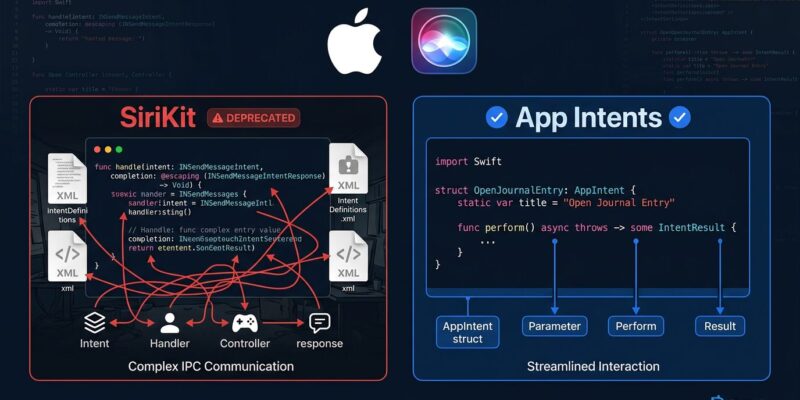
SiriKit was built on an inter-process communication model that predates modern Swift. Your app and Siri lived in separate processes. Intent definitions lived in XML files outside your Swift code. The INExtension target was a second mini-app you maintained in parallel with your main app. This is why SiriKit integrations were expensive to build and brittle to maintain.
App Intents throws all of that out. Intents are now plain Swift structs conforming to the AppIntent protocol. They run in-process with your app. There are no XML files, no separate extension target, no IPC layer you can’t control. Here’s what the same intent looks like on both sides:
// SiriKit — before
class CompleteTaskIntentHandler: NSObject, CompleteTaskIntentHandling {
    func handle(intent: CompleteTaskIntent,
                completion: @escaping (CompleteTaskIntentResponse) -> Void) {
        // Logic buried in IPC handler, separate process
        completion(CompleteTaskIntentResponse(code: .success, userActivity: nil))
    }
}
// App Intents — after
struct CompleteTaskIntent: AppIntent {
static var title: LocalizedStringResource = "Complete Task"
@Parameter(title: "Task Name") var taskName: String
func perform() async throws -> some IntentResult & ProvidesDialog {
try await TaskManager.complete(named: taskName)
return .result(dialog: "Marked '\(taskName)' as done.")
}
}The App Intents version is shorter, testable without a separate extension, and directly expresses what the intent does. The @Parameter property wrapper replaces the XML schema. The perform() method replaces the handler callback chain. Swift async/await handles the concurrency cleanly.
What App Intents 2.0 Adds in iOS 27
Migration is not just about maintaining parity with what SiriKit offered. App Intents 2.0 ships capabilities that were not architecturally possible under SiriKit’s IPC model.
Streaming responses let long-running intents show progress UI in Siri instead of appearing frozen. Any intent that might take more than a second — a search, a content generation step, a network fetch — should stream progress. Users who see “still working” stay patient. Users who see silence assume something broke.
View Annotations is the standout feature. The new .appEntityIdentifier(forSelectionType:) modifier on SwiftUI List views maps your UI elements to App Entities. When a user says “mark the first one done” while looking at your task list, Siri understands which “first one” maps to which entity and routes to CompleteTaskIntent accordingly. Apple said it plainly at WWDC26: accessibility quality and Siri AI integration are now the same engineering work. If your views are accessible, they’re already partway to being Siri-aware.
Multi-turn conversations are built into the framework. The old SiriKit model handled one exchange per request. App Intents natively supports Siri asking follow-up questions, holding context across turns, and routing back to your intent with the additional information. You do not write conversation state machines — the framework handles it.
How to Migrate
The migration has a mechanical first step: open your .intentdefinition file in Xcode 27 and click “Convert to App Intent.” Xcode generates Swift struct equivalents of your existing intent definitions. This handles the schema translation. The logic migration is still on you.
- Audit your intents. List every INIntent your app registers. Prioritize by frequency of user invocation, not by implementation complexity.
- Run the Xcode converter. Use the generated structs as a starting point, not finished code. Review each parameter mapping.
- Move the logic. Migrate your INExtension handler code into
perform()methods. Replace completion callbacks with async/await. - Define entities. Map your domain models to
AppEntityconformances. This is what enables Siri to reason about your app’s data. - Add View Annotations. Apply
.appEntityIdentifiermodifiers to list views and detail screens. Start with your highest-traffic screens. - Register App Shortcuts. Add an
AppShortcutsProviderso Siri discovers your intents without users needing to set up Shortcuts manually. - Test on iOS 27 beta. Test in Siri, the Shortcuts app, and Spotlight. The simulator works but device testing catches edge cases. Swift 6.2’s concurrency improvements also make the async migration cleaner if you are updating both at once.
The September Deadline Is Real
Apple has a two-to-three year support window before SiriKit code is removed from the SDK. That timeline covers compilation, not Siri presence. The iOS 27 public launch in September 2026 is when the new Siri reaches hundreds of millions of users — and it’s the highest-traffic Siri moment of the year, coinciding with new hardware.
Apps that ship the fall cycle without App Intents will have working code and zero Siri integration for iOS 27 users. That’s a meaningful regression, particularly for productivity apps and any app that has leaned on Siri shortcuts as a feature. The App Intents documentation is thorough, the Xcode converter removes most of the mechanical work, and what’s left is straightforward Swift. The window to do this calmly, with testing, is the next three months.