 By
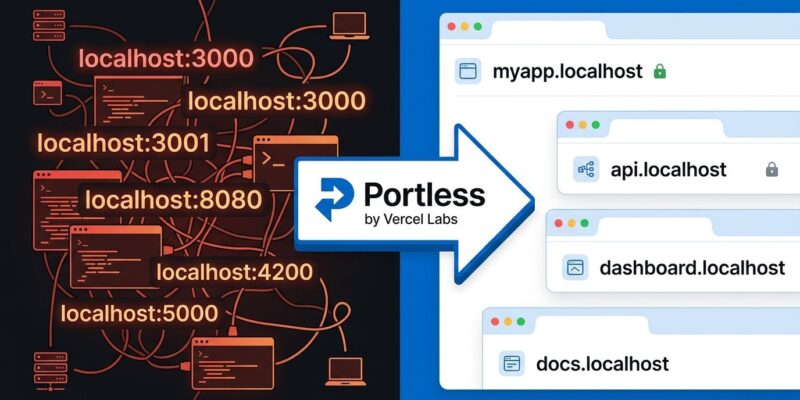
By Vercel Labs shipped Portless this week — a CLI tool that replaces localhost:3000 and its rotating cast of siblings with stable, named .localhost URLs. The pitch is clean: stop juggling port numbers, stop accidentally poisoning one project’s auth state with another’s cookies, and stop watching your AI coding agent confidently hardcode the wrong port into your test suite.
The Port Number Problem Is Worse Than It Looks
On the surface, remembering that your API runs on :3001 and your frontend on :3000 seems trivial. In practice, it compounds badly. Two projects cannot share a port — so when one collides, the fix cascades into config changes, .env updates, and updated documentation. Kill the wrong terminal and you’re debugging a missing service for ten minutes.
The deeper problem is cookies. Browsers scope cookies to the localhost hostname regardless of port number — so an auth app on :3000 and a separate project on :3001 share the same cookie jar, the same localStorage, and the same IndexedDB namespace. This causes the kind of mysterious, intermittent auth failures that leave developers convinced their session handling is broken when the real culprit is an unrelated project running in another tab.
AI coding agents have turned a low-grade irritation into a recurring problem. When an agent scaffolds a new service, it scans for occupied ports, picks an open one, and then hardcodes that choice into tests, environment files, and generated documentation. If anything changes — a new service, a restart, a teammate who picked the same port — the agent’s output is stale before it’s even committed.
How Portless Fixes It
Portless runs a background reverse proxy daemon that routes requests by hostname instead of port. Each app gets a stable name; the daemon assigns it an ephemeral port behind the scenes and handles the mapping invisibly. Setup takes about 30 seconds:
# Install globally
npm install -g portless

# Register your app (maps myapp.localhost to port 3000)
portless add myapp --port 3000

# Or let portless launch and wire the port automatically
portless run vite
After that, your app lives at https://myapp.localhost. The .localhost TLD resolves natively to 127.0.0.1 on most systems — no /etc/hosts editing required. On first run, Portless generates a local CA, installs it in your system keychain, and issues a trusted certificate automatically. No browser warnings, no manual mkcert setup. Most frameworks (Next.js, Express, Nuxt) pick up the new port via PORT automatically; for frameworks that do not (Vite, Astro, Angular), Portless auto-injects the right --port flag. See the official HTTPS docs for certificate configuration details.
The Part That Matters for AI Coding Agents
This is where Portless earns its relevance in September 2026. AI coding agents — Claude Code, Cursor, GitHub Copilot — increasingly run in parallel git worktrees, each spinning up its own services. Portless detects worktrees automatically and prepends the branch name as a subdomain prefix. A feature/auth worktree gets feature-auth.myapp.localhost; the main branch keeps myapp.localhost. Each worktree is isolated with no configuration changes required.
Portless also ships a reusable agent skill compatible with the skills.sh ecosystem, which supports Claude Code, Cursor, Cline, and 15 other AI coding agents. Drop the skill into your repo and agents know how to register apps with Portless instead of hardcoding ports. Stable URLs mean stable references in generated tests, documentation, and configuration — the kind of output that actually survives a project restart.
Bonus: HTTP/2 Comes Free
Because Portless proxies over HTTPS, it supports HTTP/2 — which removes the browser’s six-connection-per-host cap that throttles HTTP/1.1 dev servers. For Vite or Nuxt projects that serve dozens of unbundled ES modules during development, this is a real speedup. WebSockets and hot module replacement work through the proxy transparently, so your dev workflow is unchanged.
The Honest Caveats
Portless comes from Vercel Labs — the experimental side of the organization. There is no formal commitment to long-term maintenance or integration into the core Vercel platform. It is also strictly local: it does not expose your services to the internet, so it is not a substitute for ngrok or Cloudflare Tunnel when you need a public URL for webhooks. The first-run proxy setup requires sudo on macOS and Linux to bind port 443.
Worth Installing Now
The Labs caveat is real, but Portless solves a genuine problem with a minimal footprint. Cookie isolation alone is worth the 30-second setup for anyone running more than one project simultaneously. The AI agent angle makes it particularly well-timed: as parallel agentic development becomes standard workflow rather than experiment, stable local URLs are infrastructure, not a convenience. Check out the Portless GitHub repo to get started — it crossed 3,800 stars quickly, and the developer community appears to agree.