 By ByteBot
OpenCode 2.0 beta landed September 22, right as Cursor’s future under SpaceX ownership gets progressively less predictable. OpenAI is pulling model access from Cursor on November 12. Cursor’s market share among AI coding tools has already slid. And into this gap steps OpenCode 2.0 — free, MIT-licensed, provider-agnostic, and for the first time, available as more than just a terminal app.
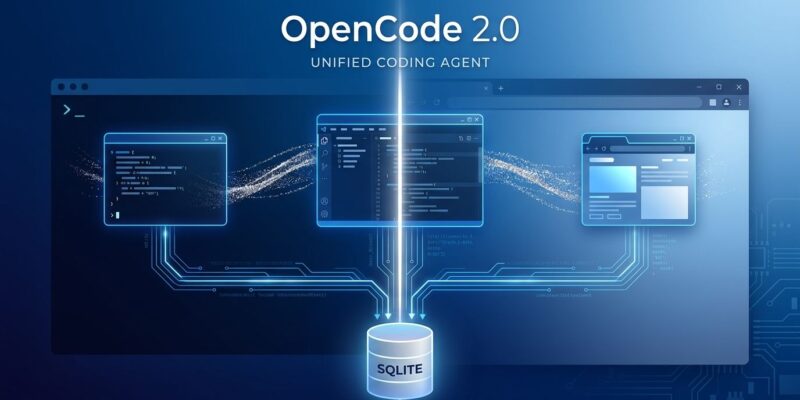
One Backend, Three Interfaces
The headline change in v2 is architectural. Where v1 was a standalone TUI, v2 ships a single Hono/SQLite server that backs the terminal interface, the new Electron desktop app, and the web UI simultaneously. State syncs automatically across all three. Close your terminal mid-session, open the desktop app, and you’re right where you left off.
The server exposes a documented HTTP REST API with Server-Sent Events for real-time updates. A generated TypeScript client — @opencode-ai/client@next — ships alongside it, which means you can build your own tooling on top of OpenCode’s AI runtime without forking the project. The full API reference and client docs are already live.
What’s New in v2
Beyond the architecture, v2 delivers several concrete changes:
- Electron replaces Tauri for the desktop app. Tauri’s WebKit rendering on macOS and Linux caused inconsistencies; Chromium via Electron fixes that.
- Node replaces Bun as the runtime to resolve memory issues under load.
- Multi-tab AI sessions — run a debug session and a feature branch session in parallel without losing context in either.
- IDE extension for VS Code, Cursor, Windsurf, and VSCodium. Slash commands include
/model,/cost,/compact,/queue, and more. - Desktop downloads for macOS (Apple Silicon and Intel), Windows x64, and Linux (.deb/.rpm).
Sessions still persist to SQLite at ~/.local/share/opencode/ — your conversation history is a local database you can query, back up, or migrate without asking anyone’s permission.
Try It Today — Safely
During the beta, opencode (v1) and opencode2 (v2) coexist. You don’t need to replace anything:
# Install v2 beta without touching your v1 setup
npm install -g @opencode-ai/cli@next

# Launch v2
opencode2
On macOS, the desktop app installs via Homebrew: brew install opencode. Downloads for Windows and Linux are at opencode.ai/download.
Before You Migrate Your Full Setup
V1 plugins do not work in v2. There is no migration path documented yet — the new plugin API uses a Plugin.define + effect/setup pattern that is a complete rewrite of the v1 approach. If you rely on community plugins, wait for stable. If you’re running vanilla OpenCode, nothing is blocking you.
The beta docs are also explicit that beta data may be wiped. Don’t put irreplaceable session history into v2 yet. The official v1-to-v2 migration guide covers what to verify before switching: models, provider credentials, agents, permissions, MCP servers, and plugins.
Where OpenCode Stands Right Now
OpenCode crossed 160,000 GitHub stars and 7.5 million monthly active developers earlier this year — before v2. The SpaceX/Cursor situation has accelerated adoption, but the project’s growth predates it. This isn’t a protest tool. It’s a well-built coding agent that happens to be free and open source at a moment when those properties matter more than they used to.
V2 is beta. Run it alongside v1, try the desktop app, poke the HTTP API. If your plugin ecosystem is intact in six weeks, it’s probably time to switch.