 By
By Gradle 9.7 landed on August 6 with one change that Java and Android teams running large monorepos have been circling for years: Isolated Projects graduated from “experimental” to “incubating.” That’s Gradle’s way of saying the feature is real, tested, and ready for broad evaluation — not yet stable, but no longer the experimental gamble it was in 9.4. Enable one property flag and your 5,000-subproject Android build could sync in 2m44s instead of 5m09s. A 2,500-module Java backend could drop from 10m53s to 2m59s on build-script recompilation. These numbers come from official Gradle benchmarks on real builds.
What “Incubating” Actually Means
Isolated Projects existed since Gradle 9.4 under the org.gradle.unsafe.isolated-projects flag — the “unsafe” prefix being Gradle’s honest acknowledgment that this was experimental territory. In 9.7, the flag was renamed to org.gradle.isolated-projects and the feature moved to incubating status. In Gradle’s versioning model, incubating means the core behavior is stable enough to test broadly but the API may still change across minor versions. It’s the green light to evaluate the feature seriously. It is not the green light to enable it in production without testing your specific build.
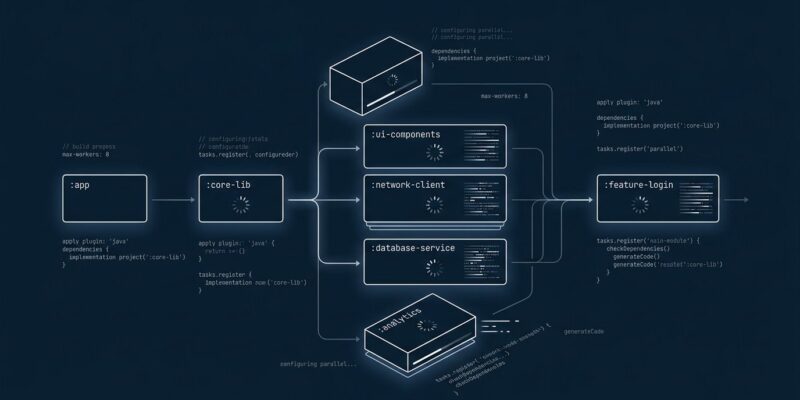
The underlying mechanism is straightforward: when Isolated Projects is active, each subproject operates in strict isolation — it cannot read or mutate another project’s mutable state (tasks, dependencies, versions, extensions). With that guarantee in place, Gradle can configure all projects in parallel instead of sequentially. Fewer dependencies between projects means more concurrency means faster builds.
The Performance Case
The numbers from official Gradle benchmarks are the strongest argument for trying this feature:
- Gradle’s own 300-subproject build (IDE sync): 84 seconds → 47 seconds (1.8x faster)
- Same build after changing build logic: 2m57s → 1m16s (2.3x faster)
- 2,500-project Java monorepo (build-script recompilation): 10m53s → 2m59s (3.6x faster)
- 5,000+ project Android monorepo (Android Studio sync): 5m09s → 2m44s (1.9x faster)
Gains are largest for IDE sync — specifically IntelliJ IDEA and Android Studio operations — and builds with many loosely-coupled projects. The more subprojects, the more parallelism compounds. A 10-module build should not expect much. A 200-module enterprise build might already justify the migration effort.
There is a catch: task graph discovery across projects remains sequential in 9.7. This limits CLI build speed-ups compared to IDE sync improvements. Running ./gradlew :app:assembleDebug benefits from parallel configuration but still resolves the task dependency graph single-threaded. The Gradle team has this on their roadmap, but it is not shipped yet. IDE users get the biggest win today.
How to Enable It
The migration has two mandatory steps before you flip the switch.
Step 1: Verify Configuration Cache compatibility. Isolated Projects requires an existing Configuration Cache-compatible build. Run your build twice:
./gradlew build --configuration-cache
./gradlew build --configuration-cache
The second run must say “Reusing configuration cache.” If it does not, fix Configuration Cache compatibility first. Trying to debug both Configuration Cache and Isolated Projects violations simultaneously is painful — and a common mistake.
Step 2: Run diagnostics before enabling. Add these two lines to gradle.properties:
org.gradle.isolated-projects=true
org.gradle.isolated-projects.diagnostics=true
Diagnostics mode runs project configuration sequentially — not in parallel — and surfaces all isolation violations without immediately failing your build. Fix the violations it reports, then drop the diagnostics flag and run in normal mode.
What Breaks: The Plugin Problem
The most common violations are patterns most Java and Android developers have used for years. Direct cross-project task access is the canonical example:
// Violates isolation — do not access another project's tasks directly
project(":library").tasks.named("build")

// The replacement
dependencies {
    implementation(project(":library"))
}
The allprojects {} and subprojects {} blocks that push configuration into sibling projects are the other major violation source. Replacing them means moving shared build logic into convention plugins — Gradle plugins that individual subprojects apply explicitly rather than receiving implicitly from root-level blocks.
Your own build logic is probably fixable in a day. Third-party plugins are the real constraint. The Gradle team’s own migration found that most violations in their codebase came from plugins, not their first-party code. The Kotlin plugin and Android Gradle Plugin both support Isolated Projects now. Many community plugins still rely on cross-project access patterns. If your build uses plugins that have not adopted Isolated Projects, you are blocked until they do.
Who Should Try This Now
Enable Isolated Projects today if your build has 100+ subprojects, your IDE sync exceeds two minutes, your Configuration Cache is already working, and your third-party plugins are from the major ecosystems (Android, Kotlin, Spring). The IDE sync improvement alone may justify the migration effort.
Wait if your build has 20 or fewer subprojects (marginal benefit), if you have not yet adopted Configuration Cache (fix that first), or if your build relies on community plugins with no Isolated Projects support. Check the Gradle 9.7 release notes for the current compatibility status before committing to the migration.
The feature is incubating, not stable — meaning the API can still change and some rough edges remain, including the sequential task graph limitation for CLI builds. But the IDE sync numbers are real, and the Gradle team now runs it as their daily driver. If you can tolerate incubating status, the case for testing it now rather than waiting for stable is solid.