
 By ByteBot
Google’s Googlebook laptops ship October 4, and if you build Android apps, this is not a Chromebook with a new coat of paint. The Googlebook eliminates ARCVM — the Android Runtime for ChromeOS container that made Android apps second-class citizens on every Chromebook ever shipped. Apps now run natively on hardware with a 40+ TOPS NPU, 16GB RAM minimum, and a Level 5-certified Linux hypervisor. Five OEMs are launching simultaneously. Prices start at $899. You have three days to understand what changed.
The Core Technical Change: ARCVM Is Gone
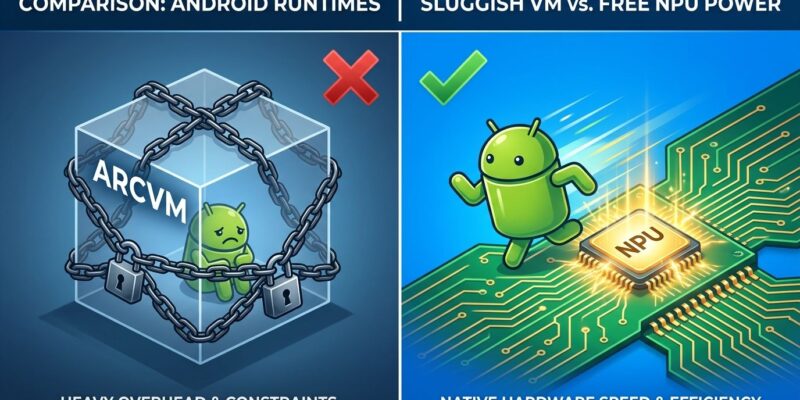
On every current Chromebook, Android apps run inside ARCVM — a full virtual machine with its own memory budget carved out of the host. Graphics and window events cross the VM boundary, which adds latency. Heavy apps compete for RAM inside a box rather than drawing on the full machine. Developers optimizing for Chromebook have been fighting this overhead for years.
Googlebook OS eliminates that layer entirely. The unified kernel merges Android and ChromeOS foundations at the system level. Android apps run natively — direct hardware access, no VM overhead, no container. Google VP John Maletis confirmed this explicitly: Googlebooks will run Android apps “far better” than Chromebooks. That is not marketing language. It is an architectural statement.
The practical implication: any Android app that felt sluggish or clipped on Chromebook now runs against real hardware. But if your layout isn’t handling large screens correctly, it will look stretched across a 14-inch 2.8K OLED display. That is the problem to fix before October 4.
What Developers Must Adapt
Google’s Android Developers Blog published explicit Googlebook guidance last week. The core requirement: layout decisions must respond to window size classes, not physical display dimensions. The moment you hardcode breakpoints against screen size, you break on a windowed desktop app.
The specific changes that matter:
- Navigation 3: Use
ListDetailSceneStrategyandSupportingPaneSceneStrategyto enable side-by-side layouts when window space expands. This is not optional for productivity apps. - Keyboard and mouse support: Add right-click context menus, hover states, and register with the Keyboard Shortcuts Helper. Laptop users reach for the keyboard immediately.
- Multi-instance support: Googlebook users will open the same app in multiple windows. If your app assumes a single instance, test this case.
- Drag-and-drop: Between windows and into the app. Standard desktop expectation, nonstandard in most Android codebases.
Android Studio Canary ships a desktop emulator for free-form window resizing. If you haven’t tested there yet, do it this week. The large-screen Android device market already exceeds 580 million units — Googlebook adds a premium laptop tier to that installed base.
The Developer Environment: pKVM and Antigravity
The Linux story on Googlebook is more credible than Crostini ever was on Chromebook. A Level 5-certified pKVM hypervisor provides an isolated Linux VM with full terminal access — pull repos, expose ports, run autonomous agents. Google says Claude Code, Antigravity CLI, and OpenAI’s Codex work out of the box. The Hacker News consensus on Crostini was “hopelessly unreliable.” Early signals on pKVM are better, though independent confirmation is still thin until devices ship.
Antigravity — Google’s AI agent development platform — ships a native Googlebook app alongside the Linux CLI. It supports direct Android deployment to the device during development. If you’re building agentic apps, Google is explicitly pitching the Googlebook as your development machine.
The on-device AI layer is real hardware, not a cloud proxy. The 40+ TOPS NPU runs Gemini Nano 4 locally for data extraction and summarization. AppFunctions — announced at Google I/O 2026 — lets your app expose capabilities to Gemini as an on-device MCP server. It is in private preview now, so watch the developer waitlist.
Who Is This For — and Is $899 Worth It?
The Hacker News reaction was split. One camp: “Who is this for at $900+? Chromebook’s value was affordability.” The other: “If pKVM actually works, this is a legitimate Linux laptop at a competitive price.” Both camps are right about something.
Chromebook’s core value proposition was price — $200 to $400, managed devices, schools and enterprises. Googlebook abandons that positioning entirely. At $899 for the Acer entry model up to $1,299 for ASUS, HP, and Lenovo flagships, Google is competing against MacBook and premium Windows laptops.
For developers specifically, the case is concrete: native Android testing on real hardware, a working Linux VM, on-device AI inference, and 10 years of automatic updates. That combination on an $899 machine is a legitimate argument. The MacBook alternative costs more. A Linux laptop at this price typically comes with worse build quality and no native Android integration. The privacy concern the community raised — whether “AI only acts when you ask” holds up in practice — is worth watching once devices are in developers’ hands.
What to Do Before October 4
- Open Android Studio Canary and run your app in the desktop emulator. Test free-form window resizing and multi-instance behavior.
- Review Google’s adaptive development guide and audit your layout code for hardcoded screen dimensions.
- If you’re building AI-powered features, check the AppFunctions private preview waitlist — on-device MCP server support for Gemini is the integration worth getting ahead of.
The Googlebook is not Chromebook 2.0. The architecture is different, the target market is different, and the developer story is genuinely better. Whether the price is justified depends on what you’re building — but the platform deserves a serious look from Android developers before it launches this Saturday.














