 By
Google Docs can now open, edit, and collaborate on .md files without converting them into a Docs document. Launched on October 26, 2026, the update means a Markdown file you upload to Drive stays a .md file — Docs is just the editor. For developers who shuttle specs, READMEs, and architecture docs between Git repos and non-technical reviewers, the import-and-reformat tax is gone.
The File Stays a .md File
This sounds obvious, but it’s the whole point. Previous “Markdown support” in Google Docs meant import-and-convert: the file turned into a proprietary Docs document, formatting got mangled, comments got stripped, and you ended up with a parallel document you’d have to manually reconcile with your repository.
Now that doesn’t happen. Drive stores the file as a .md. Docs renders it and lets you edit it. A .md badge in the document header confirms you’re in native mode. When you’re done, you’re still working with the same file — not a copy, not a converted artifact.
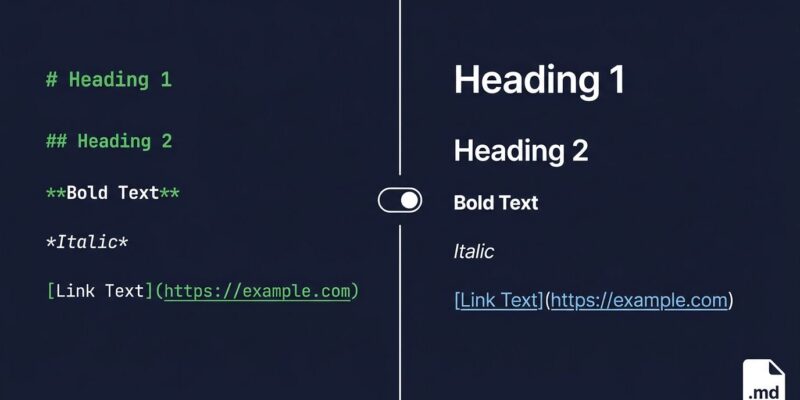
Two editing modes are available: a standard WYSIWYG view that looks like any other Docs document, and a raw Markdown view where you see the actual syntax. Toggle between them freely.
Google’s Real Reason: AI Agents
Google VP of Engineering for Workspace Chandu Thota was direct about the motivation: “Markdown has become the common language between humans and AI agents — specs, plans, READMEs, tables, task lists, generated docs.”
That’s not marketing filler. The workflow this unlocks is specific: an agent writes a plan or spec as a .md file, your team reviews and annotates it in Docs, and the agent reads the same file back without a reformatting step breaking the chain. The loop closes. Previously, some conversion step in the middle always broke it.
This also integrates with Gemini Notebook, which can use .md files in Drive as synchronized source documents — something that required workarounds before.
What You Can Now Do
The practical gains for developer teams:
- Line-level commenting on .md files — using the standard Docs comment system, not GitHub PR comments or inline code annotations
- Real-time co-editing — multiple people editing the same
.mdfile simultaneously, as with any Docs document - Drive version history — every change from every contributor (human or agent) tracked automatically
- Non-dev reviewer access — product managers and stakeholders get a rendered Markdown preview without installing VS Code, Typora, or anything else
That last one matters more than it looks. The old workflow involved either giving non-technical reviewers a converted Docs copy (which immediately went stale) or asking them to read raw Markdown (which they won’t). Now there’s a third option that doesn’t require a workaround.
The Catch (And There Is One)
Docs is not Git. If a developer edits the same file in their text editor while a colleague edits it in Docs, there is no merge — reconciliation is manual. The recommended pattern is to keep the repository as the source of truth and treat Drive as the review-and-commenting environment. Ship changes from one direction only.
Some formatting elements also get stripped when editing .md files in Docs: smart chips become plain text, HTML content becomes plain text, font colors and text alignment disappear. Standard Markdown elements — headers, bullets, bold, italic, tables, links — are preserved. If your Markdown files use any of the extended Google Docs-specific features, those won’t survive a round-trip.
Two questions remain unanswered in the official documentation: which Markdown dialect Docs produces (CommonMark, GitHub Flavored Markdown, or something undocumented), and how comments are stored — they appear to live in Docs’ own comment layer, not embedded in the .md file itself, which limits portability.
Availability
The feature rolled out automatically starting October 5, 2026, reaching all accounts within 15 days. It’s available to every Google Workspace edition and personal Gmail accounts. There’s no admin toggle to disable it — it activates for the entire organization whether IT wants it or not. Teams with strict documentation policies should take note.
Microsoft added comparable functionality to OneDrive and SharePoint in May 2026, with a split-screen mode showing raw Markdown alongside a live preview. Google chose a toggle approach instead, which is cleaner for mixed technical and non-technical teams but less useful for developers who want both views simultaneously.
The Verdict
This is a collaboration layer for Markdown, not a VS Code replacement. If your team already uses Git for documentation and everyone has a code editor, this doesn’t change your workflow. If your team includes non-technical reviewers, project managers, or anyone who currently gets a Docs copy of your specs, this closes a real gap. The conversion tax disappears, the version history stays, and agents can participate in the review loop without a formatting step in the way.
The unanswered dialect question is worth watching. If Docs quietly normalizes your Markdown into a dialect your toolchain doesn’t expect, you’ll find out at the worst possible time.