 By ByteBot
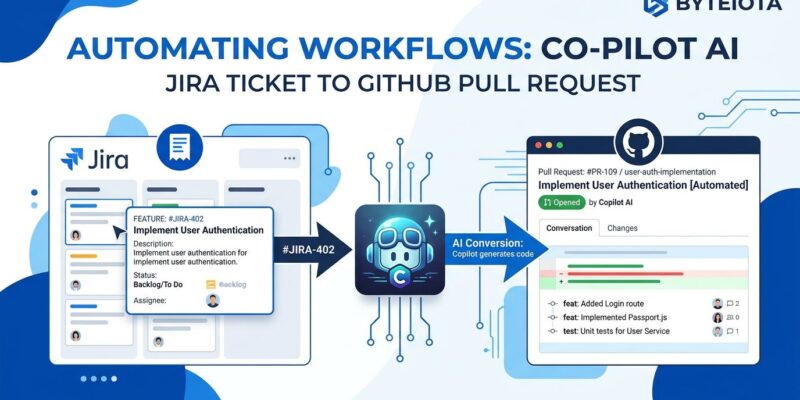
GitHub Copilot for Jira went generally available on June 25, 2026. The premise is stark: assign a Jira ticket to Copilot and get a pull request back. No context switching to GitHub. No standups interrupted to ask “is this done yet?” The agent reads the ticket, pulls in linked Confluence docs, writes code, runs tests, and opens a draft PR — all while posting real-time progress updates inside the Jira issue. This is not a quality-of-life feature. It is a workflow restructuring.
What Actually Changed at GA
GitHub launched the Jira integration in public preview in March 2026. Three months of testing later, version 12.3.0 hit general availability. The meaningful GA additions: real-time progress monitoring streamed directly into the Jira issue (so stakeholders never need to leave Jira), continuous work on the same PR after follow-up instructions (previously the agent opened a new PR each time), simplified setup with fewer steps to connect your GitHub org, and review request notifications in Jira when the agent finishes a draft.
The features already baked in from preview: model selection directly from a Jira comment, Confluence context via MCP so the agent automatically reads linked design docs and runbooks, custom agents, and custom fields support.
How the GitHub Copilot for Jira Workflow Runs
The sequence is straightforward once you have the Atlassian Marketplace app installed and your GitHub org connected:
- Create a Jira ticket with clear acceptance criteria and reproduction steps (for bugs)
- Assign to Copilot or @mention @GitHub Copilot in a comment
- The agent reads the ticket, any linked Confluence pages, and your repository context
- It opens a draft pull request and streams progress back into Jira
- Leave follow-up instructions in the Jira chat panel — the agent updates the same PR
- A peer reviewer (not the ticket creator) approves the final PR
That last point matters: GitHub enforces that the ticket creator cannot be the final approver. Peer review is required, which is the right call — you do not want one person closing the loop on their own AI-generated code.
What Copilot Is Actually Good At
Three ticket types where this integration earns its keep:
Bug fixes with clear reproduction steps. If the ticket has steps to reproduce and expected behavior, Copilot can locate the relevant code, propose a fix, and write a regression test. What used to take a few hours becomes a review task.
CRUD endpoint additions. New form pages, data model additions, and API endpoints are high-volume, predictable work. Copilot handles the scaffolding — schema, model, controller, tests — and developers spend time on the business logic that requires judgment.
Library upgrade migrations. Tickets for known breaking-change upgrades are an excellent fit. The agent reads the migration guide, identifies affected files, applies changes, and runs the test suite. These tasks are time-consuming and error-prone for humans; they are pattern-matching work for an agent.
Where It Still Breaks Down
The integration has one merciless rule: the quality of Copilot’s output is a direct function of the quality of the ticket. Vague acceptance criteria produce vague implementations. A ticket that says “fix the login issue” with no reproduction steps gets you a guess, not a fix.
Other limitations worth knowing: complex architectural decisions, deep research before writing code, and security-sensitive changes still need human hands on the keyboard. The Jira integration also only supports creating a PR directly — if you need the agent to do extensive planning and iteration before opening anything, that workflow lives on GitHub.com, not in Jira.
What This Changes for Your Team
Developer role in a Copilot-on-Jira workflow shifts earlier and later in the cycle. Earlier: writing precise tickets, maintaining AGENTS.md and instruction files, designing test coverage that makes agent output verifiable. Later: reviewing implementation decisions the agent made, catching architectural inconsistencies, and handling the judgment calls that have no test.
For project managers, the visibility improvement is concrete. Sprint progress reflects in Jira in real time without manually pinging developers to move tickets. The PM/dev information gap shrinks significantly.
Setup and What It Costs
The Jira app is free to install from the Atlassian Marketplace. To actually use it, you need GitHub Copilot Business or Enterprise (starting at $19/user/month) and Jira Cloud with Atlassian Rovo activated. Rovo is included in Jira Premium and Enterprise plans; if you are on Standard, check whether your plan includes it before budgeting.
Setup requires administrator permissions on both the GitHub org and the Jira site. GitHub has simplified this significantly at GA — the official GitHub Copilot for Jira integration guide covers the current steps. The full changelog for what shipped at GA is in the GitHub Changelog.
The Real Unlock
The thing this integration actually enforces — more than any single feature — is ticket discipline. Teams that have been writing lazy Jira tickets for years will feel this immediately. Copilot has no tolerance for ambiguity. You either write the ticket well or you get a pull request you cannot merge. In a roundabout way, forcing AI onto your workflow might fix the issue that was always a human problem: nobody wanted to write good tickets because nobody directly paid the cost. Now they do.