 By ByteBot
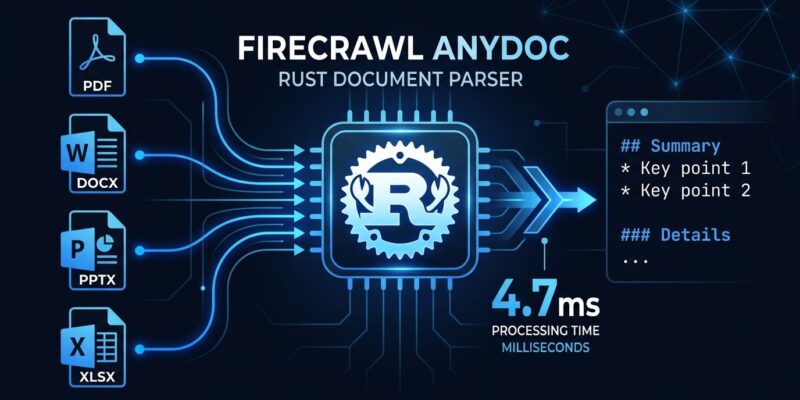
Firecrawl open-sourced AnyDoc on August 4, and developers noticed immediately: 11,900 GitHub stars in its first week. The library converts 14 document formats to clean GitHub-Flavored Markdown in a median of 4.7 milliseconds. Pure Rust. Zero external dependencies. No API key. If your AI pipeline has been choking on mixed document formats, this is the tool that makes that problem go away.
Why Document Parsing Is Still Broken
Every developer building a RAG pipeline eventually hits the same wall: users do not organize their documents to make your life easier. You get a Word doc, a scanned PDF, a PowerPoint from 2019, and a CSV, all in the same upload. Every existing tool either covers a narrow range of formats, requires heavyweight system installs like Pandoc, or ships as a 500ms Python wrapper with an ML model doing what a format spec could handle.
AnyDoc takes a different position: most document-to-text problems do not need machine learning. They need a fast, correct parser that covers the formats people actually use.
What AnyDoc Does
AnyDoc is a Rust library that converts 14 document formats to GitHub-Flavored Markdown. It detects file formats from actual file content rather than the extension, which matters more than it sounds. A PDF that is really an HTML wrapper will not silently produce garbage output. The library ships with official bindings for Node.js, Python, and the browser under MIT license.
Supported formats include: .docx, .doc, .odt, .rtf, .epub, .pdf (text-layer), .pptx, .odp, .xlsx, .ods, and .csv, plus variants.
Getting Started
No install required for one-off use:
npx @firecrawl/anydoc report.docxFor projects, pick your language:
npm install @firecrawl/anydoc
pip install firecrawl-anydoc
cargo add anydoc
Python usage in a RAG ingestion pipeline:
from firecrawl_anydoc import convert

with open("report.docx", "rb") as f:
    result = convert(f.read())

print(result.markdown)
If you are working with AI agents, AnyDoc ships as an agent skill compatible with Claude Code, Cursor, and Codex:
npx skills add firecrawl/anydocHow It Stacks Up Against Alternatives
Firecrawl benchmarked AnyDoc against alternatives using 100 real-world documents:
| Tool | Formats | Median Time | Score |
|---|---|---|---|
| AnyDoc | 14/14 | 4.7ms | 80 |
| Unstructured | 8/14 | 572.9ms | 65 |
| MarkItDown | 6/14 | 134.8ms | 65 |
| Pandoc | 5/14 | 102.1ms | 57 |
| Docling | 4/14 | 513.6ms | 57 |
AnyDoc is the only tool in the benchmark that parses every format. The speed advantage is real and reproducible. That said: AnyDoc is not a Docling replacement. Docling does semantic layout understanding, complex table extraction, scanned PDF OCR, and reading-order reconstruction. AnyDoc does text-layer extraction, fast. They are complementary tools for different stages of a pipeline.
The Limitation Worth Knowing
AnyDoc only processes the text layer of PDFs. If you are ingesting scanned documents, you will still need OCR. For most enterprise RAG pipelines, this is manageable. The majority of business documents are text-layer: Word files, PowerPoints, Excel exports.
Firecrawl’s Open-Source Parsing Stack
AnyDoc shipped alongside pdf-inspector, a second Rust library that classifies PDFs in 0.002 seconds per page. Together they form a complete document ingestion pipeline: classify with pdf-inspector, convert text-layer docs with AnyDoc, route scanned PDFs to OCR. No API key. No ML models for the parts that do not need them. pdf-inspector is also MIT licensed and already at 13,000 GitHub stars.
This is the right architecture. Not every document problem is an AI problem.
Verdict
Use AnyDoc if: you are building a RAG pipeline, AI agent, or any system that ingests mixed document formats and needs clean text output fast. Install it in one line, get 14 formats covered, and move on to the actually hard parts of your pipeline.
Do not swap Docling for AnyDoc if: you are working with scanned documents, need OCR, or require layout-aware table extraction. AnyDoc will be faster, but will not handle scanned content.
The AnyDoc repository is on GitHub. The benchmark methodology is in bench/README.md. Firecrawl’s full announcement covers AnyDoc and pdf-inspector together at firecrawl.dev/blog. The pdf-inspector companion is at github.com/firecrawl/pdf-inspector.