 By ByteBot
Figma Make can now connect to your production codebase. Not a greenfield prototype, not a new repo — your existing app. Starting today in limited beta, designers can import a Git repository into the Figma desktop app, make visual edits on the canvas, and push those changes as real GitHub pull requests that engineers review like any other commit. That’s a meaningful shift for any team that has spent time negotiating the gap between design files and shipped code.
How It Works
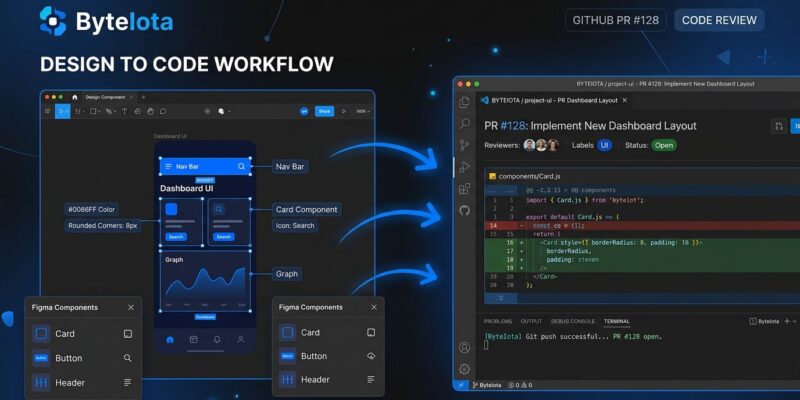
The setup follows a familiar developer flow. Connect your GitHub account or organization inside Figma Make, import a repository, and Make installs dependencies and spins up a local dev server automatically. From there, you work visually.
There are two editing modes. Direct editing handles property changes: select a UI element, adjust color, font, spacing, or layout, and the agent locates the relevant code and modifies it to match what you see on screen. Annotations handle everything more complex — interactions, animations, behaviors that go beyond visual properties. You draw annotations on elements with natural-language instructions; the agent uses them as context when generating code.
Changes accumulate as local Git commits until you decide to ship. When you’re ready, you create a branch and open a pull request directly from Figma Make. The engineering team reviews through their standard CI/CD pipeline, the same security checks, the same code review process. Figma’s framing of this is worth noting: your engineering team reviews changes like any other pull request. The governance layer stays intact.
What Actually Changed
Before today, Figma Make could export code — but only to brand-new GitHub repositories. If you had an existing app and wanted to use Make to modify its UI, you were out of luck. That limitation made the tool useful for prototyping and greenfield projects but irrelevant for most production teams.
What ships today closes that gap. You can point Make at a live codebase, edit visually, and ship changes that integrate with your existing workflow. For teams already using Figma as the design source of truth, this removes the step where a designer hands off a spec and a developer re-implements it in code.
The Limitations You Should Know
The caveats matter here. This is a Mac-only beta — it requires the Figma Beta desktop app, and Windows and Linux support is coming later with no timeline given. That alone rules it out for a significant portion of development teams.
More importantly: the sync is one-directional. Changes flow from Figma Make to GitHub, not the other way around. If an engineer edits code directly in their IDE or via GitHub and a designer then pushes from Make, those engineer changes get overwritten. This is a real workflow hazard for teams where engineers are actively touching frontend code. In practice, this works best for UI areas where designers have clear ownership and engineers don’t routinely make manual edits.
Other constraints: designers need existing codebase access — Make doesn’t grant permissions, it uses them. This is a limited beta, so it’s not available to all Figma users immediately. The upside: credits don’t consume during the beta period.
Where This Fits in the Broader Wave
Figma is not the only company working this angle. Google’s Stitch MCP pipes design data into coding agents via the Model Context Protocol. Vercel’s v0 scaffolds React components from prompts. Cursor and Copilot handle code editing with AI inside the IDE. What Figma Make does differently is preserve the PR workflow — changes go through the engineering review process, not around it. That distinction matters for any team with compliance requirements, security reviews, or just a preference for code they can audit.
The “vibe coding” framing captures the real industry anxiety: are designers becoming SWEs? The practical answer, with today’s release, is no. Designers still need codebase access, basic Git fluency, and an engineering team willing to review their PRs. This is a collaboration tool, not a replacement pipeline.
What to Do Now
If you’re on Mac and want to test it: download the Figma Beta desktop app and connect your GitHub repository. The official setup guide walks through the Git connection and first PR workflow. The full announcement is on the Figma blog.
If you’re a developer evaluating this for your team: the one-way sync limitation is where to start that conversation. Define which parts of the UI your designers have clear ownership over, and whether those areas see regular direct code edits from engineers. If they do, the overwrite risk is real until Figma ships two-way sync — which isn’t announced yet but is the obvious next step given the pace of recent Figma releases.
Today’s beta is step one of a full design-to-production pipeline. The missing piece — pulling engineer changes back into Figma — is what would make this genuinely bidirectional. Until then, it’s a powerful tool with a clear boundary: designers ship visual changes; engineers catch anything that crosses it.