
 By ByteBot
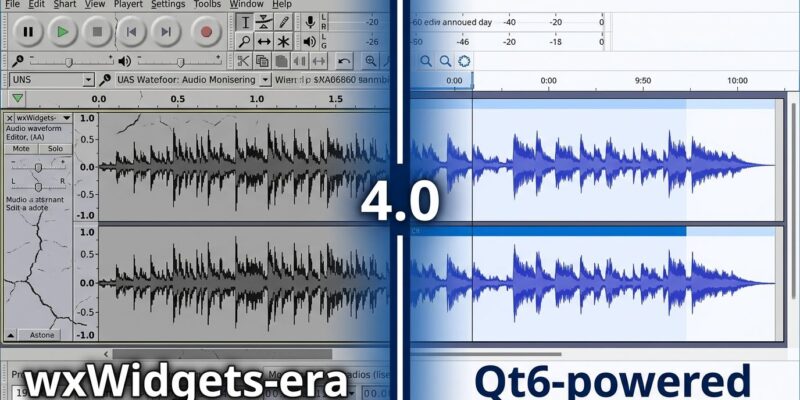
Audacity 4.0 landed today, and it is the biggest change to the free audio editor in over two decades. The headline is architectural: the team has ditched wxWidgets — Audacity’s aging UI framework — and rebuilt the whole thing on Qt6, the same foundation that powers MuseScore Studio 4. The result is native HiDPI rendering, official ASIO support on Windows, ARM64 binaries, and a new project format. It also ships without MIDI, without the Macro Manager, and without several features long-time users relied on. Whether that tradeoff works for you depends entirely on what you use Audacity for.
Why Qt6 Changes Everything (and What It Cost)
Audacity’s wxWidgets foundation was the source of most of the interface quirks that earned it the nickname “UX nightmare” in some circles. Arbitrary restrictions on clip movement, confusing edit modes, inconsistent behavior across platforms — a lot of that traced back to wxWidgets limitations rather than deliberate design choices. Qt6 cleans that slate.
The practical payoffs are real. Windows users can now use ASIO — Audio Stream Input/Output — without compiling Audacity 4.0 from source. ASIO gives direct audio interface access with lower latency than Windows Audio Session API, which matters for anyone recording live audio, running a home studio, or doing voiceover work on a budget. Previously, getting official ASIO support required navigating Steinberg’s licensing restrictions; Muse Group has sorted that. ARM64 support is in too, meaning native performance on Apple Silicon Macs and ARM64 Linux systems. HiDPI rendering is finally correct across all platforms, not an afterthought.
The tradeoff is that Muse Group treated Audacity 4.0 as a foundation release rather than a feature-complete upgrade. The Qt migration consumed most of the available engineering bandwidth. Several features from 3.x didn’t make the cut: MIDI and Note tracks are gone, the Macro Manager and scripting pipe are gone, Time Tracks are gone, and LADSPA and VAMP plugin hosting — important for Linux audio analysis workflows — have been dropped. The Play-at-speed tool is missing too. According to Audacity’s missing features page, the team has committed to bringing MIDI back, but there’s no date on the calendar yet. Community reaction has been direct: “Macros have gone, with no more batch processing — that’s the main reason I won’t be using 4.0.”
What’s Actually New in Audacity 4.0
Setting aside the missing features, the 4.0 editing model is a genuine improvement for the use cases Audacity was always strongest at: podcasting, voiceover, field recording, and basic music production. The new clip editing model lets you select and manipulate multiple clips simultaneously — move, trim, time-stretch — across both mono and stereo tracks. Moreover, clips can be grouped and moved freely without the blocking error messages that plagued Audacity 3 workflows. There’s a dedicated split tool (hold ‘S’), smarter paste logic, and rebuilt punch-and-roll recording that lets you start anywhere on the timeline.
Workspaces are new: save and switch between different toolbar and panel layouts. Plugin support got an upgrade too — VST3 and Nyquist work across all platforms, LV2 on Linux, Audio Units on macOS. The Project Manager can pull from local files or cloud storage. Spectral editing is included, letting you select frequency regions in the spectrogram and apply effects with surgical precision. Track-level meters give better visual feedback during recording. The Bass and Treble EQ effect, dropped in an earlier beta, was brought back after loud community requests.
This pattern of responding to community pressure is worth noting. Muse Group’s acquisition of Audacity in 2021 was contentious — the telemetry controversy damaged community trust significantly, and forks emerged as a result. The 4.0 release, with its feature restoration decisions and explicit MIDI commitment, reads as a credibility play. Whether it works depends on whether MIDI and macro support actually ship in reasonable time.
The .aup4 Format: What Archive Owners Need to Know
Audacity 4.0 introduces the .aup4 project format, which stores preview thumbnails and clip appearance data alongside audio. The good news: .aup3 files open in 4.0 and convert automatically, preserving the original. The less-good news is that it’s a one-way migration. Once a project is saved in .aup4, it can’t go back to .aup3. If you have years of archived .aup3 projects, they’ll open fine — but think carefully before converting anything you might need to open in Audacity 3 on another machine or share with collaborators still on the older version.
Should You Upgrade to Audacity 4.0?
If you use Audacity for podcasting, voiceover, or field recording on Windows — upgrade. ASIO support alone is worth it. If you’re on Apple Silicon, the native ARM64 build is a meaningful performance improvement. For context, OpenShot 4.0 made the same Qt6 jump earlier this year and the HiDPI and ARM improvements landed cleanly there too.
However, if MIDI is part of your workflow, or you’ve built batch processing pipelines around the Macro Manager, stay on 3.x for now. The features will come back; the team has said so explicitly. But 4.0 is not there yet.
The Qt6 migration is the right long-term call. Audacity on wxWidgets had a ceiling and everyone knew it. Whether you want to be on the frontier or wait for 4.1 is a reasonable choice either way. Audacity 4.0 is available now via the official release on GitHub for Linux, macOS, and Windows — coverage also from Phoronix and Linuxiac.


