 By
Android Dev Summit is back. October 28, Mountain View, four years after the last one — and the timing is not an accident. The 2022 summit shipped before on-device AI was a real concern, before foldables hit mainstream, before Android XR had hardware partners. A lot has changed. Google is packaging four years of platform shift into two days at Bay View, and every developer building Android apps has 25 days to pay attention.
The Part Most Developers Missed: AppFunctions
The headline item from the summit agenda is Android 18 graphics. That is not the most important thing on the agenda. AppFunctions is — and most Android developers have not looked at it yet.
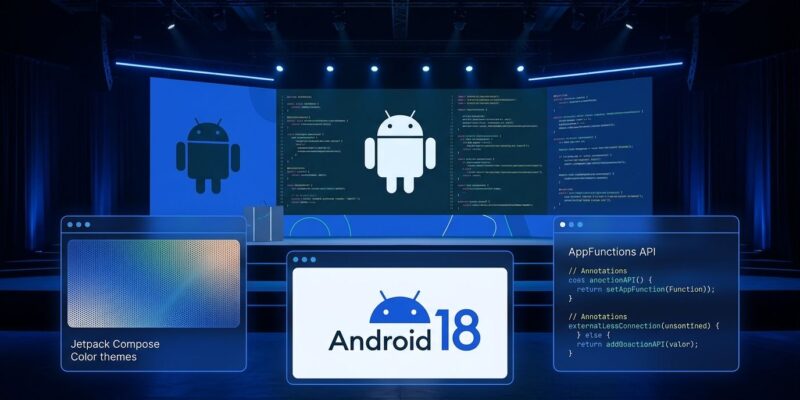
AppFunctions, which landed quietly in Android 16 and is maturing in Android 18, lets any Android app act as an on-device MCP server. You annotate methods with @AppFunction, extend AppFunctionService, and the OS indexes your app’s callable functions into the Android intelligence system. Gemini can then discover and invoke them. So can the Android Context Engine and any third-party agent with the right permissions.
The integration runs entirely on-device — no network round-trip, no cloud dependency. The KSP compiler generates schema metadata from your Kotlin types automatically. The catch is that it remains experimental API, but the summit session is expected to signal production readiness for Android 18.
Apps that implement AppFunctions get invoked by Gemini workflows. Apps that do not are invisible to them — the same way apps that ignored Android intents in 2008 got left behind. The developer community is already calling this the on-device MCP nobody saw coming. If you have high-value user workflows in your app, start identifying which ones should become AppFunctions before the session drops.
Android 18 Graphics: What Is Actually New in Compose
The summit’s graphics session will demonstrate mesh gradients and progressive blur. These already shipped in the Jetpack Compose August ’26 release (version 1.12). Android 18 adds hardware acceleration for both, and Google’s stated goal is complex visual effects without touching battery life or frame rates.
The MeshGradientPainter API defines a grid of vertices, each with a position and color. Instead of blending two colors in a line, you get organic, multi-point gradients that curve across a surface. Progressive blur via Modifier.blur is the native replacement for the Haze library. A photo can start sharp at the top and turn frosted at the bottom — useful for text-over-image layouts. If you are shipping Haze in production today, plan the migration.
The release also brings full Display P3 and HDR rendering support. Colors flow through the pipeline without clamping, with an automatic sRGB fallback for devices below Android 9.
The Four Tracks Decoded
The summit runs two days across four tracks:
- AI experiences — Gemini integration, Android Context Engine, AppFunctions, proactive cross-app workflows, and audio-first experiences for smart glasses with Gemini Nano 4
- Android XR — Spatial computing, Jetpack SceneCore, ARCore for XR, and hardware partner updates (XREAL glasses ship by end of 2026; Samsung, Warby Parker, and Gentle Monster are also building Android XR devices)
- App foundations — Android 18 adoption, window size classes, AppFunctions integration patterns
- Tools and performance — Android Performance Analyzer, which renders traces 26x faster than the old profiler and integrates with AI agents via Perfetto SQL and Perfetto Analysis skills; Android Studio 2026 tooling updates
If you are not an XR developer, the XR track still deserves one session slot. Google has been adding XR hooks to standard Android APIs — knowing what is landing lets you adopt passively when the time comes.
How to Watch and Attend
In-person attendance is by application for professional Android developers. The Mountain View event runs October 28-29 (8:30 AM PDT). The London event at 6 Pancras Square runs October 28 only. Both are invitation-only. Check the official Android Dev Summit page to apply.
The keynote livestreams publicly. Google Developer Group chapters are also hosting Extended screenings globally — GDG Berlin has one confirmed. Session recordings from past summits were on YouTube within days; the Android Developers channel is the right place to watch for uploads.
25 Days: What to Do Now
- Audit your app for AppFunction candidates. Look for high-value, discrete workflows another app or agent might want to trigger — add to cart, create a note, start a timer, send a message. The annotation-based API is straightforward; the hard part is deciding what to expose.
- Check your Compose version. Mesh gradients and progressive blur require Compose 1.12 or later. Update before the summit so you can test session examples immediately.
- If you use Haze, open a migration ticket. The native
Modifier.blurwill be the supported path going forward. Block the work now so you are not flat-footed when Haze stops getting updates.