 By ByteBot
Pierce Freeman’s article “Go ahead, self-host Postgres” hit the top of Hacker News this week (621 points, 369 comments), challenging cloud vendor narratives about database self-hosting. After running self-hosted Postgres for two years serving thousands of users and tens of millions of daily queries, Freeman reports minimal operational burden—exactly 30 minutes of stress total. AWS charges $328/month for a 4 vCPU, 32GB RAM RDS instance before storage and backups. Self-hosting the same on dedicated hardware saves 40-60%. The math doesn’t add up, and developers are noticing.
The Cost Math Cloud Vendors Don’t Show You
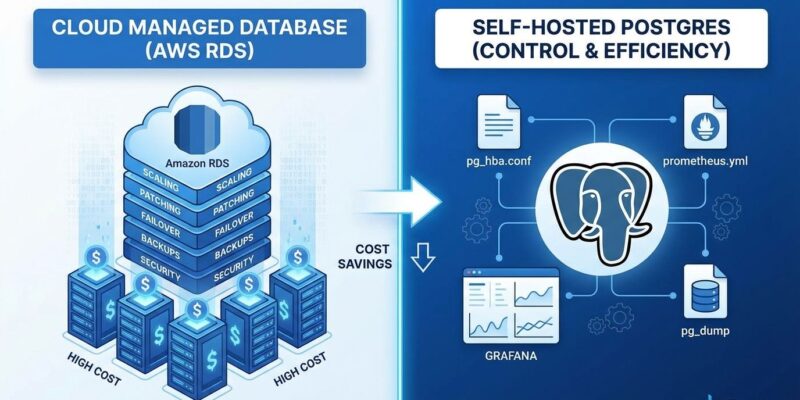
AWS RDS costs $328/month for 4 vCPU, 32GB RAM before you add storage, backups, or data transfer fees. Self-hosting Postgres on EC2 cuts that by 40-60%. For larger databases, the gap widens dramatically. A 3TB database with high availability costs $2,511/month on RDS ($90,402 over three years) versus $1,299/month self-hosted on Kubernetes ($46,759 over three years)—a 48% savings of $43,643.
These aren’t marginal savings. They compound over time. Moreover, cloud vendors bundle database management with their broader platform, creating convenience at a premium. However, “convenience” here means running a slightly modified version of open-source Postgres with operational tooling wrapped around it. Modern self-hosting tools—Prometheus, Grafana, PgBouncer, pg_basebackup—deliver that same operational layer at a fraction of the cost.
Configuration Isn’t Rocket Science
Cloud vendors want you to believe Postgres configuration is complex and error-prone. In reality, production tuning comes down to a few critical memory settings. Furthermore, modern defaults are sensible—you’re optimizing, not building from scratch. Start with shared_buffers at 25% of system RAM and effective_cache_size at 75%. Add connection pooling via PgBouncer. That covers 90% of what you need.
Here’s what Freeman’s production configuration looks like for a 32GB RAM server:
# Memory Settings
shared_buffers = 8GB           # 25% of system RAM
effective_cache_size = 24GB    # 75% of system RAM
work_mem = 64MB                # Conservative allocation
maintenance_work_mem = 2GB     # For maintenance operations

# Storage Optimization (for NVMe SSDs)
random_page_cost = 1.1         # Default is 4.0 for spinning disks
effective_io_concurrency = 200 # SSD concurrency
The PostgreSQL documentation recommends 25-40% of RAM for shared_buffers, with 25% as the starting point. Beyond 40%, you hit diminishing returns due to double buffering with the OS cache. Additionally, PgBouncer in transaction mode handles connection pooling for web apps—Postgres creates a new process per connection, so pooling prevents overhead from accumulating.
The Operational Reality: 30 Minutes Per Month
Freeman’s two-year self-hosting experience reveals the actual timeline: 4 hours for initial migration (server provisioning, Postgres install, configuration, monitoring setup, backup configuration), then 30 minutes per month for routine operations. Security updates, backup rotation, capacity planning—that’s the entire operational burden. Consequently, the total stress over two years: 30 minutes during one manual migration.
Monitoring setup is straightforward. Install postgres_exporter, which exposes approximately 450 Prometheus metrics. Configure Prometheus to scrape them. Import Grafana dashboard 9628 for PostgreSQL visualization. Standard tooling, well-documented, works out of the box.
Backups use pg_basebackup for base snapshots plus continuous WAL archiving for point-in-time recovery. PostgreSQL’s built-in WAL archiving lets you restore to any second since your base backup—no third-party tools required. Therefore, the “operations burden” FUD is cloud vendor marketing. If you have basic Linux administration skills, 30 minutes monthly is realistic.
When You Should (and Shouldn’t) Self-Host Postgres
Self-hosting makes sense for cost-conscious teams with predictable workloads. If you have 5+ engineers with at least one ops-savvy person, stable capacity patterns, and budget constraints, self-hosting delivers 40-60% savings for manageable effort. In contrast, high-scale workloads benefit most—RDS costs explode as databases grow, while self-hosted infrastructure scales more linearly.
Managed services win in different contexts. Early-stage startups need to ship features, not manage infrastructure. Teams without ops expertise face a steeper learning curve. Furthermore, compliance-heavy industries (PCI-DSS, HIPAA, FedRAMP) often require signed BAAs or specific certifications that managed platforms provide. Unpredictable scale—0 to millions overnight—favors serverless options like Neon.
The Hacker News discussion captures the nuance: “Self-hosting works for basically everyone except startups needing quick setup or massive companies needing dedicated DB engineers.” Another commenter noted that “cloud complexity often requires specialized knowledge just as expensive as traditional database administration”—the supposed staffing advantage disappears when you factor in platform-specific expertise. Context matters. The question isn’t whether you can self-host. It’s whether the 40-60% cost savings justify 4 hours upfront plus 30 minutes monthly.
Key Takeaways
- Self-hosting Postgres saves 40-60% versus AWS RDS for equivalent resources, with savings compounding over time ($43,643 over three years for 3TB HA databases).
- Configuration is straightforward: 25% RAM for
shared_buffers, 75% foreffective_cache_size, PgBouncer for connection pooling—covers 90% of production needs. - Operations burden: 4 hours migration + 30 minutes monthly maintenance, backed by Freeman’s two-year production experience with thousands of users and millions of daily queries.
- Decision depends on context: Cost-conscious teams with ops expertise and predictable workloads benefit most; early-stage startups, compliance-heavy industries, and unpredictable scale favor managed services.
- Cloud vendor FUD is marketing—modern tooling (Prometheus, Grafana, PgBouncer, pg_basebackup) makes self-hosting practical for most teams with basic Linux skills.