 By ByteBot
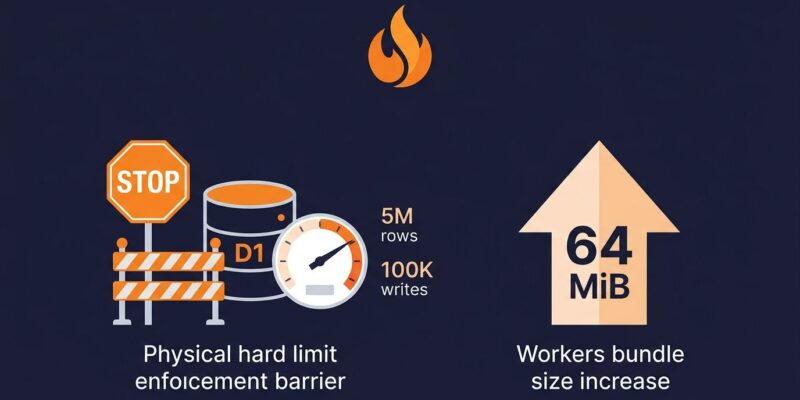
Cloudflare made two back-to-back platform moves this week that affect every developer running on Workers. On September 1, D1 started hard-failing queries when you cross daily row limits — no more silent pass-throughs. On September 4, Workers got its bundle ceiling lifted from a compressed 3 MB / 10 MB to a flat 64 MiB uncompressed, on every plan. One change tightens the screws. The other loosens them. Both demand a response.
D1 Free Tier: The Soft Pass Is Gone
The limits themselves haven’t changed. D1 free tier has always capped out at 5 million row reads and 100,000 row writes per day, with a 5 GB storage ceiling. What changed is what happens when you hit those numbers. Before September 1, enforcement was inconsistent — queries over quota sometimes slipped through. Now they don’t. Both the Workers Binding API and the REST API will return explicit errors until midnight UTC resets your daily budget. Cloudflare’s changelog entry has the full details.
The two error messages you’ll see in production:
Your account has exceeded D1's free tier daily row read limit.
Upgrade to a paid plan or wait until tomorrow (midnight UTC) to continue.

Your account has exceeded D1's free tier daily row write limit.
Upgrade to a paid plan or wait until tomorrow (midnight UTC) to continue.
Your stored data stays intact. Your app just can’t touch it until reset. If you’re running anything user-facing on a free tier D1 database, that’s a production outage window.
The Part Most Tutorials Get Wrong: Rows Read Means Rows Scanned
Here’s the trap that will bite developers who read the limits but don’t internalize the accounting. “Rows read” doesn’t count the rows your query returns. It counts the rows the database engine had to examine to produce that result. An unindexed filter against a 5,000-row table costs 5,000 row reads — even if you got back one record.
Run that query 1,000 times and you’ve spent your entire daily budget before lunch.
This isn’t hypothetical. A developer running an analytics dashboard on D1 documented a $134 monthly bill traced to four aggregate queries scanning a 765,000-row unindexed table. The worst offender: SELECT MAX(year) on a column with no index, which read 172 billion rows across 225,000 daily calls. One index fixed it. The bill dropped 95%.
Three Fixes to Run Before Your Next Traffic Spike
The good news: query optimization on SQLite is fast to implement and the gains are immediate.
1. Identify the scans. Run EXPLAIN QUERY PLAN on your most-called queries. Any result showing SCAN table_name is an unindexed full table scan. You want to see SEARCH table_name USING INDEX.
EXPLAIN QUERY PLAN SELECT * FROM orders WHERE user_id = ?;
-- Bad:  SCAN orders
-- Good: SEARCH orders USING INDEX idx_orders_user_id
2. Add the indexes. Focus on columns you filter, join, or group by. Composite indexes matter when you filter on multiple columns together. Cloudflare’s D1 index best practices walk through the most common patterns.
CREATE INDEX idx_orders_user_id ON orders(user_id);
CREATE INDEX idx_orders_user_created ON orders(user_id, created_at);
3. Update the query planner. After adding indexes, run PRAGMA optimize. This populates SQLite’s internal statistics so the planner makes better decisions. Skip this step and you can have indexes the planner ignores.
Beyond indexing: check meta.rows_read on every query response — it’s already in the result object and gives you exact scan counts in production. Set an alert at 4 million reads per day (80% of the free limit) so you have a buffer to act before queries start failing.
Workers 64 MiB: What the Ceiling Change Actually Means
The Workers bundle limit was a persistent friction point. The old 3 MB compressed ceiling on free plans and 10 MB on paid meant your actual code budget was roughly 10–30 MB of source before compression. Anything heavier required tree-shaking gymnastics, splitting Workers, or upgrading just to ship a slightly larger dependency.
As of September 4, Cloudflare measures the uncompressed bundle size only. The limit is 64 MiB, the same on both free and paid plans. The gzip figure still appears in wrangler output but is now informational.
Check your current position:
npx wrangler deploy --outdir bundled/ --dry-runThe “Total Upload” value is what counts against the limit. If you’ve been excluding packages or building lightweight alternatives specifically to stay under the old limit, revisit those decisions. Framework-heavy Workers, large WASM binaries, and bundled AI model artifacts all become significantly more tractable. And since free and paid plans now share the same ceiling, bundle size is no longer a reason to upgrade.
What Cloudflare Is Actually Signaling
Look at the first week of September as a single message. D1 hard enforcement. WAF SQL injection rules flipped from log to block. Workers bundle limits removed. Cloudflare is tightening the financial relationship on the data layer while removing friction on the compute layer. The free tier is being redrawn as a development environment, not a production substrate.
If your app is serving real users on free tier D1, the implicit understanding that “limits exist but aren’t really enforced” just expired. The Workers Paid plan at $5/month replaces the daily hard stop with 25 billion monthly row reads — enough headroom for almost any production workload that’s properly indexed.
Action Checklist
- Open your D1 dashboard and check daily row read and write metrics before your next traffic spike
- Run
EXPLAIN QUERY PLANon your five most-called queries — look for SCAN - Add indexes on every column you filter, group, or join on, then run
PRAGMA optimize - Log
meta.rows_readper query to catch scan regressions before they hit limits - Run
npx wrangler deploy --dry-runand note “Total Upload” against the new 64 MiB ceiling - If D1 is in production on free tier: budget $5/month for Workers Paid or plan for hard cutoffs at midnight UTC