 By
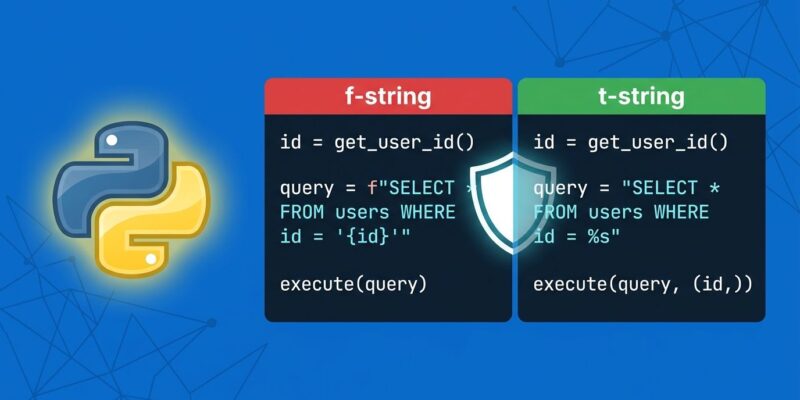
By Python 3.14.7 shipped on August 5th with 499 bugfixes and, for most developers, zero fanfare. That’s fair — a maintenance release isn’t usually worth your attention. But Python 3.14 itself contains something you should know about: t-strings (PEP 750). If you’ve been writing SQL queries or HTML templates with f-strings, you’ve been writing vulnerabilities. T-strings fix the structural problem that f-strings can’t.
What F-Strings Get Wrong
F-strings are great for what they’re designed for: readable string formatting. The problem is that developers reach for them everywhere — including places where immediate string evaluation is exactly the wrong behavior. The classic example:
# Looks fine. Is not fine.
user_input = "'; DROP TABLE users; --"
query = f"SELECT * FROM users WHERE name = '{user_input}'"
# Executes: SELECT * FROM users WHERE name = ''; DROP TABLE users; --
You already know about SQL injection. You know you should use parameterized queries. But f-strings make the dangerous pattern syntactically convenient and the safe pattern slightly inconvenient — so people take shortcuts. T-strings change the architecture of that problem.
What T-Strings Actually Are
A t-string looks like an f-string with a different prefix. The similarity ends there:
name = "Alice"
f_result = f"Hello, {name}"  # returns str: "Hello, Alice"
t_result = t"Hello, {name}"  # returns Template object — NOT a string
The Template object (from the new string.templatelib stdlib module in Python 3.14) stores the static parts and the interpolated values separately. Nothing gets collapsed into a string until you do it explicitly:
from string.templatelib import Template

name = "Alice"
age = 30
tmpl = t"My name is {name} and I am {age}."

tmpl.strings        # ('My name is ', ' and I am ', '.')
tmpl.interpolations # (Interpolation(value='Alice', expr='name'), Interpolation(value=30, expr='age'))
A function receives the Template and decides what to do with each interpolated value — escape it, validate it, parameterize it, or reject it entirely. The developer who writes the template doesn’t have to remember to sanitize. The function enforces it structurally.
The SQL Fix
Here’s a minimal t-string SQL helper that produces parameterized queries automatically:
from string.templatelib import Template, Interpolation

def sql(template: Template) -> tuple[str, list]:
    query_parts = []
    params = []
    for item in template:
        if isinstance(item, str):
            query_parts.append(item)
        else:  # Interpolation object
            query_parts.append("?")
            params.append(item.value)
    return "".join(query_parts), params

name = "Alice'; DROP TABLE users; --"
query, params = sql(t"SELECT * FROM users WHERE name = {name}")
# query  = "SELECT * FROM users WHERE name = ?"
# params = ["Alice'; DROP TABLE users; --"]
The injection string never touches the query structure. It becomes a parameter value, handled by your database driver. SQL injection is now architecturally impossible for any query written through this helper — not because developers remembered to sanitize, but because there’s no path to the query string that bypasses sanitization.
HTML Escaping Works the Same Way
Web developers get the same benefit for HTML generation:
from html import escape
from string.templatelib import Template, Interpolation
def html(template: Template) -> str:
parts = []
for item in template:
if isinstance(item, str):
parts.append(item)
else:
parts.append(escape(str(item.value)))
return "".join(parts)
user_comment = "<script>alert('xss')</script>"
safe = html(t"<p>{user_comment}</p>")
# "<p><script>alert('xss')</script></p>"Django is already discussing native t-string support for format_html(), and SQLAlchemy has an open proposal for t-string integration in its text() clause. Framework adoption is moving.
T-Strings vs F-Strings: The Decision
T-strings don’t replace f-strings. They’re a specialized tool:
- Use f-strings for log messages, display output, and string formatting where you control all inputs.
- Use t-strings for SQL queries, HTML generation, and any context where interpolated values need processing before becoming strings.
The “unnecessary new feature” criticism — and it exists — comes from developers who look at the syntax and think “we already have five string formatting methods.” The counter is simple: none of the existing methods let you intercept interpolated values before they become a string. That gap is what t-strings fill, and it’s a gap with real security consequences.
Worth noting: JavaScript has had tagged template literals since ES6 in 2015. Python’s t-strings are the same concept, arriving a decade later. The JS ecosystem validated the pattern — Python developers who’ve worked with tagged templates will recognize t-strings immediately.
Can You Use This Today?
Yes, if you’re on Python 3.14+. Python 3.14.7 is current and stable. The string.templatelib module is in the standard library — no additional packages required. The sql() and html() helpers above are production-ready implementations you can drop into any project.
If you’re on Python 3.12 or 3.13, the community backport (abilian/tstrings-backport on GitHub) has limited functionality. The real option is planning your Python 3.14 upgrade — those 499 bugfixes in the latest maintenance release are doing useful work regardless of t-strings.
The features that require discipline to use safely are the ones that eventually bite you. T-strings make the safe path the convenient path. That’s a design principle worth adopting.