 By ByteBot
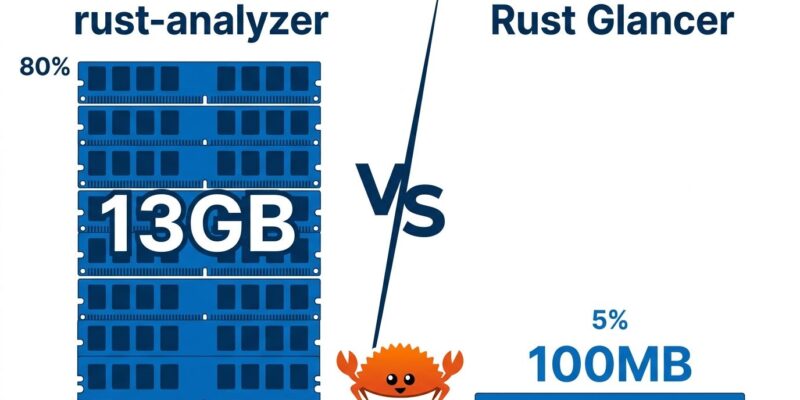
A Rust developer named popzxc published Rust Glancer yesterday — a new Rust LSP (Language Server Protocol) server that targets less than 100MB of RAM, compared to the 2–13GB rust-analyzer typically consumes on real projects. The tool hit Hacker News within hours and picked up 284 upvotes. Consequently, the reaction from matklad — the person who built rust-analyzer — was not defensiveness. It was: “incredibly cool. Go check it out.”
rust-analyzer’s RAM Problem Is Well-Documented
Before dismissing this as marginal, consider the scale of the problem Rust Glancer is addressing. GitHub issue #13954 on rust-analyzer has tracked persistent high memory usage since 2023. A developer on the Rust forum reported that 13GB of RAM for a workspace with around 830 dependencies is “quite typical.” Moreover, another GitHub thread documented rust-analyzer consuming 12GB on the Zed project. In large monorepos, spikes past 40GB have been reported. None of these are fringe cases — they’re the expected behavior on projects of meaningful scale.
The result is a real exclusion problem. Developers on machines with 8–16GB RAM — which is most people outside well-funded engineering teams — cannot realistically run rust-analyzer alongside other tools. Multiple Rust workspaces simultaneously? Nearly impossible. The tooling is excellent, but the cost of running it is high enough to constrain who can use Rust comfortably.
How Rust Glancer Cuts RAM by 100x
Rust Glancer’s answer is architectural. Rather than keeping everything in memory and recomputing incrementally, it uses what the creator calls a “frozen analysis result that gets invalidated on save.” When you save a file, the LSP performs a full analysis and writes results to disk. During typing, it performs shallow analysis on the current file body only, reusing the last complete index for everything else. When a query comes in, only the data needed for that query loads into RAM.
The performance comparison on an M1 MacBook (8GB RAM) is surprisingly competitive. Rust Glancer hits full indexing in 9 seconds; rust-analyzer takes 14. Base indexing runs in 6 seconds versus 7. Furthermore, startup RAM stays under 100MB. The tradeoff is disk I/O instead of memory — and for developers with limited RAM, that is a trade worth making.
matklad provided historical context in the HN thread, explaining that rust-analyzer’s original architecture followed a 2014 philosophy: “Don’t store anything to disk — unnecessary complexity creates bugs.” That decision made sense early on. However, proc macros and build script execution later complicated the picture significantly, because they require running real code and generating substantial intermediate data. Rust Glancer sidesteps this entirely by not running proc macros at all.
Related: Rust arrayref Attack: Cargo Build Executes Malware Today
The Tradeoffs Are Real
Rust Glancer does not support proc macro execution, which matters. Any project using derive macros — serde, thiserror, tokio’s async macros — will not get correct completions and type inference for macro-generated code. Additionally, build scripts are unsupported. New types, imports, and traits added during a session only get indexed after you save, not in real time. Code actions like “implement trait” and auto-imports are not yet available. The tool is actively developed with known bugs, and the creator is explicit about this: do not expect rust-analyzer feature parity.
These limitations are not oversights. In fact, they are direct consequences of the architecture. Avoiding proc macro execution is precisely why Rust Glancer can avoid the memory overhead that proc macros generate. You cannot have both yet — and the creator is not pretending otherwise. Read the Rust Glancer technical blog for the full breakdown of what is and is not supported.
Who Should Try It Today
Rust Glancer is worth using now if you are on a machine with under 16GB RAM and rust-analyzer is actively degrading your workflow. It is also worth testing if you run multiple Rust workspaces simultaneously, or if you use Rust in agentic or CI workflows — the tool ships with a custom file watcher built for that context. The VS Code extension is live on the Marketplace; Zed and Neovim support arrive in the next release. For projects with heavy proc macro usage, stick with rust-analyzer for now and monitor Rust Glancer’s roadmap for experimental proc macro support without code execution.
matklad’s endorsement carries weight precisely because he built the alternative. When the creator of the dominant tool says “go check it out” about a challenger, it means the challenger is doing something architecturally interesting — not just reinventing the wheel with fewer features. In contrast, Rust tooling has been a one-tool ecosystem for years. A credible Rust LSP alternative is healthy for everyone, including rust-analyzer.
Key Takeaways
- Rust Glancer targets less than 100MB of RAM for typical Rust projects — vs 2–13GB for rust-analyzer on real codebases
- It achieves this via frozen workspaces offloaded to disk, not incremental in-memory analysis
- The tradeoffs are real: no proc macro support, no build scripts, save-triggered indexing — not a drop-in replacement for every project
- VS Code extension is available today; Zed and Neovim support are coming in the next release
- matklad (rust-analyzer’s creator) called it “incredibly cool” — signaling this is architecturally serious, not a toy project