 By ByteBot
WordPress 7.1 lands August 19 — two days from now. The Tabs block is getting all the attention. The waveform Playlist block is getting its share too. Neither of those is your problem. Your problem, if you maintain custom WordPress blocks, is a three-line change to block.json that you may not have made yet.
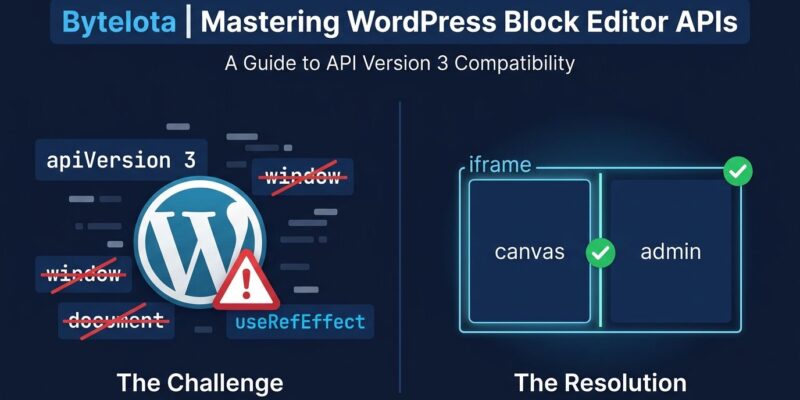
In WordPress 7.0, the post editor was iframed conditionally: only when every block in the content declared API v3 or higher. One legacy block on v2 anywhere in the post, and the editor silently dropped back to the unframed mode. That escape hatch closes on August 19. In 7.1, the post editor is always iframed — no conditions, no flags, no fallback. The Gutenberg PR removing those conditions merged on July 10 and is locked into the release.
What Actually Breaks
The iframed editor runs the editing canvas inside a separate document context. Any JavaScript in your block that reaches for the global window or document is now touching the outer admin page, not the canvas. document.querySelector('.my-selector') finds nothing in your block — or worse, finds something unexpected on the admin page and mutates it.
Styles are affected too. Code enqueued via enqueue_block_editor_assets is injected into the outer document, not the iframe. If your block’s editor appearance depends on those styles, it will look wrong after the update. The same applies to any theme stylesheet that assumed admin-page styles would bleed into the editor.
Blocks registered with "apiVersion": 2 or lower will continue to render, but they will emit a console warning under SCRIPT_DEBUG. The official dev note from the WordPress core team documents every affected area in detail.
The Three-Step Fix
The migration is straightforward once you know what to look for. Do this before August 19:
Step 1 — Declare API v3 in block.json:
{
  "apiVersion": 3,
  "name": "myplugin/my-block",
  "editorStyle": "file:./editor.css"
}
Setting apiVersion: 3 tells WordPress your block is iframe-aware. It does not change how your block renders on the front end. The editorStyle key is where canvas-affecting CSS belongs — this file gets injected inside the iframe, where your block actually lives.
Step 2 — Fix window and document references:
Grep your block’s Edit component for every occurrence of window and document. Each one is a breakage candidate. Replace them using useRefEffect from @wordpress/compose:
import { useRefEffect } from '@wordpress/compose';

function Edit() {
  const ref = useRefEffect( ( element ) => {
    const doc = element.ownerDocument;
    const view = doc.defaultView; // the iframe's window
    const target = doc.querySelector( '.my-selector' );
    // use doc and view instead of document and window
  }, [] );

  return <div ref={ ref }>...</div>;
}
For third-party libraries: if the library accepts a DOM element, pass it the block’s element from useRefEffect and you’re usually fine. For unmaintained dependencies that hardcode document internally, patch-package is the pragmatic fix — edit the module to resolve from node.ownerDocument and commit the patch. The WordPress block migration guide covers both cases.
Step 3 — Move editor styles:
Remove canvas-affecting CSS from enqueue_block_editor_assets. Put it in a dedicated file and point to it via editorStyle in block.json. That file, and only that file, is injected into the iframed canvas.
The Other Breaking Change: Component Deprecations
Approximately 20 components in @wordpress/components are hard-deprecating the __next40pxDefaultSize prop in 7.1. Affected: TextControl, BoxControl, BorderControl, FontSizePicker, RangeControl, and more. The 40px control height is now the permanent default. The prop becomes a no-op — it compiles without errors but does nothing at runtime.
The fix: search your codebase for __next40pxDefaultSize and delete it everywhere it appears. No replacement is needed.
What’s Actually New in 7.1
Once you’ve patched the breaking changes, 7.1 has some useful additions.
New blocks: The Playlist block handles audio collections with waveform visualization and per-track metadata. The Tabs block organizes content into clickable panels — Tab List for navigation, Tab Panels for content — with full color, typography, border, and spacing controls on both. Both are stable in Gutenberg 23.6.
Client-side media: HEIC photos from iPhones convert to JPG before upload. AVIF is supported without server-side capability. Animated GIFs automatically convert to autoplay videos. Disable all of this with the wp_client_side_media_processing_enabled filter.
SVG Icon API: Plugins and themes can now register named icon collections with wp_register_icon_collection() and individual icons with wp_register_icon(). Icons are namespaced as collection/icon-name, sanitized via wp_kses (svg, path, polygon elements only), and queryable via REST. The SVG Icon API dev note has full registration examples.
Responsive styling and interactive states: Responsive block styles are now an editor control — set different sizes at breakpoints without writing CSS. Hover, focus, and active states are editor-native for Button and Navigation Link blocks, available via Global Styles for everything else.
Abilities API lifecycle filters: Four new filters let plugins short-circuit ability execution, transform input, add authorization rules, or reshape results. The new wp_ability_invoked action fires before input normalization — useful for usage logging and quota enforcement. See the Abilities API dev note for the full execution lifecycle.
What’s Still Waiting
React 19 has been punted again — WordPress 7.1 remains on React 18. Real-time collaboration has no new target date. The Classic block removal was reversed on July 7 after community pushback. None of these are crises; they’re just not in this release.
Your August 19 Checklist
- Audit apiVersion. Grep your plugins for
"apiVersion": 2or missing apiVersion. Update to 3 and verify your block renders correctly in a 7.1 test environment. - Scan for window/document. Every hit in an Edit component is a breakage candidate. Fix with
useRefEffectandownerDocument. - Search for __next40pxDefaultSize. Delete it everywhere it appears in your UI code.
The August developer digest has the complete field guide reference. Two days is enough time to make these changes. It is not enough time to discover them after the update lands.