 By ByteBot
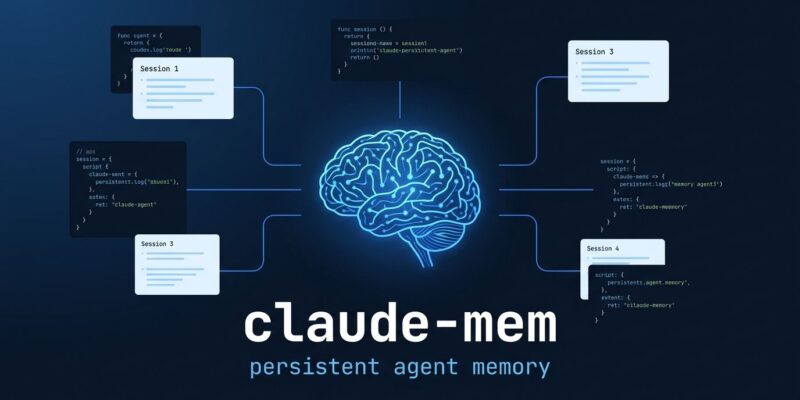
Every time you start a Claude Code or Codex session, you explain your repo again. Same folder layout. Same naming conventions. Same “we use Zod for validation, not Yup.” If you run five AI coding sessions a day, you’re burning time on context bootstrapping, not on code. claude-mem captures what your agent does during a session, compresses it, and injects the right context back automatically — and v13.8.0, released June 21, adds a production-ready Postgres backend that makes this viable for teams.
Why This Is a Real Problem
AI coding agents are stateless by design. Every new conversation window starts blank. A 2026 study tracking agent behavior across thousands of multi-session trials found that constraint compliance dropped from 73% at turn 5 to 33% by turn 16 when there was no external memory layer. The agent literally gets worse at following your project’s rules the more you use it across sessions.
Sixty-five percent of developers report that AI assistants miss relevant context during refactoring and code review. The problem is not model intelligence — it’s architecture. Claude Code, Codex, Gemini CLI, and GitHub Copilot all hit the same wall. The fix has to come from outside the model.
How claude-mem Works
Three hooks handle everything: SessionStart, UserPromptSubmit, and PostToolUse. When a session starts, the worker fires and injects compressed context from previous sessions before you type your first prompt. PostToolUse captures tool outputs as observations throughout the session. When you close out, the worker compresses and stores what happened.
The hook architecture is fail-open — if the worker is slow to start, it does not block your prompt. You can watch observations stream in real-time at http://localhost:37777, which is more useful than it sounds when you want to confirm what’s actually being captured.
The smart part is how retrieval works. claude-mem uses a three-layer MCP search: a compact index pass at 50–100 tokens per result, a timeline pass for chronological context, and a full-detail fetch at 500–1,000 tokens per observation. This progressive disclosure achieves roughly 10x token savings compared to dumping everything into context up front. To force Claude to follow this pattern, claude-mem registers an MCP tool named __IMPORTANT — because without the nudge, Claude tends to fetch everything at full detail and wipe out the efficiency.
What’s New in v13.8.0
The headline addition is the server-beta runtime: Postgres storage, BullMQ job queues, API key scoping, and audit trails. Multiple developers can point at the same Postgres backend, with tenant isolation keeping each project’s observations and sessions strictly separate. This turns claude-mem from a personal productivity tool into team infrastructure.
The server-beta track supports three AI providers for compression — Anthropic, OpenAI, and Google — so you are not locked in. Token-cost telemetry is also new: you can see actual per-session savings rather than taking the maintainer’s word for it.
One change that deserves attention: the license switched from AGPL-3.0 to Apache-2.0. Under AGPL, any server-side modifications had to be open-sourced, which created legal friction for teams embedding this in internal tooling. Apache-2.0 removes that concern entirely. If your team skipped claude-mem over license worry, it is worth revisiting.
Getting It Running
There are two correct installation paths:
# Option 1: CLI (recommended)
npx claude-mem install

# Option 2: Claude Code marketplace
/plugin marketplace add thedotmack/claude-mem
/plugin install claude-mem
Do not run npm install -g claude-mem. That installs the SDK library only — hooks do not register, the worker does not start, and nothing works. It is the most common setup mistake by a wide margin.
After install, claude-mem works automatically with Claude Code, Codex, Gemini CLI, GitHub Copilot, Cursor, Windsurf, OpenCode, OpenClaw, and Hermes. Cursor users get context injected via the Rules system — a stop hook updates .cursor/rules/claude-mem-context.mdc after each session. For the Postgres server-beta, you will need Docker Compose; the local SQLite path works out of the box.
How It Compares
The memory tool space has gotten crowded. Memmy is the right pick if you need everything fully local and air-gapped. agentmemory has a quality-scoring loop that gives you fine-grained visibility into what gets stored and why — worth the extra setup if you want that control. memsearch stores memories as Git-versionable Markdown files backed by Milvus, which fits teams who want memory auditable in their repo history.
claude-mem wins on install speed (under five minutes for the local path) and ecosystem breadth (ten-plus agents supported). For most developers running multiple AI sessions daily, that combination is hard to argue against.
The Setup Cost Is Low. The Return Is Not.
claude-mem has 83.9k GitHub stars and 288 releases since its August 2025 launch. That velocity is a signal: the tool is actively maintained, community feedback loops are short, and rough edges get filed down quickly.
If you run more than a handful of AI coding sessions per week, the productivity math is straightforward. You set it up once, and every subsequent session starts with your project context already loaded. The v13.8 server-beta makes that available to your whole team on shared infrastructure. Start with the GitHub repo or the DataCamp setup guide for a step-by-step walkthrough. The official Claude docs on agent memory are also worth reading for context on how the platform thinks about this problem.