 By
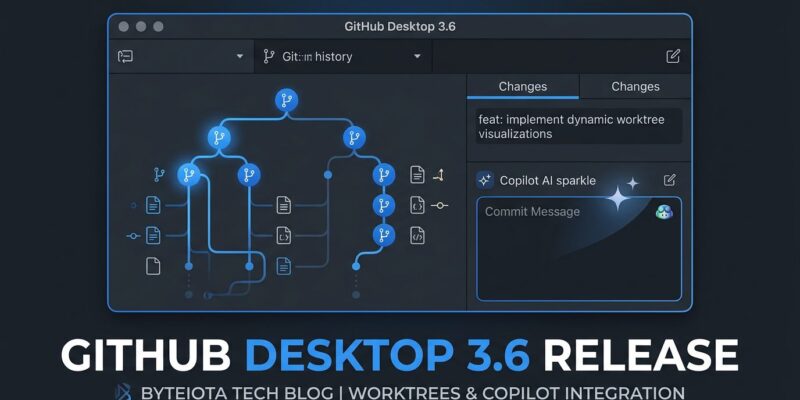
By GitHub Desktop 3.6 shipped today with three changes that close a real gap between the GUI and the CLI: Git worktrees are now manageable without opening a terminal, Copilot commit message generation reads your team’s instructions files so it actually follows your conventions, and AI-assisted merge conflict resolution — powered by the Copilot SDK — explains what’s conflicting and proposes a fix before you touch anything. If you’ve been watching the CLI and Copilot app get all the AI upgrades while Desktop stayed behind, today is the day that changes.
Git Worktrees, Now in the GUI
Git worktrees have existed since Git 2.5 in 2015 — they let you check out multiple branches of the same repository simultaneously, each in its own directory. For developers comfortable with the terminal, worktrees have become the backbone of parallel agent workflows: incident.io runs four to seven Claude Code agents per developer using this pattern, each agent isolated in its own worktree so file edits never collide. The catch has always been that worktrees are a CLI-only feature. Until today.
GitHub Desktop 3.6 adds a Worktree dropdown to the toolbar, sitting between the Repository and Branch selectors. From there you can create, switch, rename, and delete worktrees entirely from the GUI. Each entry shows the directory name and the branch it tracks; a “Main worktree” section separates your original checkout from linked worktrees. Switching a worktree updates the working directory instantly.
The timing is deliberate. The Copilot app (which went GA on June 17) runs parallel agent sessions in isolated worktrees automatically — but it hides that detail from users. Desktop 3.6 surfaces it explicitly, which matters for developers who want direct control over which branch each agent is working on. If you’re running multiple Copilot sessions or mixing Copilot with Claude Code, this visibility is useful.
Commit Messages That Follow Your Rules
The previous version of Copilot commit message generation in Desktop had a predictable problem: it was generic. It looked at your diff and produced something like “Update authentication logic.” Technically accurate, practically useless if your team enforces conventional commits or requires a Jira ticket prefix.
In 3.6, commit generation reads two files before writing anything: .github/copilot-instructions.md and AGENTS.md. These are the same instruction files that Copilot CLI and Claude Code already respect — so if you’ve already defined commit message rules for your CLI-based workflows, Desktop now automatically picks them up. A repo with conventional commits defined in those files will produce feat(auth): add JWT token refresh endpoint instead of “Update login.” Teams using semantic-release or enforcing conventional commit linting in CI will find this useful immediately.
One small but practical addition: you can now cancel a commit message generation mid-flight. Previously, if you clicked the button and changed your mind, you waited. That is gone.
Merge Conflict Resolution: Explain, Then Suggest
Merge conflict tooling in Git GUIs has barely changed in a decade: show the conflict markers, pick incoming or current, done. Desktop 3.6 does something different. When Copilot encounters a conflict, it explains what is actually different between the two versions and proposes a specific resolution. A Copilot-authored diff appears in the Changes tab so you can see exactly what it intends to do. You accept, edit, or discard the suggestion before completing the merge.
The “explain + suggest, don’t auto-apply” model is the right call here. Merge conflicts are high-stakes — an AI that silently resolves them and gets it wrong in a subtle way is worse than no AI at all. Keeping the human in the loop on the final decision is the correct design, even if it is less flashy than full automation.
This feature runs on the Copilot SDK, the same agent runtime that shipped in the CLI and the Copilot app. That means the resolution quality reflects the same model and context-handling as those surfaces — not a weaker embedded model.
One Engine, Five Surfaces
The Copilot SDK went generally available on June 2. Desktop 3.6 is the first first-party GitHub product outside the CLI to run on it. That is significant because it completes a unified loop: Copilot for Jira (GA on June 25) assigns an issue to the cloud agent, which opens a branch and writes code, Desktop resolves any merge conflicts using the same SDK, and the CLI handles final merge and deploy. One instruction set. One agent runtime. Five surfaces — and they are now consistent.
How to Get It
Open GitHub Desktop and check for updates, or download the latest release from desktop.github.com. To get the most out of the commit message improvements, add a commit message section to your existing .github/copilot-instructions.md or AGENTS.md — the format is standard Markdown and the instructions take effect immediately on the next generation attempt. If your team already maintains these files for Copilot CLI or Claude Code, Desktop 3.6 will pick them up with no additional work.