 By ByteBot
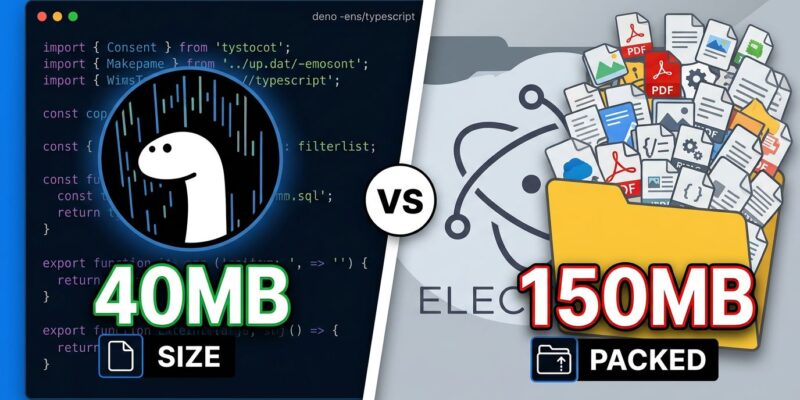
The developer desktop app problem has two answers, and both are unsatisfying. Electron bundles all of Chromium and ships you a 150 MB installer for what is sometimes a to-do list. Tauri fixes the size problem—getting you to 2–10 MB—but demands you write the backend in Rust. If your team does not know Rust, that is a two-to-three-month tax before you ship anything. Now Deno v2.9 is landing in canary with Deno Desktop—a deno desktop command that compiles TypeScript projects into cross-platform desktop apps without either of those compromises.
What deno desktop Does
deno desktop bundles your code, the Deno runtime, and a web rendering engine into a single redistributable binary per platform. The default backend uses the OS’s native WebView—WKWebView on macOS, WebView2 on Windows, WebKitGTK on Linux—which keeps binary size around 40 MB. If you need identical rendering across all three platforms, you can opt into the bundled Chromium (CEF) backend, at the cost of a larger binary. According to the Deno Desktop documentation, the feature ships in Deno v2.9.0, currently available via canary.
To try it today:
deno upgrade canary
deno desktop main.ts
A minimal app is three lines of TypeScript:
Deno.serve(() =>
  new Response("<h1>Hello, desktop</h1>", {
    headers: { "content-type": "text/html" },
  })
);
For existing web projects, deno desktop . auto-detects the framework and builds without any code changes. Supported out of the box: Next.js, Astro, Fresh, Remix, Nuxt, SvelteKit, SolidStart, TanStack Start, and Vite SSR. No adapters, no config changes—point it at the directory and go. This is a meaningful upgrade from the Deno ecosystem’s previous position: ByteIota covered Deno 2.8’s new subcommands last month, but Desktop is a different category of ambition entirely.
Three Things That Set It Apart
Cross-compilation from one machine. Build for macOS, Windows, and Linux without setting up target environments. This is something Tauri cannot do—a Windows build on Tauri requires a Windows machine or a CI runner that provides one. deno compile --target handles all platforms from wherever you are. For small teams without multi-OS CI pipelines, that alone is a significant workflow win.
In-process bindings instead of IPC. Electron and Tauri send messages between processes over sockets. Deno Desktop runs the backend and renderer in the same process, communicating over in-process channels. The result is lower latency and a simpler mental model for developers who already think in web app terms—no message serialization, no async bridge layer.
Built-in auto-update. Ship a latest.json manifest and bsdiff patches. The runtime polls, applies updates, and rolls back automatically if a launch fails. No third-party updater binary, no Squirrel.Windows integration. This is one fewer thing to maintain, and it works out of the box.
How Deno Desktop Stacks Up Against Electron and Tauri
The Deno team published a candid comparison of Deno Desktop against Electron, Tauri, Electrobun, and Dioxus. Here is what matters for most teams:
| Framework | Language | App Size | Cross-Compile | Mobile | npm Compatible |
|---|---|---|---|---|---|
| Electron | JS/TS (Node) | ~100 MB+ | Yes | No | Yes |
| Tauri | Rust + web | ~2–10 MB | No | Yes | No |
| Electrobun | JS/TS (Bun) | ~14 MB | No | No | Yes |
| Deno Desktop | JS/TS (Deno) | ~40 MB / ~150 MB CEF | Yes | Not yet | Yes |
Deno Desktop does not win on raw binary size—Tauri is still the smallest by a wide margin. What it offers instead is a combination that no other tool currently delivers: TypeScript-only codebase, full npm compatibility, and cross-compilation from one machine. That is the gap Tauri never filled. According to a 2026 Tauri vs Electron analysis, Tauri’s Rust requirement still demands a two-to-three-month ramp for web-focused teams—a genuine barrier that Deno sidesteps completely.
For broader runtime context, see ByteIota’s JavaScript runtime performance comparison for 2026—Deno’s trajectory in the ecosystem has been consistent and improving.
The Limitations You Should Know Now
This is a canary feature. The command, configuration keys, and TypeScript APIs will change before stable lands. Beyond that caveat, there are specific gaps worth knowing before committing:
- No auto-update on Windows—macOS and Linux only
- No one-step macOS notarization—code-signing works, but notarization is still manual
- No Windows MSI or Linux .deb/.rpm installers yet
- No mobile support (iOS or Android)—Tauri wins this category outright
- No native clipboard or secure-storage APIs
- CEF mode bundles a separate Chromium copy per app, not shared—user machines pay a large-per-app footprint
None of these are permanent limitations. The roadmap includes a shared CEF runtime, automated notarization, and expanded platform installers. However, right now they are real blockers if you are evaluating Deno Desktop for production use.
When to Use What
If you need mobile (iOS or Android), use Tauri. If your entire team writes Rust, Tauri or Dioxus are the stronger choices. If you are on macOS only and already using Bun, Electrobun is worth a look. If you need the most mature ecosystem and have a large Node.js codebase to port, Electron is still the safe default.
Deno Desktop makes the most sense when you have a TypeScript web project you want to distribute as a desktop app, need cross-platform builds from one machine, and can wait for stable. The zero-config framework support is genuinely impressive—turning an existing SvelteKit or Next.js project into a desktop app with deno desktop . is as frictionless as desktop development gets in 2026.
Install the canary build and run your first Deno Desktop app today. It is not ready for production customers—but it is absolutely ready for experimentation. And for TypeScript developers tired of the Electron-or-Rust binary choice, it is the most interesting thing to arrive in the desktop space in years.
deno upgrade canary
deno desktop .