 By ByteBot
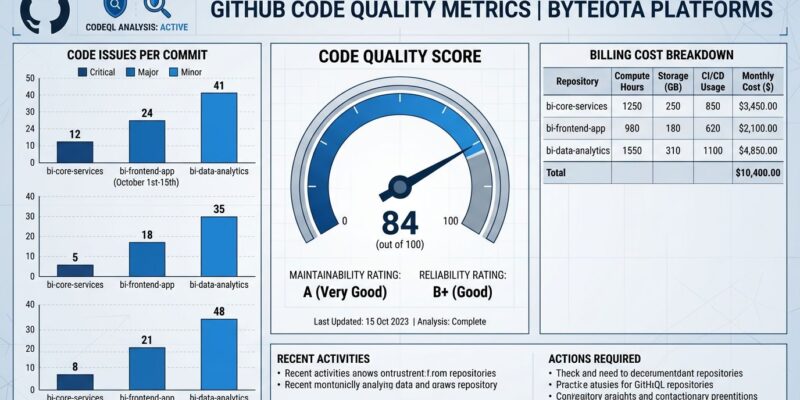
GitHub Code Quality exits public preview on July 20 and becomes a paid product. The price is $10 per active committer per month — but that is not the full bill. Two more cost components attach automatically, and teams that enabled Code Quality during the free preview will start getting charged without any additional action. You have 29 days to audit your exposure.
GitHub Code Quality Is Not GitHub Code Security
Most teams conflate these two products, which is the first billing trap. GitHub Advanced Security — the $49/committer product your enterprise already pays for — covers security vulnerabilities: Dependabot alerts, secret scanning, dependency review, and code scanning for CVEs. GitHub Code Quality is a separate product that scans for something different: maintainability and reliability problems. Dead code paths, overly complex functions, unreachable error handlers, test coverage gaps.
Since March 2026, GitHub lets you manage the two independently in enterprise policies. You can have Code Security without Code Quality, or Code Quality without Code Security. You do not need a Copilot license to use Code Quality. If your team already pays for Advanced Security, Code Quality is an additional cost — it is not bundled in.
The Three-Part GitHub Code Quality Pricing Bill
Here is what billing looks like after July 20:
- $10/active committer/month — the base license, applied per repository where Code Quality is enabled
- AI-powered capabilities — usage-based billing for Copilot code review, AI-assisted detection, and Copilot Autofix when it generates fixes on Code Quality findings
- GitHub Actions minutes — CodeQL’s deterministic scan engine runs on your Actions runners, consuming included minutes or triggering overage charges
The license fee is predictable. The other two are not. A team that enables Copilot Autofix on every Code Quality finding across a high-volume repository will accumulate AI credits in ways that are difficult to forecast without a month of production data. Plan for the license cost; build in a buffer for the rest.
The Active Committer Definition Will Surprise You
GitHub defines an active committer as anyone who pushed a commit to a Code Quality-enabled repository in the last 90 days. GitHub App bots are excluded. Everyone else counts — full-time engineers, external collaborators, contractors who pushed twice in April, pending invitees. According to GitHub’s billing documentation, the committer must also hold a GitHub Team or Enterprise license with your organization.
For most organizations, the active committer count is higher than headcount. A shared monorepo with contributions from multiple teams, or a repository touched by contractors during a recent project, can generate a billing count well above the number of people who work on it daily. GitHub provides a committer count view in Organization Settings under Billing. Check it before July 20.
What GitHub Code Quality Does in a Pull Request
When Code Quality is enabled and a developer opens a pull request, CodeQL scans the changed files against quality rules — not security rules. If it finds issues, the github-code-quality[bot] posts a comment directly on the diff. Each comment can include a Copilot Autofix suggestion: a generated patch the developer can apply with one click. In the background, an LLM-powered pass runs on recently pushed files on the default branch, catching patterns that deterministic analysis misses.
Six languages are supported: Java, C#, Python, JavaScript, Go, and Ruby. Organization-level enablement — announced the same day as the GA date, on June 16 — means admins can now enable Code Quality across all repositories from a single org setting, rather than enabling it per repository. That convenience makes the committer count audit even more important: one checkbox can expand billing scope significantly.
Quality gates add enforcement. Using GitHub’s ruleset system, you can require that pull requests pass Code Quality checks before merging. Set a severity threshold in Repository Settings under Rules, and any PR that exceeds it is blocked. The same configuration works at organization level, covering all enabled repos with one rule.
What to Do Before July 20
Audit your active committer count. Go to Organization Settings, then Billing, then GitHub Advanced Security. The committer view shows unique active committers on Code Quality-enabled repositories over the last 90 days. If the number is larger than expected, decide which repositories to disable Code Quality on before billing begins. If you used Code Quality in preview across the entire org, that decision is urgent.
Scope your enablement before expanding it. The organization-level toggle is convenient, but enabling Code Quality org-wide without the committer audit is how teams generate surprise invoices. Start with your highest-priority repositories — production services, customer-facing APIs, critical infrastructure — and expand once you understand the per-repo committer profile and what Code Quality actually finds in your codebase.
Set quality gate thresholds before enforcement goes live. Introducing a gate that blocks PR merges after the team is already used to Code Quality running silently is harder than introducing it proactively. Configure your thresholds now while still in preview mode, so developers can see what would be blocked. Adjust before July 20, so enforcement starts with buy-in rather than surprise. This also applies if you are already using Copilot for code review — Code Quality adds a parallel review layer, and the two have overlapping AI capabilities that may generate redundant findings.
Is $10/Committer Worth It?
For a 10-person team: roughly $100 a month before AI usage and Actions minutes. For a 50-person team: $500 a month. The closest independent alternative is SonarCloud, which is free for open-source projects and runs $75–150 a month for small private teams at similar scale.
GitHub’s advantage is integration depth. Findings live in the PR review. Fixes apply with one click in the same UI the team already uses. The ruleset system is the same one enforcing branch protection and required reviewers. There is no third-party dashboard, no separate login, no context switch. For teams already inside the GitHub ecosystem, that integration has real value — but only for the six supported languages. If your primary codebase is Rust, Kotlin, or Go with heavy use of language-specific patterns CodeQL does not model well, the value proposition weakens.
The unpredictable AI cost component is the real risk. Enable Code Quality on critical repositories first. Run it for a month and observe the credit consumption before expanding. At $10/committer plus variable AI costs, this product can be a genuine improvement to your PR review quality — or it can add cost without adding signal, depending on how disciplined your team is about acting on the findings.