 By ByteBot
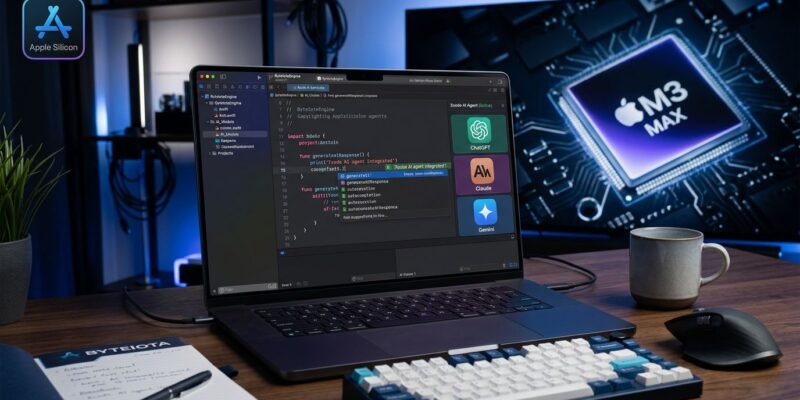
Apple shipped Xcode 27 at WWDC 2026 with multi-model AI agents built directly into the IDE — Claude, ChatGPT, and Gemini are available out of the box, alongside a local on-device model that never touches a server. There is a catch: Xcode 27 requires Apple Silicon, full stop. For iOS developers on M-series hardware, this is the most significant IDE upgrade in years. For anyone still on an Intel Mac, it is a hard deadline to plan around.
How the Agents Actually Work
Xcode 27 uses a dual-tier architecture. The first tier is a local model that runs natively on the Apple Silicon Neural Engine — fast, private, and zero latency. It handles inline code completion, method prediction, and real-time suggestions tuned specifically for Swift and Apple SDKs. This is not a generic coding model; Apple has optimized it for the frameworks you actually use.
The second tier is where the agentic work happens. Claude, ChatGPT, and Gemini are integrated natively via their respective APIs — you bring your own keys and pay usage costs directly to Anthropic, OpenAI, or Google. These models handle complex, multi-file analysis, refactoring, test generation, and long-horizon tasks. Agent conversations live in the editor pane with tab and split support, and a new /plan command lets you scope work with the agent before it touches a single file. That alone is worth the upgrade — it eliminates the “agent ran off and changed 40 files” experience that made earlier agentic tools frustrating.
Device Hub Changes the Game
What separates Xcode 27 from running Claude Code in a terminal is Device Hub, a unified window that replaces the fragmented device and simulator management experience. Agents in Xcode 27 are not just editing source files — they can run tests on a real simulator, inspect visual changes with live previews, use Playgrounds, and interact directly with your app as it runs. Accessibility settings testing and iPhone Mirroring resize testing (relevant ahead of the iPhone Fold) are built into the same view.
The redesigned Organizer adds agent-powered fix recommendations, animation hitch metrics, and Metric Goals. When something goes wrong in a build, the agent can see the diagnostics and propose a fix with full context about what your app was doing at the time. This is meaningfully different from pasting error output into a chat window.
Which Model Should You Use?
With three external models plus the on-device option, the obvious question is: which one? Here is a practical split:
- On-device Apple model: Inline completion, routine suggestions, anything you want offline or private. Fast at roughly 30 tokens per second on M-series chips.
- Claude (Anthropic): Complex refactoring, multi-file reasoning, code review, and any task where you want the model to think before acting. Claude’s strength is reasoning through ambiguous requirements.
- ChatGPT (OpenAI): Documentation generation, explaining patterns, broad knowledge retrieval. Better when you need the agent to draw on general programming knowledge rather than deep project understanding.
- Gemini (Google): Useful if your project integrates Google APIs or Firebase — Gemini has natural context around those ecosystems. Also strong for data transformation and API-heavy work.
You can switch models per task inside Xcode 27. There is no lock-in once you have your API keys configured.
MCP Plugins: Bring Your Own Tools
Xcode 27 supports the Model Context Protocol, which means you can extend the built-in agent with custom MCP servers — your team’s internal documentation, a design system, a staging API. Configuration lives at ~/Library/Developer/Xcode/CodingAssistant/ClaudeAgentConfig/. Teams that have already built MCP servers for Claude Code or Cursor can often reuse them directly.
This is where Xcode 27 pulls ahead of any general-purpose AI IDE for iOS teams: the agent understands your project at the framework level and can be extended to understand your specific tooling on top of that. No other tool gives you both.
The Apple Silicon Reality Check
Xcode 27 requires Apple Silicon. macOS 27 Golden Gate drops the four remaining Intel Mac models: the MacBook Pro 13-inch (2020), MacBook Pro 16-inch (2019), iMac 27-inch (2020), and Mac Pro (2019). Those machines will continue to receive security patches for three years, but no new OS features and no Xcode 27.
If you are on one of those machines, you have options. Cursor, Windsurf, and OpenCode all work fine on Intel Macs and provide capable agentic coding environments. Windsurf, in particular, reads .xcodeproj files natively and has solid Xcode integration for older versions. The trade-off is you lose the deep simulator and device integration that makes Xcode 27 distinctive. For teams in this situation, the honest answer is that a hardware refresh is coming whether you plan for it or not — macOS 27 this fall accelerates that timeline.
Billing Math: Xcode 27 vs. Copilot
GitHub Copilot switched to token-metered AI Credits on June 1, 2026. Some developers are reporting cost jumps from $29 per month to several hundred dollars or more under heavy agent use. Xcode 27’s model is: no subscription to Apple, pay API costs directly at provider rates. The on-device tier for inline completion costs nothing. For iOS developers on Apple Silicon who are already unhappy with their Copilot bill, this comparison is worth running with your actual usage numbers before making a switch.
Getting Started Today
The Xcode 27 developer beta is available now at developer.apple.com. A free Apple ID is all you need to access the developer beta since Apple dropped the paid requirement in 2023. Install it on a secondary machine for early testing — first developer betas ship with bugs. For the WWDC26 session covering new features in detail, the What’s New in Xcode 27 video is the authoritative starting point. The beta release notes cover the full feature list.
Xcode 27 is 30 percent smaller than its predecessor and ships with a simpler setup flow. If you have an M-series Mac, there is no reason not to have the beta installed by end of day.