 By
By Git 2.54 shipped on April 20 with one feature that should have existed years ago: git history, an experimental command that handles the two most common git rebase -i use cases — reword and split — without the ceremony. No TODO file. No checking out the branch first. No accidentally touching other commits. It even works in bare repositories, which rebase -i cannot. If you’ve ever typed git rebase -i HEAD~1 just to fix a typo in a commit message, this is for you.
The Problem With git rebase -i for Simple Tasks
Interactive rebase is Git’s Swiss Army knife for history editing, but it’s wildly over-engineered for two extremely common tasks: rewording a commit message and splitting one commit into two. The workflow for rewording a single commit is: run git rebase -i HEAD~N, open a TODO file in your editor, change pick to reword for the right commit, save, close, write the new message, save, close, and then double-check that nothing else got mangled. That’s six steps to change three words. JetBrains measured the actual impact in their IDE’s interactive rebase UI and found that even with a polished graphical interface, this operation in a large monorepo could take tens of seconds. About 12% of interactive rebases result in merge conflicts; another ~1% fail entirely. The new git history command collapses most of that.
git history reword: Fixing Commit Messages the Right Way
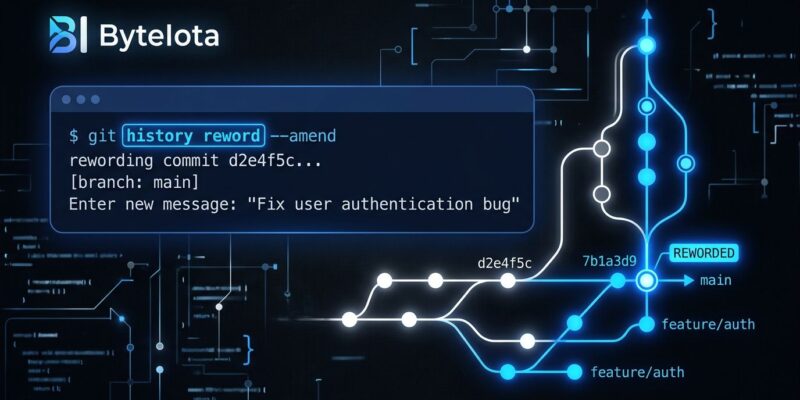
git history reword <commit> opens your editor directly with the commit message. You edit it, save, and close. Git rewrites the commit in place and automatically updates every branch that descends from it. That’s it.
git history reword abc123Two things make this better than git rebase -i for this use case. First, you don’t need to check out the branch. You can reword a commit on a feature branch while sitting on main. Second, it works in bare repositories — something rebase -i fundamentally cannot do. That’s significant for server-side workflows, Git hosting platforms, and CI systems that operate on bare clones.
The caveat: git history reword is experimental, and it refuses to operate on any history that contains merge commits. Keep that in mind if you work on branches with a complex merge history.
git history split: Breaking Commits Without the Dance
“One logical change per commit” is good practice in theory and painful in practice. Splitting a commit with git rebase -i requires a full rebase session, staging hunks interactively, making a new commit, then continuing the rebase. Git 2.54 compresses that into one command:
git history split abc123

# Only split out changes to a specific file
git history split abc123 src/auth.py
Git presents the changes interactively. You stage what goes into the new parent commit, write the first message, and Git handles the rest — the original commit becomes the “later” commit with whatever wasn’t staged. You can also pass a pathspec to limit what gets split out.
This is Git’s clearest signal yet that it’s investing in the stacked diffs workflow — the practice of breaking work into a series of small, independently-reviewable PRs. Tools like Graphite have made stacked diffs popular in teams that do high-velocity code review. git history split is the native Git primitive that workflow has been missing.
Config-Based Hooks: Hooks That Actually Travel With You
Git hooks have always been awkward to share. Files in .git/hooks/ are not version-controlled and don’t follow you from machine to machine. The core.hooksPath setting from Git 2.9 helped, but required pointing to a directory. Git 2.54 adds a new approach: define hooks directly in your config files.
# In ~/.gitconfig
[hook "pre-commit"]
    command = ~/.githooks/lint.sh
    command = ~/.githooks/check-secrets.sh
Multiple commands per hook event run in order. These live in ~/.gitconfig, so they apply across all your repositories without per-repo setup. You can stack global config hooks with repo-specific ones. Existing .git/hooks/ scripts still work alongside them.
On security: a cloned repo’s .git/config is not auto-trusted for hook execution. Config-based hooks only execute from configs you’ve explicitly set or inherited from trusted sources — not from repos you just cloned.
Geometric Repacking Is Now the Default
One quieter change: git maintenance run now defaults to geometric repacking instead of the gc-based strategy. The practical effect is faster repository maintenance without an expensive all-into-one repack. If you run git maintenance on a large monorepo or in CI, this is noticeably faster without any configuration change.
The Bigger Picture: Git Is Betting on Linear History
The community reaction — particularly on Hacker News — was something like “finally, but jj does this better.” That’s fair. Jujutsu (jj) has offered elegant history manipulation for a while. But Git’s power is ubiquity. The git history command is explicitly part of a multi-version effort to bring first-class stacked diff support into Git itself. More subcommands are planned for Git 2.55.
What this release signals is that Git’s maintainers understand where developer workflows are heading: smaller PRs, atomic commits, AI-readable history, and tools that favor clean linear diffs over merge-heavy branches. Git 2.54 is a step in that direction. Not a leap, but a meaningful one.
How to Get Git 2.54
Download from git/git on GitHub. On Ubuntu, the PPA provides 2.54.0 for Noble and Jammy. On Windows: choco upgrade git. On macOS with Homebrew: brew upgrade git. Once installed, check the version with git --version and try git history reword on your next commit that needs a message cleanup. It takes about two seconds — which is what it should have taken all along.