 By ByteBot
What if you could build an AI agent that researches the web, writes Python code, and generates complete reports—in 15 minutes? ByteDance DeerFlow 2.0 hit #1 on GitHub Trending within 24 hours of launch (February 27, 2026) and now has 49,000+ stars. Unlike chatbot wrappers that just suggest code, DeerFlow gives AI agents a real Docker sandbox to execute code, manage files, and persist memory. This tutorial shows you how to set it up and build your first autonomous agent—zero to running in 15 minutes.
What Makes DeerFlow Different
Most AI agents are chatbots with function calling. They give you Python code to analyze data. DeerFlow agents write the code, execute it in a Docker sandbox, process your dataset, and return results. That is the difference between suggesting and doing.
Traditional agents run in your terminal. If they execute malicious code, your host is compromised. DeerFlow isolates each agent in a separate Docker container. The blast radius is contained. Your host stays clean.
DeerFlow is built on LangGraph and LangChain, but it is not a framework you wire together—it is batteries-included. Out of the box: filesystem, long-term memory, sandboxed execution, sub-agent spawning. Where LangChain gives you building blocks and AutoGPT gives you chaos, DeerFlow gives you a production-ready system.
LangChain is excellent for chat-based interactions where you want full control, but you build all orchestration yourself. AutoGPT has 160K stars but remains experimental—demos well, breaks on long tasks. DeerFlow targets complex, multi-hour autonomous workflows where you need reliability. That is why 45,000 developers starred it in a month—they can actually deploy it.
Real-World Use Cases
Research and report generation: Give it cloud cost optimization strategies in 2026—DeerFlow searches the web, gathers sources, generates charts, produces a formatted report with citations. Not a summary. An actual document. Takes minutes to an hour.
Data pipeline automation: Feed it a CSV and specify transformations. It writes Python scripts to clean and analyze data, executes in sandbox, returns processed output. Docker isolation means no dependency conflicts.
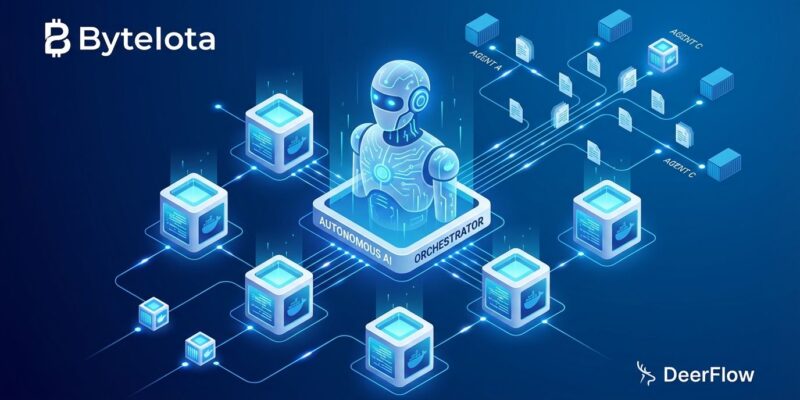
Multi-agent workflows: The SuperAgent decomposes objectives into sub-tasks and spawns parallel sub-agents. For competitor analysis: one scrapes funding data, another analyzes positioning, a third generates visualizations—simultaneously. The SuperAgent synthesizes results.
Real-world proof: a Massachusetts developer used an AI agent to negotiate a Hyundai Palisade purchase, bypassing dealerships entirely. Automotive News covered it. That is production use, not a demo.
15-Minute Setup: Get DeerFlow Running
Prerequisites are minimal: Python 3.12+, Docker, and an API key for OpenAI, Anthropic Claude, or Ollama. No GPU required. DeerFlow runs on localhost during development.
Step 1: Clone and Configure
git clone https://github.com/bytedance/deer-flow.git
cd deer-flow
make config
This generates the base configuration files.
Step 2: Configure Your Model
Edit config.yaml to specify which LLM you are using:
models:
  - name: gpt-4
    display_name: GPT-4
    use: langchain_openai:ChatOpenAI
    model: gpt-4
    api_key: $OPENAI_API_KEY
    max_tokens: 4096
DeerFlow supports OpenAI, Anthropic Claude, DeepSeek, and Ollama. ByteDance recommends Doubao-Seed-2.0-Code or DeepSeek v3.2 for optimal performance, but GPT-4 works fine for testing.
Step 3: Launch Docker
make docker-init
make docker-start
Docker initialization takes 5-8 minutes depending on your internet connection. Once running, access the interface at http://localhost:2026.
Your First Agent: Web Research Bot
Through the web UI, create a new task: Research recent developments in Rust async programming and generate a 500-word summary with citations. Hit submit. DeerFlow spawns a SuperAgent that breaks this into sub-tasks: web search, content extraction, summarization, citation formatting. Sub-agents execute in parallel. Within 3-5 minutes, you have a structured report.
Key concepts you just used:
- SuperAgent: The main orchestrator that decomposes your objective
- Sub-agents: Specialized agents spawned for specific tasks (search, summarize, format)
- Sandbox: Each agent runs in isolated Docker container
- Memory: Context persists across the workflow—agents remember what previous steps discovered
- Progressive loading: Capabilities load on-demand to conserve tokens and cost
That is it. You have a working autonomous agent in under 15 minutes.
Production Considerations
Security: Docker sandboxing improves on raw execution, but no independent security audit exists yet. Enterprise teams will flag this. ByteDance association may be a dealbreaker for strict data sovereignty orgs. Evaluate your risk tolerance.
Deployment: Docker dev mode for development. Docker production for stable deploys. Kubernetes for enterprise scale. Do not use local execution in production—no isolation.
Cost: LLM API costs per token. Progressive loading (on-demand skills) conserves tokens. Docker resources minimal (few hundred MB per container).
Models: Works with any OpenAI-compatible API. ByteDance recommends Doubao-Seed-2.0-Code, DeepSeek v3.2, Kimi 2.5. Claude performs well. For data privacy, use Ollama for local inference—no external calls.
Next Steps
You have a working DeerFlow installation. SuperAgents orchestrate sub-agents for complex tasks. Sandboxed execution, persistent memory, and parallel agents set it apart from chatbot wrappers.
Build your own agent. Try analyze this codebase and generate optimization recommendations or research competitor pricing and build a comparison table. Experiment with different LLMs.
Resources: GitHub repository has documentation and examples. SitePoint deep dive covers architecture. MarkTechPost launch coverage provides technical analysis.
DeerFlow delivers autonomous agents that execute tasks, not just suggest them. Fifteen minutes to deployment. Production-ready. Open source. 49,000 developers starred it in a month. Now you can too.