 By ByteBot
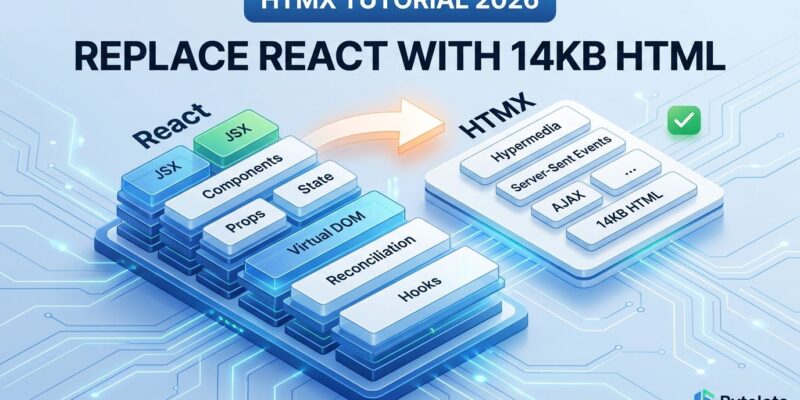
The hypermedia renaissance is real. HTMX has moved from niche enthusiasm to mainstream production in 2026, and the results are startling. When Contexte, a SaaS company, replaced their React UI with Django templates and HTMX, they cut their codebase by 67%—from 21,500 lines to 7,200—in just two months. The React version took two years to build. This is not an isolated case. Ten Django developers who migrated from React to HTMX in production discovered something unexpected: they are not going back. HTMX challenges the JavaScript framework orthodoxy with a radical proposition: extend HTML to do what it should have always done, without the 200-500KB bundles.
What Is HTMX?
HTMX is a 14KB JavaScript library that extends HTML with attributes for AJAX requests. The core philosophy, articulated by creator Carson Gross, is simple: “Any element can issue any HTTP request in response to any event.” Servers respond with HTML fragments instead of JSON, following a hypermedia-driven architecture. There is no build step. HTMX works with any backend that returns HTML—Django, Flask, Express, Go, Rails, Laravel, Spring Boot.
Here is a search input with auto-complete in HTMX:
<input type="text" name="q"
    hx-get="/search"
    hx-trigger="keyup changed delay:500ms"
    hx-target="#results"
    placeholder="Search...">
<div id="results"></div>
This input issues a GET request to /search 500 milliseconds after typing stops, but only if the content changed. HTMX inserts the response into the #results div. No JavaScript. No state management library. No build configuration.
The core attributes are:
hx-get,hx-post,hx-put,hx-delete— HTTP method and URLhx-trigger— When to fire the request (supports modifiers:delay,changed,throttle,every)hx-target— Where to insert the response (CSS selector)hx-swap— How to insert it (innerHTML,outerHTML,beforeend,afterend)
Why Developers Are Switching
The pain points HTMX solves are real. Maintaining two codebases—server-side and client-side—means context-switching between languages, synchronizing state, and managing API versioning. One healthcare startup senior engineer reported: “Dev productivity went through the roof. I can build something in minutes that would have taken hours before.”
Another developer noted that with React, “even making text changes can be too difficult for a junior developer.” With HTMX, “pretty much anyone can pick it up.” Full-stack features become accessible to inexperienced team members. One team lead found that team members were “way faster than before with HTMX and AlpineJS, could do quite a lot with minimal guidance.”
The Contexte migration is instructive. They replaced two years of React development in two months. Same functionality. 67% less code. No more dual codebase. No more Python-to-JavaScript context-switching. No more API versioning headaches.
Performance Reality
Numbers matter. HTMX delivers content 40-60% faster than React on first load for typical CRUD applications. On mobile devices, the gap is dramatic. A budget Android phone on a 3G connection renders an HTMX page in under one second. The same React app takes 5-10 seconds to become interactive.
Bundle sizes tell the story:
- HTMX: 14KB minified and gzipped
- React (minimal): 47KB+ before adding a router
- Real-world React apps: 200-500KB+ with React DOM, React Router, Redux, and application logic
- HTMX apps: 14-30KB total (interactivity driven by HTML attributes and server-side logic)
Specific metrics from production apps:
- React CSR (uncached JavaScript): 4.1 seconds until anything is visible
- React SSR (with server data fetching): 2.16 seconds LCP
- HTMX typical: Sub-second on mobile
The bundle size gap is not academic. It is developer experience at the expense of user experience. Most CRUD apps do not need React. We have been solving a problem we created.
When to Use HTMX (and When Not To)
HTMX excels for server-driven workflows with complex business logic but straightforward UI patterns: admin panels, dashboards, content management systems, form-heavy applications, internal tools, e-commerce. If your app is primarily CRUD operations with standard interactions, HTMX is a strong default.
Do not use HTMX for:
- Complex client state: Google Maps-level interactivity, collaborative editors, real-time multiplayer
- Offline-first applications: HTMX makes server round-trips for every interaction
- Mobile apps: Use React Native or native development
- Existing React expertise: If your team is deep in React and it is working, the switching cost may outweigh benefits
The fundamental trade-off is clear. HTMX makes more server round-trips. React can handle interactions client-side after the initial load. Different philosophies for different problems. The mistake is defaulting to SPAs when hypermedia suffices.
Getting Started with HTMX
Add HTMX to your HTML:
<script src="https://unpkg.com/htmx.org"></script>Add attributes to elements:
<form hx-post="/submit" hx-target="#response">
  <input type="email" name="email" required>
  <button type="submit">Subscribe</button>
</form>
<div id="response"></div>
Your server endpoint returns HTML:
# Django example
def submit(request):
    email = request.POST.get('email')
    # ... validate and save ...
    return HttpResponse('<p class="success">Subscribed!</p>')
HTMX swaps the response into #response. Form validation, database writes, business logic—all server-side, where it belongs.
For infinite scroll:
<div hx-get="/more-items"
     hx-trigger="revealed"
     hx-swap="afterend">
  Load More...
</div>
The revealed trigger fires when the element scrolls into view. The server returns more items as HTML. HTMX appends them after the trigger element.
Real-time updates via polling:
<div hx-get="/status"
     hx-trigger="every 2s"
     hx-swap="innerHTML">
  Checking status...
</div>
Every two seconds, HTMX fetches /status and updates the div.
The Bigger Picture
By 2026, HTMX is no longer just for enthusiasts. It is a primary choice for top engineering teams that prioritize speed and lower cognitive load. The JavaScript framework industrial complex has overcomplicated web development. Most apps do not need 500KB bundles and build pipelines. Web standards got it right the first time. HTMX proves that extending HTML beats replacing it.
Carson Gross, HTMX creator, puts it plainly: “HTMX tries to build on network architecture by enhancing HTML as hypermedia, rather than replacing that original architecture with fixed-format JSON Data APIs.” The philosophy values simplicity, backward compatibility, and high power-to-weight ratio.
The shift is philosophical as much as technical. SPAs became default architecture without questioning whether they solved real problems or created new ones. HTMX challenges that orthodoxy. For many applications—perhaps most—hypermedia-driven development is faster, simpler, and delivers better user experiences.
For more information, check out the official HTMX documentation and explore community examples and resources.