Visual Studio Code 1.110 shipped on March 4, 2026, with agent plugins, experimental browser tools, and a real-time debug panel—infrastructure that transforms AI coding from chat assistance to controllable, debuggable workflows. Moreover, the release introduces a plugin ecosystem built on Anthropic’s Model Context Protocol (MCP), enabling 30+ million developers to extend agents with prepackaged bundles of skills, commands, and external integrations. Microsoft’s message is clear: agents are no longer experimental features; they’re production-ready development infrastructure.
Agent Plugins Create an Ecosystem
Agent plugins are prepackaged bundles containing slash commands, MCP servers, agent skills, custom agents, and hooks. Furthermore, developers install them via the Extensions view using the @agentPlugins filter—just like VS Code extensions, but for AI agents. Default marketplaces include copilot-plugins and awesome-copilot, with support for GitHub repos or Claude-style marketplaces.
This enables specialization without bloat. Finance agents pull market data and run models. Security agents scan code and identify vulnerabilities. Consequently, each plugin bundles domain-specific capabilities into a single install, avoiding manual configuration of dozens of MCP servers and custom commands.
The Model Context Protocol (MCP) is the foundation—Anthropic’s open standard for connecting AI agents to data sources. It defines tools (actions), resources (data), and prompts (templates). Additionally, hundreds of pre-built MCP servers exist for GitHub, Slack, databases, and APIs. By adopting MCP, VS Code taps into this ecosystem. If MCP wins, AI tool integration becomes commoditized.
Browser Tools Enable Verification
Experimental browser tools let agents interact with VS Code’s integrated browser—navigating pages, clicking elements, reading content, and running Playwright code. Users enable workbench.browser.enableChatTools to share pages with agents.
The use case is automated testing. Developer: “Verify the login form rejects invalid credentials.” Agent: Opens browser, types wrong password, clicks submit, screenshots result, reports “Login shows ‘Invalid credentials’ error.” This is “show me, don’t tell me”—agents verify their own changes visually.
GitHub Copilot spins up VMs for automation but lacks integrated browsers. However, Cursor focuses on file editing and terminal commands. VS Code differentiates here for end-to-end testing workflows.
Debug Panel Makes Agents Transparent
The agent debug panel displays real-time chat events, system prompts, tool calls, and loaded customizations. Accessible via “Developer: Open Agent Debug Panel” or the Chat gear icon, it shows which prompt files, skills, hooks, and agents are active. Current limitations: local chat only, logs not persisted.
This solves the trust problem. Opaque agents work for autocomplete. For production workflows—refactoring codebases, deploying infrastructure, generating tests—developers need visibility. What prompt? Which tools? Why this decision? The debug panel answers in real time.
This is the maturation arc: AI autocomplete (2021-2023) → AI chat (2024-2025) → AI agents with debugging (2026). Therefore, enterprises won’t adopt agents they can’t audit. Microsoft knows this.
The Battle: Embedded vs AI-Native
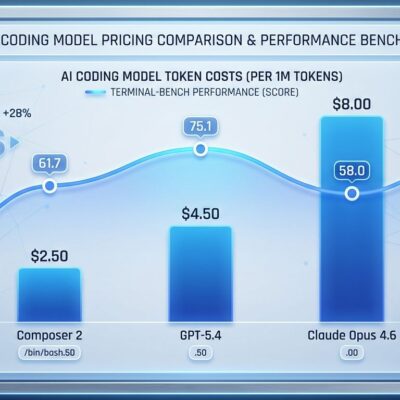
VS Code catches up to Cursor’s agent features while leveraging 30 million users, lower cost ($10 vs $20/month), and a massive extensions ecosystem. Benchmarks: Cursor solves 51.7% of tasks in 63 seconds; Copilot solves 56.0% in 90 seconds—30% faster but 8% less accurate.
The cost difference matters. A 20-developer team pays $5,040/year more for Cursor. Consequently, if speed doesn’t justify the premium, Copilot wins on TCO. VS Code bets developers won’t switch editors for agent features at 2x the price.
MCP standardization levels the field. Cursor has launch partners (AWS, Figma, Linear, Stripe), but VS Code taps the same MCP ecosystem. The question: Does Cursor’s agent-first design justify 2x cost, or does VS Code’s user base win through inertia?
Key Takeaways
- VS Code 1.110 marks AI agents’ transition from experimental to production-ready infrastructure
- Agent plugins built on MCP enable specialization through ecosystem model, avoiding integration fragmentation
- Browser tools enable automated testing and verification—agents can visually validate their own changes
- Debug panels provide real-time visibility into agent decisions, addressing enterprise audit requirements
- Competitive battle: Cursor’s agent-first design ($20) vs VS Code’s embedded convenience ($10) and 30M users
Cursor pioneered agent-first workflows and leads on cutting-edge features. Meanwhile, VS Code embeds agents into the world’s most popular editor at half the price. MCP standardization gives both access to the same ecosystem. The winner depends on what developers value: embedded convenience or specialized performance.
Agent plugins are experimental, but debug panels, browser tools, and session management work today. The question isn’t whether AI agents become standard—they already are. It’s which platform defines how developers use them.