 By ByteBot
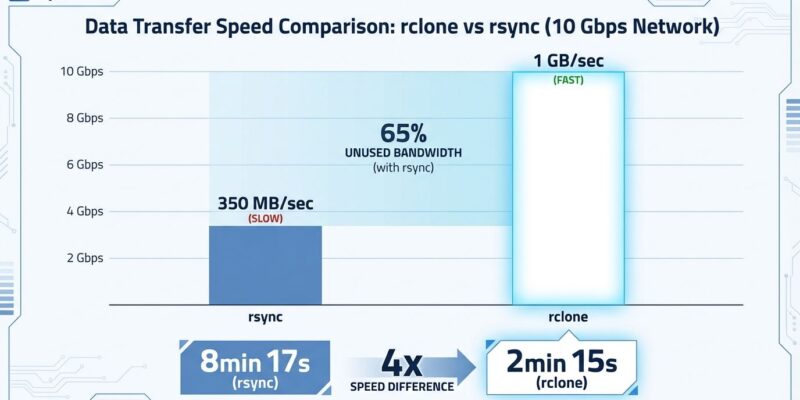
Jeff Geerling’s February 1, 2026 performance testing exposed a 4x speed gap between rclone and rsync for network file synchronization. While rsync maxed out at 350 MB/sec on a 10 Gbps network—leaving 65% of bandwidth unused—rclone saturated the full 1 GB/sec capacity through parallel transfers. The culprit: rsync’s single-threaded architecture processes one file at a time, a design that made sense in 1996 but leaves modern high-speed networks idle.
For sysadmins and DevOps teams managing terabyte-scale migrations, this isn’t academic. Moreover, it’s the difference between an 8-hour data center move and a 2-hour one. More importantly, it reveals that the bottleneck for many “slow transfers” isn’t bandwidth or storage speed—it’s the tool’s inability to use available resources.
The Single-Threaded Bottleneck
rsync’s fundamental limitation is architectural. Written in C as a single-threaded application, it processes files sequentially: File 1 completes, then File 2 begins, then File 3. This serial processing made sense in the 1990s when networks ran at 10-100 Mbps and single-core CPUs dominated. However, with 10 Gbps networks standard and 16-core servers common, rsync leaves resources idle.
Geerling’s real-world test quantifies the waste. He synced a 62.9 GB dataset containing 3,564 files from a NAS to a Thunderbolt 5 NVMe SSD over a 10 Gbps network. rsync took 8 minutes 17 seconds, averaging ~128 MB/sec. The network pipe sat 65% empty. In contrast, rclone completed the identical transfer in 2 minutes 15 seconds at ~1 GB/sec, saturating the full capacity. Same hardware, same files—only the tool changed.
The irony: organizations pay for expensive 10 Gbps infrastructure, then use a tool designed when dial-up modems were common. Consequently, rsync maxes out around 350 MB/sec regardless of network capacity. That’s 35% utilization on 1 GB/sec connections, 3.5% on 10 GB/sec. The bottleneck isn’t the pipe—it’s the single-threaded processing leaving it unfilled.
Speed vs Efficiency: The rsync Advantage
rclone’s 4x speed comes with a catch: it transfers whole files, not deltas. rsync’s delta algorithm sends only changed blocks within files, making it bandwidth-efficient for incremental backups where 95% of data is unchanged. Nevertheless, this isn’t a flaw—it’s a design trade-off that determines when each tool excels.
Consider a nightly backup scenario: 100 GB changed in a 10 TB dataset. rsync sends ~100 GB (only the delta blocks). rclone sends 100 GB (whole files that changed). Both consume similar bandwidth, but rsync’s efficiency shines on limited connections. On a 100 Mbps WAN link, rsync’s delta algorithm prevents saturating the pipe unnecessarily. However, on a 10 Gbps LAN where bandwidth isn’t constrained, rclone’s parallelism dominates.
This matters for ongoing operations. Furthermore, a video editor backing up a 500 GB Final Cut Pro project to a NAS over 10 Gbps benefits from rclone’s full file transfers parallelized. Conversely, a sysadmin syncing /etc configs nightly to a remote backup server over 100 Mbps wins with rsync’s delta algorithm saving bandwidth. The tool choice depends on bandwidth availability and change frequency, not habit.
Unlocking rclone’s 4x Performance
rclone’s speed isn’t automatic—it requires tuning. Two flags control parallelism: --transfers (number of files transferred simultaneously, default: 4) and --multi-thread-streams (parallel streams per large file, default: 0). Therefore, default rclone is only marginally faster than rsync. The 4x speedup demands configuration.
Geerling’s recommended command for high-speed LANs:
rclone sync \
  --exclude='**/._*' \
  --exclude='.fcpcache/**' \
  --multi-thread-streams=32 \
  --transfers=32 \
  -P -L --metadata \
  /source /destination
The --transfers=32 flag processes up to 32 files concurrently, saturating bandwidth through parallelism. Additionally, the --multi-thread-streams=32 flag splits individual large files into 32 parallel streams, leveraging multi-core CPUs. Together, they transform rclone from “slightly faster” to “4x faster” on 10 Gbps networks. Check the official rclone documentation for detailed flag explanations.
CPU usage scales accordingly. With --multi-thread-streams=4, expect 400% CPU usage (4 cores). At 32 streams, prepare for significant CPU consumption. Therefore, balance parallelism against available CPU capacity—start with --transfers=16 and --multi-thread-streams=8, then tune based on monitoring.
Choosing the Right Tool for Your Workload
After 30 years, rsync became the default reflex. This decision tree breaks the habit:
Use rclone when:
- High-bandwidth LAN (1 Gbps+) with bulk transfers
- Cloud storage destination (S3, Azure, GCS) — rclone is cloud-native
- Initial migrations or full copies (not incremental)
- Time-sensitive (4x speed matters)
Use rsync when:
- Incremental backups with <10% daily change
- Limited WAN bandwidth (100 Mbps or less) — delta algorithm essential
- Server-to-server sync over SSH
- Large files with small edits (databases, documents)
Sophisticated teams use both: rclone for initial 10 TB migration (4x faster = 75% time savings), then rsync for nightly incremental backups (bandwidth efficient). This hybrid approach optimizes for both RTO (Recovery Time Objective) and TCO (Total Cost of Ownership).
For comparison, rsync’s incremental backup command:
rsync -avz --delete \
  --exclude='*.log' \
  --progress \
  /source/ user@remote:/backup/
The -z flag compresses during transfer (critical for WAN), --delete mirrors source to destination, and the delta algorithm ensures only changed blocks transmit. On limited bandwidth, this efficiency outweighs rclone’s parallelism. Learn more about rsync vs rclone architectural differences.
Key Takeaways
- The 4x gap is real: Jeff Geerling’s February 1, 2026 testing shows rclone (2m 15s) vs rsync (8m 17s) for 62.9 GB on 10 Gbps networks—parallelism saturates bandwidth that single-threading leaves idle.
- Tune rclone for speed: Default
--transfers=4is marginally faster than rsync. Use--transfers=32and--multi-thread-streams=8on high-speed LANs to unlock 4x performance. - Delta algorithm matters: rsync sends only changed blocks, rclone sends whole files. For incremental backups (<10% change), rsync saves bandwidth on limited connections.
- Hybrid approach wins: Use rclone for initial bulk migrations (75% time savings), switch to rsync for ongoing incremental syncs (bandwidth efficiency).
- Choose intentionally: High-bandwidth LAN + bulk transfer = rclone. Limited WAN + incremental backup = rsync. Cloud storage = rclone (cloud-native design).
After three decades as the gold standard, rsync’s single-threaded architecture is the bottleneck on modern networks. rclone’s parallelism unlocks the bandwidth organizations already paid for. Therefore, the tool isn’t the problem—it’s using the wrong one for the job.