 By ByteBot
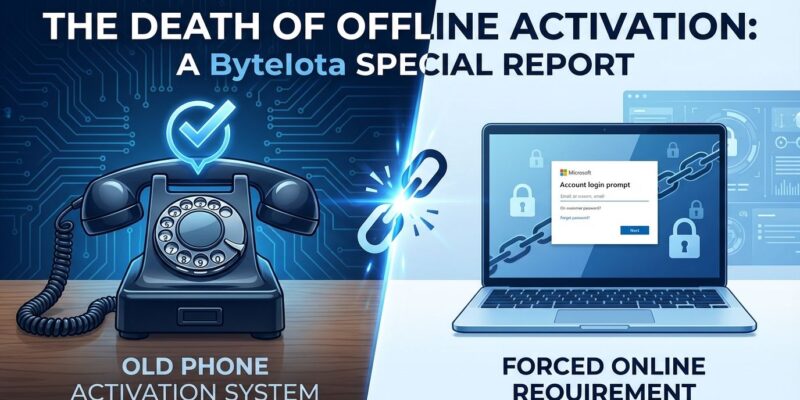
Microsoft silently killed phone-based offline activation for Windows and Office on December 3, 2025, discovered just days ago when users calling the traditional activation hotline heard an automated message directing them to an online-only portal at aka.ms/aoh. The change ends a 24-year-old activation method dating back to Windows XP. Despite Microsoft claiming “offline activation capabilities remain fully supported,” the new system requires internet access and a Microsoft account—making it offline in name only.
This breaks air-gapped development environments, manufacturing control systems, secure government facilities, and privacy-focused workflows. For developers and IT pros with truly offline systems, there’s no legitimate activation path anymore.
The Death of True Offline Activation
Phone activation was completely offline: call a toll-free number, read a 54-digit Installation ID to an automated system, receive a 42-digit Confirmation ID, and activate Windows without touching the internet. No account required, no tracking, no telemetry. Tom’s Hardware broke the story on January 3, reporting that Microsoft made the change without any official announcement.
However, the new web portal process requires visiting aka.ms/aoh from another device, signing in with a Microsoft account, entering the Installation ID, receiving a Confirmation ID online, and manually typing it into the offline machine. Microsoft calls this “offline” because you manually type a code, but you need internet and an account to get that code. It’s Orwellian doublespeak.
For systems without network cards, air-gapped environments, or secure facilities with no external network access, this is a death sentence. Moreover, hardware failure used to mean calling Microsoft and explaining the situation. Now it means permanently locked out.
Air-Gapped Systems and Developers Hit Hardest
Manufacturing plants run Windows XP and 7 on industrial control systems with 20-30 year lifecycles. These machines have no internet connectivity by design—connecting them to a network would be a security risk. When a drive fails or a motherboard needs replacing, phone activation was the only option.
One IT professional on Slashdot put it bluntly: “I maintain air-gapped boxes that run win 7, and two even still on XP. Manufacturers depend on offline activation for legacy control systems.” That dependency just evaporated.
Consequently, developers building secure systems or testing offline scenarios face the same problem. VMs and test environments intentionally isolated from the internet can’t activate anymore. Additionally, government facilities with SCIFs (Sensitive Compartmented Information Facilities) have no external network access—activation is now impossible without violating security protocols.
Hardware failures happen. Drives die, motherboards fail, components get replaced. Previously, phone activation provided recourse. Now there’s none.
Enterprise Gets KMS, Small Users Get Tracked
Large enterprises have a workaround: KMS (Key Management Service) servers on their local networks that activate Windows clients without internet. However, KMS requires 25+ Windows machines and Volume License agreements (Enterprise or Education editions only). Individual developers, small businesses, and home users don’t have access.
A security researcher on Slashdot confirmed the two-tier system: “Large organizations use KMS rather than phone activation. This change primarily affects individual users, not major enterprises.” Microsoft gives big customers autonomy while forcing small users online to be tracked.
The message is clear: if you’re big enough to negotiate a Volume License, you keep offline capabilities. If you’re an individual developer or small business, you get herded into Microsoft’s always-online, account-backed ecosystem with no escape.
Forced Online Means Forced Tracking
The new activation portal requires a Microsoft account, tying your Windows license to your online identity. Furthermore, this isn’t about activation—it’s about control. Once your license is tied to your account, Microsoft can track usage, collect telemetry, and build profiles.
Windows 11 already sets diagnostic data to “Full” by default (Windows 10 used “Basic”). Microsoft account requirements keep expanding—Windows 11 Home demands one, Pro increasingly pushes them, and workarounds like OOBE\BYPASSNRO have been systematically removed. As reported by Security Online, the pattern is unmistakable: eliminate offline options, force account integration, enable tracking.
Privacy-conscious users and developers are running out of recourse. Microsoft is closing every door to offline Windows usage. Phone activation is dead. Local account workarounds are disappearing. Next up: subscription-based activation. Mark my words.
Key Takeaways
- Microsoft killed phone-based offline activation on December 3, 2025, ending a 24-year-old feature with no official announcement
- The new “offline” activation requires internet access and Microsoft account—offline in name only, doublespeak in practice
- Air-gapped systems (manufacturing, secure facilities, development environments) are permanently locked out when hardware fails
- Enterprise customers with KMS servers (25+ machines, Volume License) retain offline activation; individual users and small businesses don’t
- Forced Microsoft account ties licenses to online identity, enabling telemetry collection and usage tracking as part of broader push to eliminate user autonomy
This isn’t just a technical change—it’s Microsoft systematically dismantling offline capabilities to force users into always-online, account-backed ecosystems. Therefore, expect more autonomy removal. For privacy-critical or air-gapped systems, Linux is looking better every day.