 By ByteBot
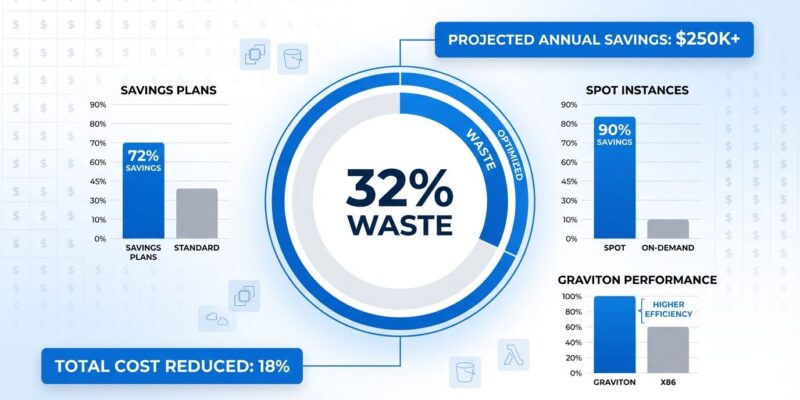
Organizations waste 32% of cloud spend in 2026 – $1 burned for every $3 spent on AWS, Azure, and GCP. The culprits aren’t mysterious: idle EC2 instances running 24/7 when needed 8 hours, over-provisioned databases using 10% of capacity, forgotten EBS snapshots accumulating charges, and hidden data transfer fees. This isn’t a technical problem. It’s structural. Cloud pricing is designed to favor providers – you pay for what you provision, not what you use – and default configurations promote overspending. However, concrete solutions exist: AWS Savings Plans deliver up to 72% discounts, Spot Instances offer 90% savings, and Graviton processors provide 40% better price-performance.
For developers and engineering teams, cloud waste isn’t abstract CFO metrics. It’s wasted budget that could fund features, delayed projects because “costs are too high,” and pressure to “do more with less.” Understanding where money disappears and how to recover it demonstrates business value and builds career-relevant FinOps skills. Average FinOps engineer salary: $128,365. Senior positions: $187,000-$253,000.
Where Cloud Money Disappears
Cloud waste comes from four sources. Idle resources account for 40% of waste – development and test environments running 24/7 when used Monday-Friday 9am-6pm (45 hours out of 168 hours per week). EC2 instances sitting at less than 5% CPU utilization for 30 days straight. Servers no one remembers launching still running months after projects complete.
Over-provisioning drives 30% of waste. Engineering teams launch t3.2xlarge instances when t3.medium would work because “let’s be safe.” Databases are sized for peak Black Friday load that happens one day per year, costing $2,100/month when a right-sized $525/month instance scaled up for one day would save $1,500/month. Storage configured as Standard when Infrequent Access or Glacier would cost 70% less.
Forgotten resources create 15% of waste – EBS snapshots that accumulate without deletion policies, Elastic IPs attached to stopped instances (still charged), old load balancers no one uses. Hidden fees account for 10%: data transfer between Availability Zones at $0.01/GB, NAT Gateway charges of $0.045/hour plus data processing, egress to internet that sneaks into bills.
Real example: A SaaS company grew to 150 customers, provisioned infrastructure for 1,000 during rapid growth, never right-sized after plateaus at 150. Cost: $15,000/month when $5,000 would work. Savings: $10,000/month or 67%. Another case: Engineering team of 20 runs dev/staging/test 24/7. Actual usage: 45 hours per week out of 168. Waste: 73% of compute hours. Auto-shutdown schedules recovered $8,000/month.
The Actual Numbers: How Much You Can Save
AWS cost optimization isn’t theoretical. Concrete savings numbers exist. AWS Savings Plans offer up to 72% discount versus on-demand pricing for committed usage. Example: 10 t3.large instances on-demand cost $7,296/year. With a 1-year Savings Plan: $2,044/year. Savings: $5,252 annually, or 72%. The commitment is flexible – apply to any instance family in the same region.
Spot Instances provide up to 90% savings for interruptible workloads like CI/CD pipelines, batch processing, or ML training. Batch processing on c6i.4xlarge on-demand costs $8,160/year. Spot pricing: $840/year. Savings: $7,320 annually, or 90%. The catch: AWS can terminate with 2 minutes notice when capacity is needed. Acceptable for stateless workloads, unacceptable for production databases.
Graviton processors deliver 40% better price-performance than x86 equivalents. An m5.2xlarge (Intel) costs $281/month. An m6g.2xlarge (Graviton ARM) costs $225/month for the same workload. Savings: $56/month per instance, or $672/year. AWS Graviton4 benchmarks show 23% faster database performance than Graviton3, and 41% faster than Graviton2. Migration effort: recompile for ARM64, which most modern stacks support. AWS offers t4g.small instances free for 750 hours/month through December 31, 2026 for testing.
Right-sizing saves 30-50% on compute costs. Target 40-60% average CPU utilization. Downsize instances with less than 20% utilization over 30 days. AWS Compute Optimizer is free and provides ML-powered recommendations. Most companies find hundreds of underutilized instances within hours.
Why Cloud Bills Are Broken by Design
Cloud waste isn’t a bug. It’s a feature. AWS has 630+ pricing dimensions across services – different pricing for the same resource in different regions, time-based pricing (per-hour, per-second, per-request), Reserved versus On-Demand versus Spot models, and dozens of configuration options per service. Default configurations favor over-provisioning. No auto-shutdown schedules. No commitment discounts applied automatically. Instance size recommendations default to “safe” (larger than needed). The pricing model is pay-for-what-you-provision, not pay-for-what-you-use. An idle EC2 instance at 0% CPU costs the same as one at 100% CPU.
Real incident: A developer got a $4,676 Google Cloud Run bill in 6 weeks with zero traffic. They migrated from App Engine following official documentation and Gemini CLI guidance. The bill arrived anyway. Community response on Hacker News: “Cloud billing systems are terrible at billing in a way that could be reasonably investigated.” Another thread highlighted that 81% of IT teams were directed to reduce or halt cloud spending, reflecting industry-wide pressure.
The self-hosted versus cloud debate persists. A Hacker News discussion compared $60,000 self-hosted infrastructure to a $2 million cloud equivalent. Commenters noted “we are paying for cables and HDDs man. ‘ancient’ tech is cheaper” at scale. Lyft spent $300 million on AWS in 2019. The break-even point for self-hosting is roughly $50,000-$100,000/month cloud spend, though this varies by company. Cloud wins on elasticity, global reach, and managed services. Self-hosting wins on predictable costs, no egress fees, and better margins at scale.
New 2026 Tools: Amazon Q and AI-Powered FinOps
AWS acknowledges the problem. Amazon Q launched as a FinOps assistant in late 2025, providing natural language cost queries via CLI and IDE. Ask “Why did my bill increase 40% last month?” and get instant root cause analysis. The tool identifies savings opportunities, estimates costs for new workloads, tracks costs against budgets, and identifies cost anomalies. Available to all customers at no additional cost.
AWS introduced the Billing and Cost Management MCP server, enabling AI assistants to access AWS cost data through Model Context Protocol. Developers can build custom AI agents on top of AWS billing services. The updated AWS Cost Explorer includes a Cost Comparison tool for automatic month-over-month spend analysis. AWS Compute Optimizer received ML improvements for right-sizing recommendations across EC2, Lambda, and EBS volumes.
Community skepticism remains high. Amazon Q is “much more intelligent than it was at the beginning of the year,” according to AWS, but developers want real-time cost visibility (not 24-hour delays) and simpler pricing, not AI assistants to explain complex bills. Tools help. They don’t fix the structural problem that cloud providers profit when customers overspend.
What Engineers Can Do Now
Five immediate actions require no executive approval. First, right-sizing. Use AWS Compute Optimizer (free) to identify underutilized instances. Target 40-60% average CPU utilization. Downsize instances with less than 20% CPU over 30 days. Test changes in staging before production. Typical savings: 30-50% on compute costs.
Second, implement auto-shutdown schedules for non-production environments. Tag resources by environment (dev, staging, prod). Write Lambda functions to stop/start on schedule – stop at 6pm Friday, start at 9am Monday. Exclude production, automate everything else. Typical savings: 60-70% on dev/test environments. An engineering team of 20 saved $8,000/month this way.
Third, clean up storage. Delete old EBS snapshots – implement 90-day retention for non-critical backups. Apply S3 lifecycle policies to move objects to Infrequent Access after 30 days, Glacier after 90 days. Use S3 Intelligent-Tiering for automatic cost optimization when access patterns are unknown. Detach Elastic IPs from stopped instances or delete them (charged $0.005/hour when not attached to running instance).
Fourth, replace on-demand instances in CI/CD pipelines with Spot Instances. Build servers, test runners, and batch processing tolerate interruptions. Savings: 90% versus on-demand pricing. Keep production on Reserved Instances or Savings Plans. Use Spot for everything stateless.
Fifth, set up monitoring and alerts. Enable AWS Cost Anomaly Detection at 10% variance threshold (not the default 20%) to catch waste earlier. Create monthly budget alerts. Implement cost allocation tags by team/project/environment to track spending and create accountability. Tag enforcement via AWS Organizations Service Control Policies prevents resource creation without required tags.
FinOps as a Career
Cloud FinOps Engineers are in high demand because companies struggle with unexpected cloud bills. Average salary: $128,365 annually in the United States. Senior positions range from $187,000 to $253,000. Currently, 184 positions pay $175,000+ on Indeed. The role is relatively new but growing fast, expanding from tech into finance, healthcare, and retail.
FinOps combines technical skills (cloud architecture, cost analysis) with business understanding (budget planning, financial modeling). Engineers who optimize costs have career leverage. As cloud adoption grows, professionals who manage and optimize costs become more valuable. AWS offers a “FinOps for GenAI” course specifically for managing AI workload costs. The FinOps Foundation standardizes practices, certifications, and training.
This isn’t just “save your company money.” It’s skill development. FinOps knowledge is marketable. Salaries are high. Demand is growing. Position optimization as career advancement, not cost-cutting drudgery.
Key Takeaways
Cloud waste is structural. Providers profit from complexity and defaults that promote overspending. You pay for what you provision, not what you use. AWS has 630+ pricing dimensions. Default configurations favor over-provisioning. The onus is on customers to optimize, not providers to prevent waste.
Concrete solutions exist. Savings Plans offer 72% discounts. Spot Instances provide 90% savings. Graviton delivers 40% better price-performance. Right-sizing saves 30-50% on compute. Auto-shutdown schedules cut dev/test costs by 60-70%. These aren’t estimates – they’re AWS’s actual pricing tiers.
Engineers control optimization. You set instance sizes, implement auto-shutdown, clean up snapshots, and configure alerts. No budget approval needed. Use AWS Compute Optimizer (free) to identify waste. Set Cost Anomaly Detection at 10% threshold. Test Graviton with free tier (750 hours/month through December 2026). Start small. Measure impact. Demonstrate value.
FinOps skills are valuable. Average salary $128,365. Senior positions $187,000-$253,000. Demand growing across industries. Combining technical and business skills creates career leverage. This is professional development, not just cost reduction.
The fundamental problem remains: cloud providers design systems where overspending is default, and optimization requires expertise. Tools like Amazon Q help, but they don’t change incentives. Until pricing simplifies and defaults favor customers, engineers must stay vigilant. Waste isn’t going away. Learning to fight it is now a core skill.