 By ByteBot
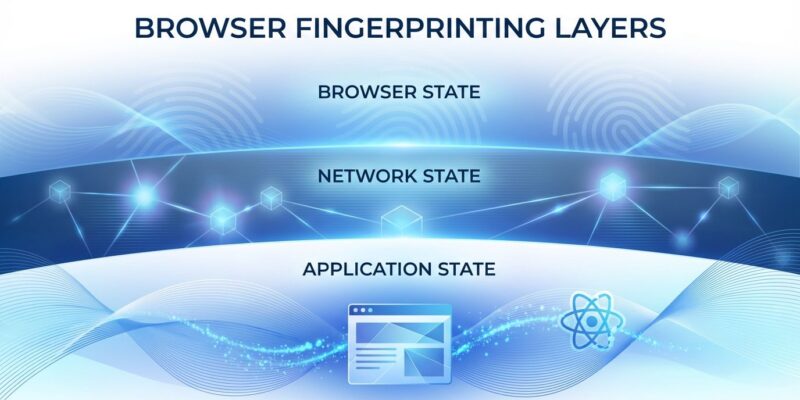
A security researcher reverse-engineered ChatGPT’s Cloudflare Turnstile verification system this week and discovered it reads far more than standard browser fingerprints. Every message you send triggers a silent check of 55 properties across three layers: your browser (GPU, screen, fonts), Cloudflare’s network (IP, city, region), and your React application state. Yes, application state—Turnstile verifies you’re running a fully hydrated React app, not just checking if you’re human.
The finding, published March 28-30 and trending on Hacker News today, raises questions about what “bot detection” actually means when it includes reading framework internals that developers never documented for external access.
Turnstile Reads Your React Router State
This isn’t standard fingerprinting. Cloudflare’s system checks browser APIs like WebGL and screen properties, sure—but it also reads __reactRouterContext, loaderData, and clientBootstrap. These are React Router v6+ internals that only exist when the ChatGPT single-page application has fully rendered and hydrated.
The researcher calls this “bot detection at the application layer, not the browser layer.” Turnstile doesn’t just ask “are you human?” It asks “are you running this specific React application?” A headless browser that loads HTML but doesn’t execute JavaScript bundles fails. A bot framework that stubs browser APIs without actually running React fails. It’s sophisticated—and invasive.
React Router’s loaderData contains route results, data fetched before a route renders. __reactRouterContext holds internal routing state. These aren’t public APIs. They’re implementation details. Cloudflare accessing them means bot detection now depends on framework internals that can change between versions. If you’re building a React app, Cloudflare might be reading state you never intended to expose.
55 Properties Across Three Layers
The researcher decrypted 377 Turnstile programs from network traffic and documented exactly what it checks. The breakdown: 38 browser properties (WebGL vendor/renderer, screen dimensions, hardware concurrency, device memory, font measurements), 5 Cloudflare network properties (IP city, latitude, longitude, region injected server-side), and 3 React application properties.
The browser layer is standard fingerprinting—GPU details, screen resolution, available fonts. The network layer leverages Cloudflare’s edge to inject geolocation data. But the application layer is new. It’s one thing to check if a browser has WebGL. It’s another to verify that React Router has initialized routing contexts and hydrated server-rendered content.
Moreover, Turnstile persists your fingerprint to localStorage under key 6f376b6560133c2c. That creates a cross-session identifier that survives clearing cookies. Combined with behavioral biometrics—keystroke timing, mouse velocity, scroll patterns from Cloudflare’s Signal Orchestrator—this builds a persistent digital signature. Calling it “privacy-preserving” feels generous when it tracks 55 properties and stores identifiers locally.
Reverse Engineering the “Encryption”
How did the researcher decrypt this? Cloudflare obfuscates Turnstile’s code, but the “encryption” is XOR with keys embedded in the same payload. The researcher extracted the p token from the prepare request, retrieved the 28,000-character base64 blob from the response, and XORed them. Then they located a VM instruction with a float literal (like 97.35) serving as the inner XOR key.
Here’s the simplified decryption:
# XOR decryption (simplified)
outer = json.loads(bytes(
    base64decode(dx)[i] ^ p_token[i % len(p_token)]
    for i in range(len(base64decode(dx)))
))
# Extract float literal key from VM instruction
# XOR inner blob to reveal fingerprinting program
The researcher decrypted 377 programs with 100% success. As they note: “The ‘encryption’ is XOR with a key that’s in the same data stream. It prevents casual inspection. It does not prevent analysis.” Cloudflare’s obfuscation serves operational purposes—hiding the checklist, preventing replay attacks, keeping OpenAI from reading raw fingerprints—but it’s not cryptographic protection. Security researchers can still analyze what Turnstile actually does.
Developer Frustration and Scraping Hypocrisy
The Hacker News thread reveals developer frustration. One recurring theme: OpenAI trained ChatGPT on scraped web data, then aggressively fingerprints users to block bots from accessing ChatGPT itself. The irony isn’t lost. “Without all the scraping openai has done, there would have been no ChatGPT,” one commenter wrote.
Developers also questioned the UX choice. Why block typing until verification completes? Why not buffer input locally and validate after submission? Blocking keystrokes creates friction. Website operators chimed in with real costs: AI scraper traffic pushed one site’s monthly bill from $3 to $800. “60% of our traffic is bot, on average.” The bot problem is real—but does that justify reading React state without disclosure?
Security vs. Privacy: Where’s the Line?
OpenAI’s integrity team defends this. The checks protect free ChatGPT access by ensuring compute reaches real users, not attackers. Cloudflare’s Turnstile documentation calls it “privacy-preserving” and claims it “does not have the ability to directly identify any individuals from any of the Signals.”
However, W3C’s fingerprinting guidance warns that browser fingerprinting “may occur without the user’s knowledge or consent” and “allows tracking across origins.” Under GDPR, browser fingerprinting is considered personally identifiable information requiring explicit consent. Violations carry fines up to €20 million or 4% of global revenue. Whether React state reading falls under that is unresolved, but the 55-property fingerprint with localStorage persistence looks a lot like cross-session tracking.
The researcher’s work shows what “bot detection” actually means: not just checking if you’re human, but verifying you’re running a specific application with fully hydrated React state. It’s effective against sophisticated bots. It’s also opaque. Every ChatGPT message triggers this. Most developers had no idea. That’s the problem.
Key takeaways:
- Turnstile checks 55 properties including React Router internals (
__reactRouterContext,loaderData) - Verifies full SPA hydration, not just browser presence—”application layer” bot detection
- localStorage persistence creates cross-session identifiers surviving cookie clears
- XOR “encryption” is analyzable despite obfuscation (377 programs decrypted)
- GDPR considers fingerprinting PII requiring consent; React state reading uncharted territory
The full technical breakdown is in the original research. If you build React apps or use ChatGPT daily, it’s worth understanding what’s happening under the hood. The fingerprinting is sophisticated. Whether it crosses the line from security to surveillance depends on where you draw that line.