 By ByteBot
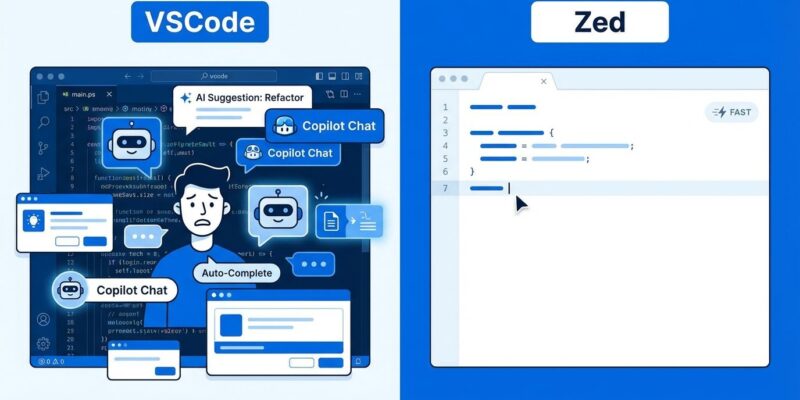
Microsoft is losing VSCode developers to Zed because of forced AI features. A prominent developer blog post “I switched from VSCode to Zed” hit Hacker News this week (250+ comments, Jan 6 2026), crystallizing a growing frustration: “every update there are new AI-related features that I need to figure out how to disable.” VSCode isn’t literally forcing developers to use GitHub Copilot—it’s technically optional with a free tier—but the AI features are inescapable in the UX, persistent despite being disabled, and degrading performance. Developers are fed up, and they’re switching to Zed for the speed and stability VSCode used to have.
The Problem Isn’t Copilot—It’s That You Can’t Turn It Off
The controversy isn’t that Copilot exists. It’s that AI features persist in VSCode’s UI and workflow even when disabled. Developers report that each VSCode update introduces new AI features enabled by default—chat panels, inline suggestions, terminal autocomplete—requiring constant maintenance of settings files to disable them.
One developer described accumulating dozens of AI-related toggles just to keep VSCode usable:
{
  "github.copilot.enable": false,
  "editor.inlineSuggest.enabled": false,
  "terminal.integrated.suggest.enabled": false,
  "editor.suggest.showCopilot": false,
  "chat.enabled": false
  // ... dozens more accumulate with each update
}
Specific complaints from the blog post include forced Copilot UI reappearing after updates (even when disabled), unwanted terminal inline suggestions conflicting with zsh autocomplete, and new “Next Edit Suggestions” and “Agent Mode” features shipping without opt-in. The VSCode official site confirms the rapid AI integration: Agent mode, Next Edit Suggestions, free Copilot tier—all prominently marketed.
Developers want control over their tools. When every update introduces features they don’t want, that’s bloat, not improvement. Microsoft treats “more AI” as inherently better when developers are saying “I just want a fast, stable editor.”
VSCode Performance Degradation: AI Bloat Makes It Slower
Multiple developers report VSCode has become noticeably slower and less stable over time, with increased crashes and sluggish performance despite hardware improvements. The blog author states VSCode “became more buggy, feeling even slower, and crashing frequently” compared to years of stable use.
After switching to Zed: “noticeably faster and more responsive than VS Code. Over two weeks, I haven’t run into any crashes or glitches.” Another Zed user (React Core Team member) echoed: “My god it is so fast. Boot time, UI interaction, typing latency. I feel it.”
The technical gap is real. VSCode is built on Electron (Chromium + Node.js), inherently heavier than native apps. Zed is built in Rust with multi-core CPU and GPU utilization, delivering native performance. AI features add computational overhead even when “disabled”—background processes persist.
Performance is a feature. Developers work in their editor 8+ hours a day—typing latency, boot time, and stability matter. When Microsoft ships AI features faster than they fix performance regressions, they’re telling developers “AI hype matters more than your experience.” That’s when people switch.
Zed Editor Wins on Performance and Respect for Developers
Zed editor is the primary beneficiary of VSCode AI bloat, attracting developers who prioritize performance and stability over extension ecosystems. Built in Rust by Atom and Tree-sitter creators, Zed offers sub-second boot times, minimal typing latency, and zero crashes reported in user testimonials—everything VSCode used to be.
Zed’s advantages are clear: noticeably faster and more responsive (blog author), zero crashes in 2-week trial vs VSCode “crashing frequently,” familiar UX for easy switching (similar keybindings, interface), AI features that are optional and non-intrusive, and built-in real-time collaboration (screen sharing, project sharing, chat).
To be fair, Zed has limitations. The extension ecosystem is smaller (hundreds vs VSCode’s 40,000), Python LSP setup took “half a day” (not out-of-box like Go), and there’s no GitLens equivalent (major git diff viewer). But here’s the point: developers are willing to leave VSCode’s massive extension ecosystem for Zed’s performance. That proves how bad the VSCode AI bloat problem has become.
Ecosystem lock-in is powerful—switching tools is hard. When Microsoft’s AI strategy is strong enough to overcome that lock-in, they’re misreading the market badly.
Microsoft’s AI-First Strategy Backfires
Microsoft’s rapid AI feature shipping prioritizes market positioning (being seen as “AI-first”) over developer experience (stable, fast tools). The result is update fatigue, settings bloat, and performance degradation—the opposite of what developers want from their code editor.
The evidence is clear. VSCode’s official marketing: “Use AI features in VS Code for free – No trial. No credit card required.” Features ship rapidly: Agent mode, Next Edit Suggestions, chat interface, model flexibility (Claude/GPT/Gemini). Meanwhile, Microsoft CEO Nadella defends AI against “slop” criticism while users complain about AI UX bloat.
The developer response speaks volumes: 250+ Hacker News comments on “I switched from VSCode to Zed” show a divided community. The blog author’s conclusion: “VS Code finally has competition, and I’d like to think this isn’t just an opinion piece about one developer’s preferences.” Growing Zed testimonials from high-profile developers (React Core Team, D3 creator, Elixir creator) prove this isn’t isolated frustration.
This is a case study in misaligned incentives. Microsoft wants to be seen as an AI leader (market positioning), but developers want tools that work well (product quality). When those goals conflict, users vote with their feet—or in this case, with their editors. The exodus to Zed is a warning sign Microsoft should heed.
Developer Autonomy Over Vendor Hype
The underlying issue is developer autonomy: we should choose our tools and features, not have vendors decide for us. AI features aren’t inherently bad—Copilot helps many developers—but forcing them on users who don’t want them, through persistent UI and update churn, violates developer trust.
Copilot is technically optional (free tier, can be disabled). But UI persistence, update churn, and default-on features make it feel forced. Developers maintain growing lists of disable-toggles in settings.json. Each update requires reconfiguring preferences (not respecting user choices).
What good looks like: make AI opt-in, not opt-out. Respect disabled settings across updates (don’t re-enable what users turned off). Prioritize stability over feature velocity. Let developers choose when and how to use AI, not vendor roadmaps.
Developer tools exist to serve developers, not vendor strategies. Microsoft can ship all the AI they want—but make it opt-in, respect disabled settings, and prioritize stability over hype. If they don’t, more developers will switch to tools that do.
Key Takeaways
- Microsoft’s AI bloat is real: VSCode ships AI features faster than developers can opt out, creating UI clutter and performance degradation despite technical “optionality”
- Performance matters more than features: Developers are abandoning VSCode’s 40,000 extensions for Zed’s native speed—a powerful signal Microsoft is misreading the market
- Update fatigue breaks trust: Constant re-enabling of disabled AI features and growing settings.json toggles show Microsoft prioritizes AI hype over developer experience
- Developer autonomy wins: Make AI opt-in (not opt-out), respect user choices across updates, and prioritize stability over feature velocity—or lose users to competitors who do
- Try alternatives: If VSCode AI bloat frustrates you, give Zed a 2-week trial—the performance difference is significant enough to overcome ecosystem lock-in