
 By
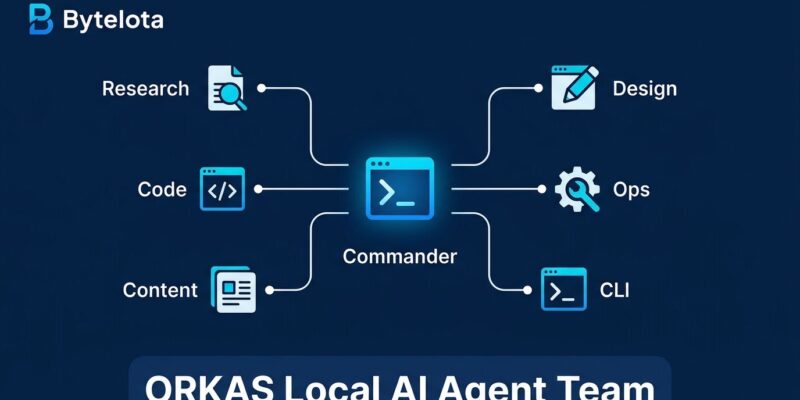
Developers have accumulated a small zoo of AI tools — Claude Code in one terminal, a browser tab for research, a writing assistant in another, an image generator somewhere else. Each one does its job in isolation. Orkas, an open-source MIT-licensed desktop app that hit 7,000 GitHub stars this week, proposes a different model: a single Commander coordinates a team of specialist agents, all running locally, all using your own API keys. No orchestration code required.
One Commander, Many Workers
The core concept in Orkas is a Commander LLM that receives a goal, decomposes it into tasks, and routes work to the right agents. You do not write YAML or Python to configure this — you chat with the Commander and it decides who to involve. Under the hood, the Commander uses three routing patterns: delegating and returning results, transferring remaining work entirely, or spinning up isolated sub-tasks. For most users that detail is invisible; what you see is your goal getting tackled by multiple specialists in sequence or in parallel.
The part worth highlighting for developers: Orkas treats Claude Code, Codex, and OpenCode as external workers it can drive. You are not choosing between Orkas and your existing coding CLI — you can keep using Claude Code for deep coding work and have Orkas coordinate it alongside research, content generation, and documentation as part of a larger task. These are complementary layers, not competing tools.
Local-First, Any Model
Orkas keeps all data — conversations, memory, files, API keys — on your local disk by default. Model calls go directly from your machine to whichever provider you use: OpenAI, Anthropic, Google, DeepSeek, Qwen, or a local endpoint like Ollama or LM Studio. Nothing goes through an Orkas-owned relay. The packaged app ships with 500 free credits so you can try it without supplying API keys at all; building from source requires no account. For developers who are unwilling to send proprietary codebases or internal documents to a third-party cloud service, this architecture matters.
What 16 Agents Actually Covers
Orkas ships 16 built-in specialist agents that span more ground than most multi-agent tools:
- Research: DeepResearcher produces evidence-grounded reports with flagged contradictions. SeoGeoAgent runs technical and content audits.
- Development: ProductDeveloper implements requirements and fixes bugs; UIDesigner produces HTML-first UI from goals and design materials.
- Content and media: ContentWriter, PptMaker, ImageStudio, VideoStudio, VoiceStudio — a full production chain.
- Operations: OfficeWorker handles batch Word/Excel/PDF generation. Four e-commerce agents handle research through analytics.
Projects in Orkas bind these agents together. A project holds your goal, rules, persistent memory, and attached files — so when you return to a task the next day, no context gets lost. Scheduled automations (hourly to monthly) and an auto-advance feature let the team move through a backlog without constant prompting.
Agents That Learn From Themselves
When the app is idle, background reviews kick in. The system examines recent agent activity, updates per-agent competence notes and reusable learning strategies, and crystallizes new skills — meaning a complex multi-step workflow you ran once becomes an invocable skill the Commander can call directly next time. The process is signal-triggered with cooldowns, not automatic after every task, and the reviews may conclude there is nothing worth recording. It is modest self-improvement rather than dramatic self-modification, but it points toward AI tooling that builds institutional memory over time instead of starting fresh each session.
Getting Started
macOS and Windows users can download the packaged installer from the Orkas website. Linux users and developers who want full control can build from source:
git clone https://github.com/Orkas-AI/Orkas.git
cd Orkas
./run.sh
After launch, go to Settings → AI Providers, add your API key for whichever model you want to use as Commander (Claude Sonnet or GPT-4-class models work well), and start chatting. The setup guide at CodePick covers the full configuration flow. Paid plans start at $11.99/month for cloud sync and additional credits; the free tier with your own keys has no meaningful restrictions.
The Verdict
Orkas is the right tool if your work crosses domains — you are writing, researching, building, and generating assets — and you want those tasks coordinated rather than context-switching between tools. GitHub Octoverse 2026 data shows agents now initiate 40% of pull requests; the problem has shifted from “can agents do this?” to “how do I coordinate agents without drowning in orchestration overhead?” Orkas answers the second question with a desktop app instead of a framework.
If your work is primarily coding, Claude Code and Codex remain sharper tools for that specific job. But if you find yourself stitching together multiple AI tools on the same project, Orkas — and its transparent comparison with Claude Code — is worth 10 minutes to install and try.


