 By ByteBot
Apple’s first foldable iPhone ships in 17 days. Pre-orders open October 16. If your iOS app hasn’t been tested against the iPhone Duo’s 7.6-inch inner display, a compact-compact size class combination you’ve never seen before, and two front cameras that occlude your UI — you have less than three weeks to find out what breaks. This is not a “nice to have” update cycle. It’s a hard deadline.
Two Displays, Two Front Cameras, Five Layout States
The iPhone Duo has a 5.4-inch outer display and a 7.6-inch inner display. Both run iOS 27.1. When open, the device reports a regular-regular size class — something no previous iPhone has ever done. When closed in landscape, it reports compact-compact, another combination that has never existed on an iPhone. Your app will run across five distinct layout states, and most existing layout code was written assuming none of them.
The two front cameras matter because iOS 27.1 treats them as reserved regions. The outer front camera always occludes; the inner front camera occludes when active. If your UI places content at fixed coordinates near the top of the screen, you may be putting it directly under a camera. Apple’s official iPhone Duo prepare page has the full list of layout changes required by the new form factor.
The Three iOS 27.1 APIs That Actually Matter
Apple added a focused set of fold-aware APIs in iOS 27.1. You do not need all of them for every app, but you need to know which ones apply to yours.
ArrangementView and UIArrangementViewController
This is Apple’s answer to “how do I lay out two things around a fold.” You hand it a primary and a secondary view controller. It decides whether to split them side-by-side or stack them, and animates the transition when the device opens or closes. UIKit:
let arrangementVC = UIArrangementViewController()
arrangementVC.setViewController(PlayerViewController(), for: .primary)
arrangementVC.setViewController(TranscriptViewController(), for: .secondary)
arrangementVC.updateArrangement(.split.axes(.horizontal))
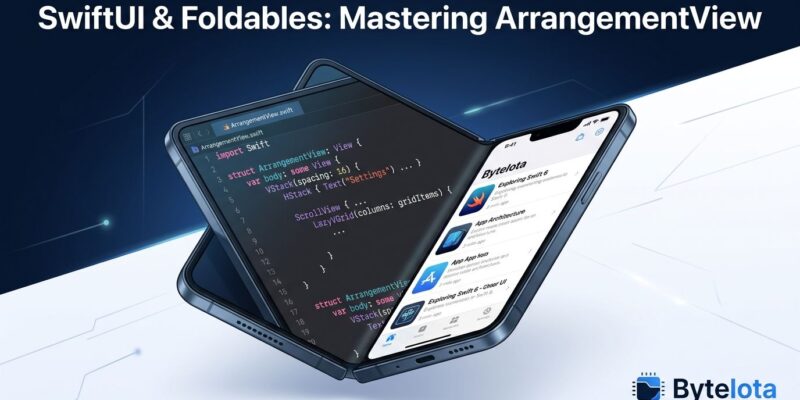
SwiftUI’s ArrangementView works the same way — pass in two views, let the system handle the rest. If you have a detail pane, a transcript, an inspector, or any companion view in your app, this API should replace whatever you built. The Apple Tech Talk on preparing your app for iPhone Duo walks through ArrangementView end-to-end.
ReservedRegion
The fold and the cameras are physical obstacles. UIView.ReservedRegion tells you where they are. Division regions describe the fold — do not place interactive controls across the hinge. Occlusion regions describe the cameras. Query it in SwiftUI via reservedRegions(kind:options:) on GeometryProxy, or the equivalent UIKit call on UIView. Do not guess where the fold is — measure it.
Hinge API
The hinge API (.onHingeChange in SwiftUI, UIHingeInteraction in UIKit) reports a continuous fold angle from 0° (closed) to 180° (fully open). Use this for animations and interactive effects — not layout decisions. That is what ReservedRegion is for. Mixing the two leads to layouts that flicker on every degree of rotation. Working code samples are available in artemnovichkov’s iPhone-Duo-by-Examples repository on GitHub.
What Will Silently Break in Your Existing App
Three patterns produce the most breakage, and all three look fine in an iPhone 16 simulator:
- UIScreen.main.bounds — a two-display device makes this ambiguous. The value depends on which display is active, and it changes. Replace it with the window’s bounds or the view’s frame.
- UIDevice.current.orientation — on iPhone Duo, device orientation does not describe app shape. Your layout space is defined by which display is active and the current size class, not the gyroscope.
- Compact-compact assumptions — if your layout code has no branch for compact-compact, the closed-landscape state is untested. Add it, or use adaptive containers that handle it automatically.
The worst silent failure: apps that branch on userInterfaceIdiom == .phone receive a regular-regular size class on the inner open display and fall into unexpected code paths — because the phone branch never anticipated regular-regular. InfoQ’s iPhone Duo API breakdown covers exactly which code patterns break and why.
How to Test Today — No Hardware Required
Xcode 27.1 beta is available on the Apple Developer portal now. It ships with an iPhone Duo simulator. Once installed, add the device via Device Hub and run through these four poses:
- Closed portrait (outer display, compact-regular)
- Closed landscape (outer display, compact-compact) — the one most apps fail
- Open portrait (inner display, regular-regular)
- Open landscape (inner display, regular-compact)
The most important test is the transition: open the phone mid-session. Does your app reload content? Does navigation state survive? Does scroll position reset? Users will open their phones constantly. If your app treats it like a cold launch, it will feel broken.
Known simulator gaps: StandBy is unavailable, most app extensions cannot be debugged in the simulator. A physical device will expose edge cases the simulator misses, but simulator testing will catch the majority of layout failures before October 23.
Five Steps to Complete Before Pre-Orders Open
- Install Xcode 27.1 beta and add the iPhone Duo simulator from Device Hub.
- Search your codebase for
UIScreen.main,UIDevice.current.orientation, andstatusBarOrientation. Replace them. - Run your app in all four Duo poses. Log every layout that looks wrong.
- Anywhere you have a companion pane or detail view, evaluate whether
UIArrangementViewControllerorArrangementViewis the right container. - Submit your update before October 23. App Store review typically takes 24-48 hours. You have time — but not much.
The iPhone Duo starts at $1,999. The users who buy it on day one are exactly the kind of high-engagement customers who leave App Store reviews. Getting your app right before launch is cheaper than repairing a one-star reputation after it.