 By ByteBot
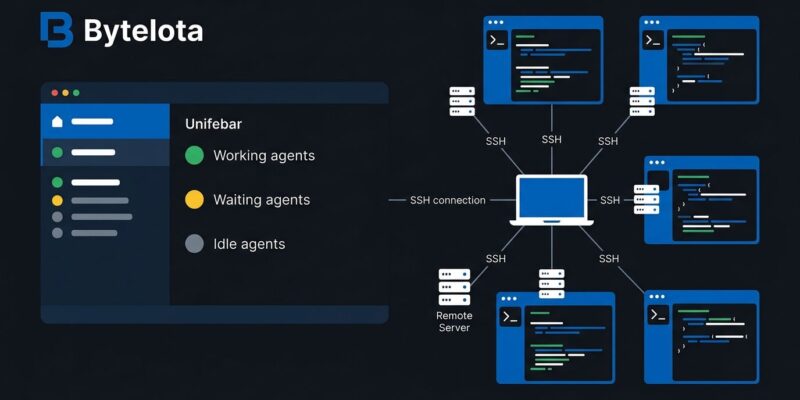
Herdr 0.9 dropped this week with the feature the community has been pushing for since launch: multi-machine support. If you run AI coding agents across more than one box — a desktop, a remote dev server, anything reachable over SSH — you no longer manage each machine from a separate terminal session. Add a machine once, and its workspaces, tabs, and agents appear in the same sidebar as your local ones. Disconnect, and your agents keep running. The other machines stay connected.
This is the version where Herdr stops feeling like a clever local tool and starts feeling like actual infrastructure.
What the multi-machine feature actually does
Before 0.9, getting a remote view meant SSHing into the target machine and running herdr --remote to attach as a thin client — one machine at a time, one terminal tab per box. The workflow for anyone running agents on two or three machines was essentially: tab through terminals, check what’s blocked, repeat.
0.9 changes the underlying model. The outer UI now renders on the client. Each machine’s Herdr server owns its own sessions and processes. The client pulls those independent servers into one TUI. A lost connection to one machine does not touch the others.
The setup is a single command:
herdr machine add user@remote-host.example.comHerdr checks the SSH connection, verifies the binary on the remote, and asks before installing or updating anything. Once added, that machine’s agents show up in your sidebar alongside local ones. Switch machines without opening a new client. Disconnect, reconnect — the agents were never waiting on you.
For teams using Tailscale or machines on local networks, this works the same way. Any SSH-reachable host is a candidate. The official documentation covers the full setup flow, including named remote sessions with --remote-session.
What else shipped in 0.9
The multi-machine feature is the headline, but 0.9 has a few other changes worth knowing about.
- Multi-client tab independence: Multiple clients can now connect to the same Herdr server and view different workspaces and tabs independently. When two clients share a tab, the one that interacted with it last controls the pane size.
- Muse agent detection: Herdr now detects Muse agent states — idle, working, waiting for approval, waiting on a question — the same way it handles Claude Code and Codex. If your workflow includes Muse, the sidebar now gives you an accurate picture.
- Wayland clipboard fix: Clipboard copies no longer freeze Herdr while wl-copy serves the selection. Linux users on Wayland will notice this immediately.
- Mouse selection behavior: Selections stay visible and copyable while terminal output continues. Ctrl+C and Cmd+C copy a selection even before a delayed mouse release.
- Sidebar theming: Text and metadata tokens can change color, boldness, and dimming based on values. Custom themes support separate light and dark color overrides.
How to get 0.9
If you installed via the official script, upgrade with one command:
herdr updateFresh install on Linux or macOS:
curl -fsSL https://herdr.dev/install.sh | shOr via Homebrew on macOS:
brew install herdrFull v0.9.0 release notes are on GitHub. The Herdr team also published Connecting the machines, which covers why the architecture changed the way it did — worth reading if you want the full picture on how the client/server split now works.
Where Herdr goes from here
The 0.9 release comes alongside a $6M seed round led by Bessemer Venture Partners, with Y Combinator and angels including Shopify CEO Tobi Lütke. The hiring focus is Rust, terminals, and agent runtime performance. That’s a signal about where the roadmap is pointed: stability at scale and more agent integrations as the field keeps fragmenting.
Herdr has been the tool developers reach for when running serious agent workloads for most of 2026. Version 0.9 extends that to wherever those workloads actually run — not just your laptop.