 By ByteBot
Node.js 24 — the current LTS — runs TypeScript files natively by default. No ts-node. No tsx. No build step. You point node at a .ts file and it runs. The question developers are actually asking isn’t “is this possible?” It’s “when can I actually make the switch?” The answer is more nuanced than the hype suggests, and getting it wrong will cost you runtime surprises.
What Node 24 Actually Does With Your TypeScript
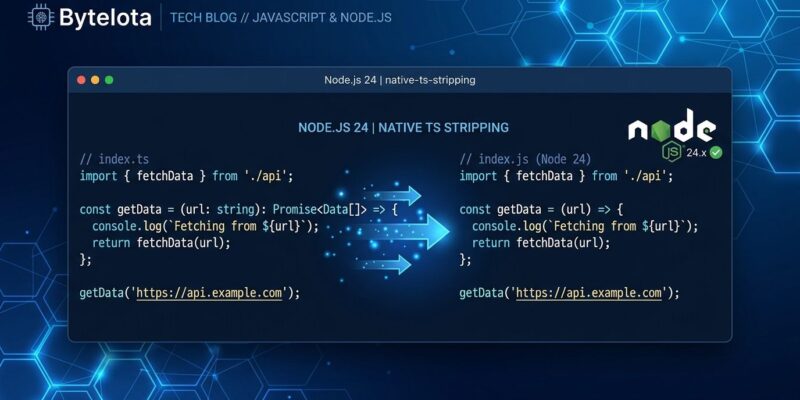
Node 24 uses a module called amaro — a thin wrapper around SWC, the Rust-based TypeScript parser compiled to WebAssembly. When you run node server.ts, amaro strips your type annotations, interfaces, type aliases, and as casts. Crucially, it replaces them with whitespace rather than deleting them outright, which keeps line numbers in stack traces exactly where you expect them. The resulting plain JavaScript goes straight to V8.
This process is called type stripping, and the name is the whole story: it strips your types off and hands what’s left to the engine. It does not compile. It does not type-check. Node 24 has no idea whether your types are correct — and it doesn’t care.
If your codebase uses only erasable TypeScript syntax — the kind that can be removed without generating any runtime code — you’re on the green path. Here’s what that looks like:
// This runs natively in Node 24 — no build needed
const greet = (name: string): string => `Hello, ${name}`;

interface User { name: string; age: number; }
type Result<T> = { ok: true; value: T } | { ok: false; error: string };

console.log(greet("world"));
The Hard No List: Where Type Stripping Breaks
Here’s where the “just run your TypeScript” narrative falls apart. Type stripping only works on syntax that can be erased without producing different JavaScript. Several TypeScript features can’t be stripped — they need to be transformed into actual runtime code:
- Decorators (
@Injectable(),@Entity(), etc.) — decorators are still a TC39 Stage 3 proposal. Node 24 does not transform them; a decorated class throws a parser error. - Enums — Enums compile into runtime JavaScript objects. You can’t strip them.
- Namespaces with runtime values — Same problem as enums.
- Parameter properties (
constructor(private name: string)) — A NestJS staple. Not erasable. - JSX/TSX files — Type stripping doesn’t touch JSX syntax at all.
- Path aliases (
@/utils,~/lib) — Node has no awareness of your tsconfig paths. Imports break at runtime.
Node 22.7 introduced --experimental-transform-types that handles enums, namespaces, and parameter properties at the cost of leaving the fast stripping path. Decorators still require a full build step or a runtime like Bun that handles them natively.
Who Can Drop ts-node Today
The honest answer is: a meaningful chunk of Node backends — but not NestJS shops. Run this audit first:
grep -r "experimentalDecorators\|@Injectable\|@Entity\|enum\|namespace " src/If that returns nothing, you’re probably good. The full green-light checklist:
- ESM codebase (
"type": "module"in package.json) - No framework decorators — Express, Fastify, Hono, or plain HTTP servers
- No JSX in any imported file
- No tsconfig path aliases (
@/shortcuts) - Deploying to Node 24 or Node 22.18+
If you’re on NestJS, TypeORM, or any decorator-heavy framework: keep your build step. Native stripping isn’t there yet for those stacks, and fighting it isn’t worth the debugging time.
ts-node vs tsx vs Native: The Performance Picture
There’s a clear hierarchy now:
- ts-node — runs the full tsc compiler under the hood; 5–10x slower cold starts than modern alternatives. It’s legacy.
- tsx — esbuild-powered, ~10x faster startup than ts-node, handles decorators and JSX. The pragmatic drop-in for existing codebases regardless of Node version.
- Node 24 native — zero extra tooling, fastest cold starts, but the strictest about what TypeScript it accepts.
For greenfield Node 24 projects, go native. For legacy codebases with decorators or JSX, switch to tsx first — it’s a one-line change and you can always migrate to native later once your stack catches up. A detailed guide on Node.js native TypeScript type stripping covers the migration path in depth.
The One Thing You Must Keep: tsc in CI
This is the part that gets dropped and then causes an incident at 2 AM.
Native type stripping gives a dangerous illusion of safety: your code runs, it doesn’t crash on startup, so everything must be fine. It’s not. Unchecked types are silent time bombs. A wrong return type, a missing property, a null that shouldn’t be null — these surface at runtime, in production, under real load.
Your CI pipeline must keep:
{
  "scripts": {
    "start": "node src/index.ts",
    "typecheck": "tsc --noEmit"
  }
}
The split is intentional: the runtime (Node 24) is fast and type-ignorant. The type checker (tsc) is slow and thorough. They do different jobs. Don’t conflate them.
The Verdict
ts-node is legacy for any greenfield project on Node 24. If you’re starting a new service today, you don’t need it. Run the audit, confirm you’re on the clean path, and remove it.
For existing projects, tsx is the practical bridge: one devDependency, no config changes, handles all the messy TypeScript features Node’s stripping won’t touch. You can migrate to native TypeScript execution once your framework and dependencies are ready for it.
The build step isn’t dead — bundlers and tsc still matter for production artifacts and type safety. But the development experience has shifted. The era of mandatory compilation before you can even run a script is ending, and Node.js just made that official.