 By ByteBot
The Microsoft certificates that have secured every Windows and Linux boot since 2011 start expiring in 29 days. Your Windows PCs will survive — Windows Update handles it automatically. Your servers will not.
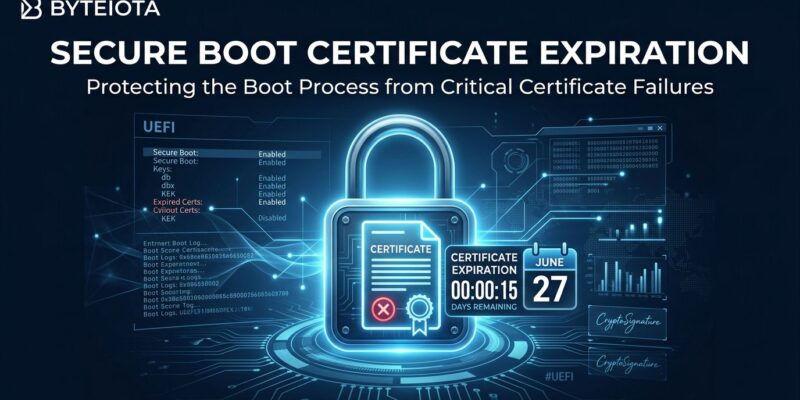
On June 24, the Microsoft Corporation KEK CA 2011 expires. Three days later, on June 27, the Microsoft Corporation UEFI CA 2011 follows — the certificate that signs every Linux bootloader in production. Windows Server receives no automatic fix. Neither do GCP instances created before November 2025, Generation 2 Hyper-V VMs, VMware guests on older hardware, or Linux systems awaiting a shim update. If you operate any of these, you have roughly a month before they enter a degraded Secure Boot posture they cannot self-correct.
Three Certificates, Three Deadlines
The 2011 certificate generation is being replaced by Microsoft’s 2023 CA family. Here is what expires and when:
- Microsoft Corporation KEK CA 2011 — June 24, 2026: The Key Exchange Key controls who can update the Secure Boot signature database. Lose this and systems cannot accept future DB updates.
- Microsoft Corporation UEFI CA 2011 — June 27, 2026: Signs all Linux bootloaders — Shim and GRUB across every major distribution. Linux and dual-boot administrators should act on this one immediately.
- Microsoft Windows Production PCA 2011 — October 19, 2026: Signs Windows Boot Manager and Windows components. Longer runway, but still requires action before autumn.
To be clear: systems booting today will continue to boot after June 27. The expiration does not brick machines. What it does is prevent future boot-component updates from being trusted — meaning your systems accumulate security debt with every patch cycle missed after the deadline.
Who Is Actually at Risk
Windows Server — highest priority. Unlike Windows 10 and 11, Windows Server does not receive Secure Boot certificate updates through Controlled Feature Rollout. Administrators must manually deploy the 2023 replacement certificates to all physical servers and Generation 2 Hyper-V VMs. Affected versions span Windows Server 2012 R2 through 2022; Windows Server 2025 on certified platforms ships with 2023 certs in firmware, but many older deployments do not. Microsoft’s full server playbook is available via aka.ms/GetSecureBoot.
GCP instances created before November 7, 2025 — medium priority. Cloud instances provisioned before this date did not automatically receive updated certificates. An instance is at risk if it has Secure Boot enabled, uses vTPM PCR sealing, runs BitLocker or Virtual Secure Mode on Windows, or runs Linux with full disk encryption. Container-Optimized OS and instances with Secure Boot disabled are not affected by the certificate expiration specifically.
Linux dual-boot and RHEL servers — medium priority. The UEFI CA 2011 is the signing authority for Shim and GRUB. After June 27, shim updates signed exclusively with the 2023 certificate will be blocked on systems still running the 2011 CA. Red Hat is shipping dual-signed shim builds (2011 + 2023) for RHEL 9 and 10 in May 2026 and for RHEL 8 in June 2026. Ubuntu, Fedora, and openSUSE have already integrated the 2023 key into their update channels.
VMware VMs — edge case. Virtual machines running on hardware version earlier than 20 have insufficient UEFI variable storage for the updated certificates. Upgrade VM compatibility to hardware version 20 or later (ESXi 8.0+) before attempting any certificate update.
Your 30-Day Checklist
Windows Server and Hyper-V
Start by confirming your current state:
# Check Secure Boot status
Confirm-SecureBootUEFI

# Verify 2023 certificate presence
reg query "HKLM\SYSTEM\CurrentControlSet\Control\SecureBoot" /v UEFICA2023Status
# Expected value: "updated"

# Manually trigger certificate deployment
Start-ScheduledTask -TaskName "\Microsoft\Windows\PI\Secure-Boot-Update"
For enterprise deployments, Microsoft supports Group Policy (Computer Configuration → Administrative Templates → Windows Components → Secure Boot → Enable Secure Boot certificate updates), Intune via Settings Catalog, and the WinCS CLI for domain-joined servers. Plan for 48 hours and one or more restarts for certificates to fully apply — build that into your change window. See KB5062713 for the full deployment guide.
Linux and RHEL
# Verify Secure Boot is active
sudo mokutil --sb-state

# Update shim (RHEL/Fedora)
sudo dnf update shim

# Update shim (Debian/Ubuntu)
sudo apt update && sudo apt upgrade shim-signed

# Confirm new shim carries 2023 certificate
pesign -S -i /boot/efi/EFI/redhat/shimx64.efi
Update the shim now, not in June. The dual-signed build is backward compatible — it works on machines running either the 2011 or 2023 CA. Waiting until after June 27 risks installing a version signed only with the newer CA onto a system that cannot yet trust it.
Google Cloud Platform
# Verify certificate presence (Linux instance)
sudo efi-readvar -v KEK | grep "KEK 2K CA 2023"
sudo efi-readvar -v db | grep "UEFI CA 2023"

# Verify (Windows instance — PowerShell)
[System.Text.Encoding]::ASCII.GetString((Get-SecureBootUEFI KEK).bytes) -match 'Microsoft Corporation KEK 2K CA 2023'
Google recommends recreating affected instances from a snapshot rather than manually updating certificates in-place. Snapshot the boot disk, provision a new instance using that snapshot as the source, and the new VM inherits updated certificates automatically. The full GCP documentation covers the gcloud CLI steps for both recreation and in-place update.
The BitLocker and LUKS Warning
Updating the UEFI database changes TPM PCR7 values. Systems using PCR7 for BitLocker key sealing will prompt for recovery keys after the certificate update. This is not a bug — it is the TPM working correctly. Run manage-bde -status now and save your BitLocker recovery key before starting. For Linux systems using LUKS with TPM enrollment via systemd-cryptenroll, reseal against stable PCRs (PCR0) before rebooting, then reseal against the updated PCR7 afterward.
Act Before June 24
The checklist is short once you know which systems are affected. The risk is not that infrastructure collapses on June 27 — it is that unpatched systems quietly fall out of the trust hierarchy and cannot receive boot-level security updates thereafter. Start with aka.ms/GetSecureBoot for Windows, the Red Hat developer guide for Linux, and Google’s documentation for GCP. Run the verification commands today. You have 29 days.